Unfortunately, Samsung Accessory Service is no longer available keeps popping up?

AndyK83

New member
Apr 1, 2016
2
0
0
"Unfortunately, Samsung Accessory Service is no longer available" keeps popping up.

I downloaded and installed the update this morning and now my phone wont stop saying "Unfortunately, Samsung Accessory Service is no longer available". There'a a little button that says "ok" on the popup, but every time I click "ok", the popup immediately reappears. Sometimes it only reappears once or twice, other times it won't stop reappearing. If it keeps reappearing, t basically makes the phone useless. Any ideas on how to fix this?
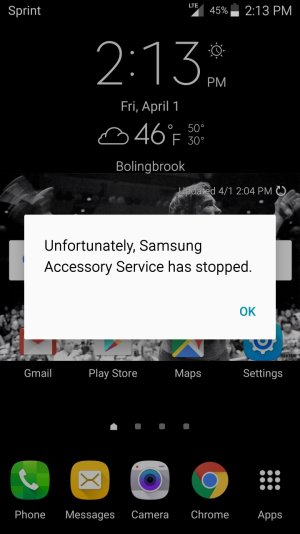
 
Screenshot_2016-04-01-14-13-27.jpg

Here's a screenshot of the popup. It also always pops up if I use the volume control buttons.
 
My note 4 is doing exact same thing. I updated to android 6.0.1 last night and has been saying "unfortunately, Samsung accessory service has stopped" ever since. I hope someone has a solution.
 
Re: "Unfortunately, Samsung Accessory Service is no longer available" keeps popping up.

I downloaded and installed the update this morning and now my phone wont stop saying "Unfortunately, Samsung Accessory Service is no longer available". There'a a little button that says "ok" on the popup, but every time I click "ok", the popup immediately reappears. Sometimes it only reappears once or twice, other times it won't stop reappearing. If it keeps reappearing, t basically makes the phone useless. Any ideas on how to fix this?
 
Re: "Unfortunately, Samsung Accessory Service is no longer available" keeps popping up.

I am having same issue. Is there nothing from Samsung on this issue?
 
I just had this issue fix by Samsung customer service. It turns out that the Samsung Gear app is what causes the issues with the phone. Disable the app and the error message stop popping up. Now just reinstall app and then update and it fixes the issue. Also clearing the data along with restarting the phone. Hope these helps
 
Re: "Unfortunately, Samsung Accessory Service is no longer available" keeps popping up.

What worked for me was

Settings > Applications Manager > scroll down to Samsung accessory service > then notifications turn them off. Hopefully that should fix the problem.
 

Latest posts

Trending Posts

Members online

Forum statistics

Threads
963,184
Messages
6,992,811
Members
3,164,988
Latest member
r3dpuk3
