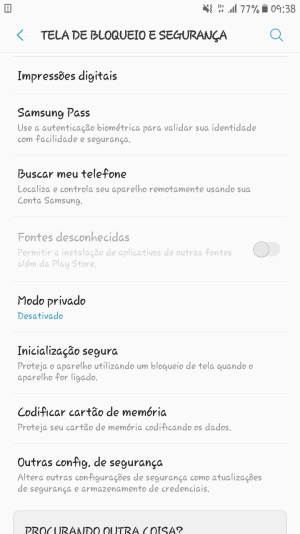
Unmarkeable/unavaliable "unknown sources" button

Ricardo Travi

New member
Jan 29, 2018
2
0
0
I'd like to install a non-play store apk. Of course already tried to mark unknown sources,but it's unavaliable (it's grey-transparent). I already tried to able developer mode, but nothing works.

Galaxy s7 sm-g930u
Android 7.0
 

Attachments
  • Screenshot_20180129-093827.png
    Screenshot_20180129-093827.png
    113.8 KB · Views: 7
Last edited:
Are you linked to a corporate Exchange account?

If so, the Exchange administrator can enforce certain security policies on your device such as: device must be password locked and password must meet specific minimum requirements, the ability to remotely wipe your device, and other policies.

I'm pretty certain banning unknown source APKs is one of those policies enforceable by the Exchange administrator.
 
N4Newbie,

You got straight to the point. It's worked. It was so easy, WHEN we known the answer...

I took off administrator's privilege from all corporate's application. Then marked "unkown sources", installed apk non-playstore.

After all, i dismarked unknown sources and took back administrator's privilege from company's application.

I had to reset configuration of ibm lotus traveller and all it's working perfectly.

Thank you a lot.
 
N4Newbie,

You got straight to the point. It's worked. It was so easy, WHEN we known the answer...

I took off administrator's privilege from all corporate's application. Then marked "unkown sources", installed apk non-playstore.

After all, i dismarked unknown sources and took back administrator's privilege from company's application.

I had to reset configuration of ibm lotus traveller and all it's working perfectly.

Thank you a lot.


That's awesome; thanks for the feedback.

It's nice to know when I get one right. :)
 

Latest posts

Trending Posts

Forum statistics

Threads
960,697
Messages
6,983,272
Members
3,164,544
Latest member
jnnfrmcmrphy00
