Weird Problem: "Secure Startup" settings open every time an app or update is installed

waqqas31

Well-known member
Nov 4, 2014
796
258
63
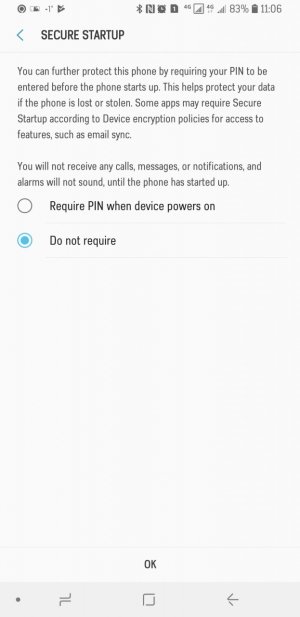
It used to happen on my S7 edge as well, but the difference was that the phone would automatically kill the Secure Startup settings screen itself. On the S9+, it stays open (like in the screenshot.)

Anyone know how to stop this from happening? It's been happening from the moment I got the phone.
 

Attachments

  • Screenshot_20180327-110651_Settings.jpg
    Screenshot_20180327-110651_Settings.jpg
    113 KB · Views: 23
It used to happen on my S7 edge as well, but the difference was that the phone would automatically kill the Secure Startup settings screen itself. On the S9+, it stays open (like in the screenshot.)

Anyone know how to stop this from happening? It's been happening from the moment I got the phone.

Hi, did you ever get a solution to this? I have the same issue on my S8. It is a device that was provided by my company, and we are running Blackberry UEM software for internal Exchange connectivity. I have no idea if this has anything to do with it. I've used other devices with UEM and I never get asked for the secure startup.
 
Hi, did you ever get a solution to this? I have the same issue on my S8. It is a device that was provided by my company, and we are running Blackberry UEM software for internal Exchange connectivity. I have no idea if this has anything to do with it. I've used other devices with UEM and I never get asked for the secure startup.

Bingo, I came to the same conclusion, that UEM was the culprit. The good news is, for the past couple days, the behavior has disappeared! UEM had an update last week, so I hope that did the trick!
 

Trending Posts

Forum statistics

Threads
961,036
Messages
6,984,646
Members
3,164,630
Latest member
akununtukunduhfilm2
