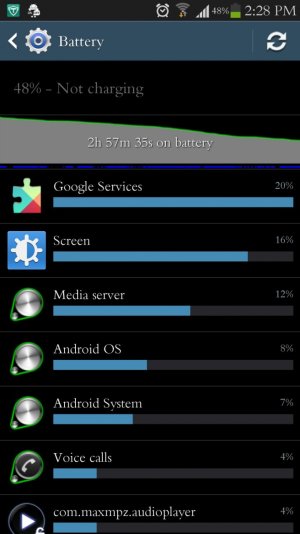
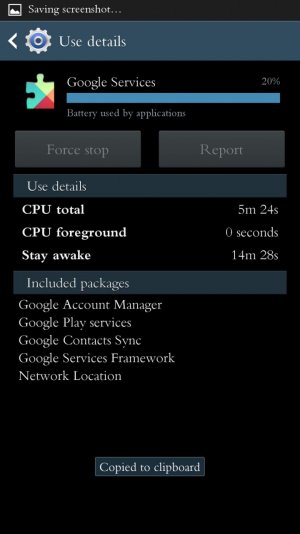
What exactly is Google Network Locator

smooth4lyfe

Trusted Member
Sep 16, 2012
5,534
0
0
Is it Location Services? Something from Google Play? It seems to be my battery culprit today

Sent from my Galaxy S4 Exynos!
 

Attachments

  • uploadfromtaptalk1370284202532.jpg
    uploadfromtaptalk1370284202532.jpg
    146 KB · Views: 19
  • uploadfromtaptalk1370284212047.jpg
    uploadfromtaptalk1370284212047.jpg
    123.5 KB · Views: 18
Had the same problem as OP. For me it was only solved by turning off location for the Google apps.
 
Is it Location Services? Something from Google Play? It seems to be my battery culprit today
It's finding your location using your cellular network rather than GPS. It takes less battery but might not be as accurate.

I've had Maps taking up a ton of battery and I found if I turned off Location Reporting, Location Sharing and Location History in the Maps settings as well as disable any location based Google Now cards it helps out a lot (they took about 20% of my total battery capacity in a day (5am to 9pm). In another thread someone reports having those on while using the SnapDragon Battery Guru app and still getting good battery life. I'm trying that out myself to see if I can replicate the results.
 
It's finding your location using your cellular network rather than GPS. It takes less battery but might not be as accurate.

I've had Maps taking up a ton of battery and I found if I turned off Location Reporting, Location Sharing and Location History in the Maps settings as well as disable any location based Google Now cards it helps out a lot (they took about 20% of my total battery capacity in a day (5am to 9pm). In another thread someone reports having those on while using the SnapDragon Battery Guru app and still getting good battery life. I'm trying that out myself to see if I can replicate the results.

Yeah, I think its my Google Now that's taking the battery. I wish I didn't have to turn it off, but I'll turn it off and test it
I also can't use the Snapdragon App because I have the international version
 
android is not windows. you may know how some avs slow a pc down. i was giving you ideas. if i had to turn my location services off that would remove a lot of the fun in android ...for me

good luck that all i got for ya


Really? Hmmmm what makes you so sure?
 
Yeah, I think its my Google Now that's taking the battery. I wish I didn't have to turn it off, but I'll turn it off and test it
I also can't use the Snapdragon App because I have the international version
There's a thread somewhere where I listed all the cards I disabled. It's anything that migtht track your location like photo ops, traffic, next appointment (it might look for where your next appointment is and tell you how long it takes to get there), anything "nearby", etc. The cards that track your search history and Gmail don't seem to suck the battery.

What I should have done is just disabled the location tracking but left the Google Now cards alone. That might be a good experiment if you don't mind it potentially sucking your batter for a day or two.
 
android is not windows. you may know how some avs slow a pc down. i was giving you ideas. if i had to turn my location services off that would remove a lot of the fun in android ...for me

good luck that all i got for ya

Lol true, thanks though
 

Forum statistics

Threads
962,690
Messages
6,991,380
Members
3,164,902
Latest member
aktivasipinbnimobile