Where is "Multiple Widget Feature"?

monicakm

Well-known member
Sep 8, 2012
2,092
1
38
I'm watching a YouTube Video on the GN 2014. At the 2:30 point he mentions and demonstrates the "Multiple Widget" feature. He goes on to say you have to enable it. It looks like he is spinning a cube of widgets. I'm not finding it. Also did a pdf search for the term and didn't find it.
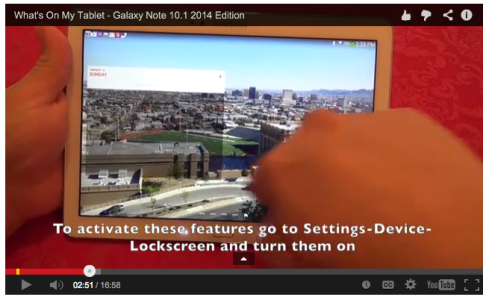
 
The instructions to activate the features are actually provided as subtitles right in the video...
 

Attachments

  • Screen Shot 2014-01-14 at 6.46.55 PM.png
    Screen Shot 2014-01-14 at 6.46.55 PM.png
    274.1 KB · Views: 38
Thanks, I saw that but didn't see anything about a multiple widget feature such as what he showed. So I went back and actually chose a lock screen and THEN saw the information. Don't want to have to lock my screen tho. I like that. Wish it could be used without a lock screen. Doesn't make sense to me, but what do I know :)
 
I am feeling very slow here but I do not see the multiple widgets option under - settings-device-lockscreen. Is it not an option if you have a PIN enabled?
 
Yes, with PIN enabled and it wont works. Muliple widget features only works with "swipe to unlock".
 
Lock-screen widgets (to which these options refer to) can only be used with a NON SECURE lockscreen. If you select a secure one, like PIN or password, they won't be available.

If you don't use a lockscreen they're not available because,well, you have widgets on your home screens. Just add them there :P
