Where's the handwriting keyboard on 2.0?

jmk32

Well-known member
Jun 8, 2010
476
7
18
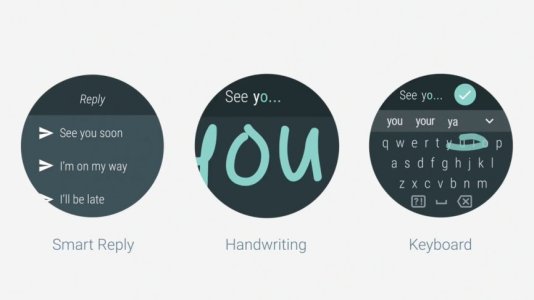
The handwriting option is supposed to be under input methods in settings (per an article I saw about Wear 2.0) and it's not there on my Urbane. How can we get this and activate it?

Also, anyone else having issues responding to an email with the Wear 2.0 keyboard? I can type a reply, hit send, but the email is undeliverable for some reason...
android-wear-20-messaging-1463626054-Cghp-column-width-inline.jpg
 
The handwriting option is supposed to be under input methods in settings (per an article I saw about Wear 2.0) and it's not there on my Urbane. How can we get this and activate it?

I'd like to know what happened to the handwriting ability as well. Also the glide and keyboard are a HUGE improvement!
 
Found the Handwriting Keyboard!! You need to go to the Play Store on your watch (under TOOLS) and download the Google Handwriting input keyboard. You then need to go to settings, personalization - input and check it to activate.

Then when you're in an app that can use the keyboard, just long press the keyboard icon to show the alternate keyboard (handwriting) option. It works ok, not super, but good to have it!!
 
Last edited:

Members online

Forum statistics

Threads
960,261
Messages
6,981,633
Members
3,164,451
Latest member
einchewon
