Why has my calender changed?

are21

Active member
Sep 7, 2014
31
0
0
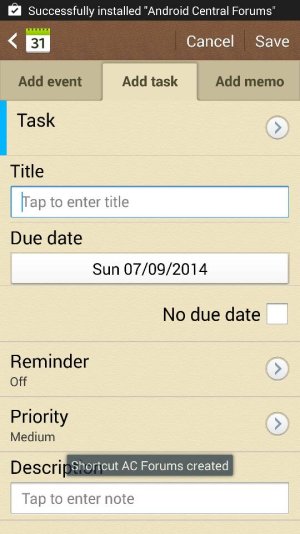
I used to be able to add events with times and reminders and my calender has somehow deleted all reminders I had and when I go to add them again the format and options are completely different. Ive attached a screen shot of how it looks now. Any suggestions how to change is back?
 

Attachments

  • 1410080024138.jpg
    1410080024138.jpg
    66.5 KB · Views: 19
You're looking at tasks, not events. Click the add event tab.
 
Hiya when I click on add event it just comes up blank and stays that way?
 

Attachments

  • 1410084860656.jpg
    1410084860656.jpg
    41.1 KB · Views: 18
And its also deleted all my upcoming events aswell. Not too sure how to find them or if they've gone forever?
 
Did you have them synced anywhere? Like your Samsung account or Google account? If Google, go online to Google calendar and see if they are there. If Samsung, you will have to see if they come back after syncing once your calendar app is fixed.

I would try going into Application Manager and finding the calendar app. Force Close it, then Clear cache and Clear data. Then power down phone and remove battery. Replace and boot up again. Open the calendar and go to settings and make sure it is set to sync with whatever calendars you sync with. Give it some time to sync up and check your events.
 
Thank you :) I dont think I had it synced with google so I will give it a shot...
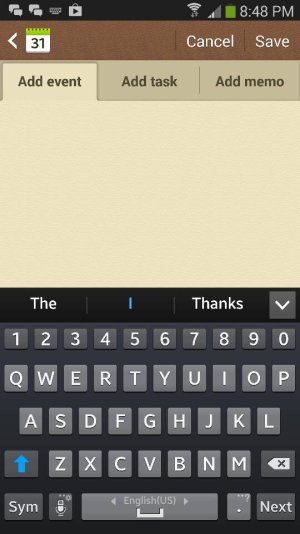
 
I forced stop and cleared cache, then synced again. I tried to create a new event but it keeps coming up blank. Could it be an app error?
 

Attachments

  • 1410086992933.jpg
    1410086992933.jpg
    57.8 KB · Views: 12
Did you do all the steps - clearing data, powering down and removing battery?
 
Yes, I cleared the data, switched off the phone, put battery back in and then did a sync on the calender which seemed to work but still wont come up with the usual options in add event.
 
Did anything change in your phone recently - a firmware update, new apps you installed, did you root your phone? Try booting into Safe Mode and see if you can add an event. Be aware that this will reset any widgets you have on your home screen so save any settings you need. Here are instructions for safe mode and also follow the instructions to wipe the cache partition. They're from t-mobile but should work on any S4.
Reset: Samsung Galaxy S 4 | T-Mobile Support

Be careful not to do the Master Reset, although if nothing else works you may have to.
 
Lots of new apps installed but im pretty clueless when it comes to firmware or phone roots? I never use widgets so I dont mind them being reset. Will try the safemode thingy. Thanks so much for helping me out!
 

Trending Posts

Forum statistics

Threads
962,713
Messages
6,991,527
Members
3,164,906
Latest member
Screwgoogle