Question Why is this?

MadamCandy1

New member
Nov 4, 2024
1
0
1
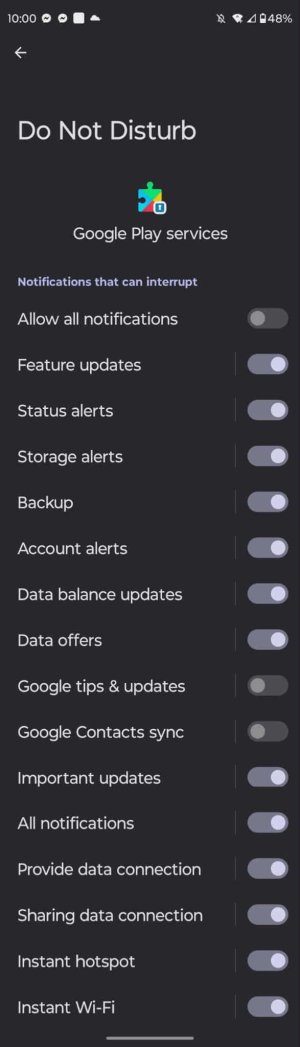
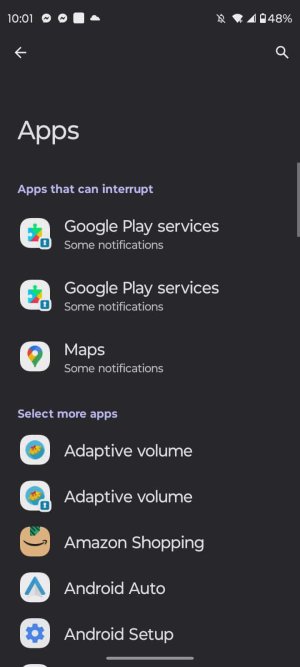
In my do not disturb Notification settings are these three things. Can anybody tell me what these are? I posted screenshots of the 3 apps, plus what comes up when I click on the two identical apps.
 

Attachments

  • 7151EA1D-7848-4DC4-A2F3-ED0031A422E7.jpeg
    7151EA1D-7848-4DC4-A2F3-ED0031A422E7.jpeg
    43.2 KB · Views: 10
  • 750E23F3-B145-4FDC-8593-7DE57B73CB41.jpeg
    750E23F3-B145-4FDC-8593-7DE57B73CB41.jpeg
    50.4 KB · Views: 10
  • EF77338C-6A49-415A-AB5B-EFBA20F2E1A3.jpeg
    EF77338C-6A49-415A-AB5B-EFBA20F2E1A3.jpeg
    35.5 KB · Views: 10
Welcome to Android Central forums. Just a few questions to get us started.

What device do you have?

You don't indicate which 3 items you are referring to, please provide some clarity, name the apps in question, or provide screenshots with the items circled?

Which screenshot is first and which is the result of you making selections?

Do you feel these apps are running without permission, are they interrupting your DND time, are you just curious because you noticed them? Besides them appearing here is there a problem?

After looking at your pics multiple times any response I have would be a pure guess. Initially I thought you might be asking why you had doubles of some items. It looks like some of them may be in a secure or private folder, which is why I assume they have locks on them and I thought it might be why there are two, one out here in the regular real world and the other in your secure or private folder. I can't match anything up with your screenshots but for me on a Samsung, they install a new instance of the app for your private folder, so essentially you have the same app installed twice. This way the two app instances don't and can't share anything on the device, sandboxing the one for privacy.

Let us know what you find and provide a bit of clarity and we'll get back to you.
 
In my do not disturb Notification settings are these three things...

Two of the screenshots appear to be Do Not Disturb notification settings specifically for or within the Google Play Services app, one for the normal Google Play Services app and the other for what I'm guessing is the dual instance of the Google Play Services app (you must be using the dual feature on your device, for being able to use two different FB accounts/apps simultaneously or for another particular app that can work with dual, per say). I'll suggest you can set each of those toggles as you feel you would like/desire for tailored Do Not Disturb for stuff the Google Play Services App does for notifications, but I'll also suggest it's probably not entirely clear what Google Play Services actually does for some things. For my specific arrangement, the only things I allow to burn through Do Not Disturb are calls/messages from specific contacts, which is a higher level Do Not Disturb setting. When I have Do Not Disturb active, for me the notifications still show up on the screen as normal, but no notification sound or vibration.

The third screenshot appears to be of the "Apps That Can Interrupt" for notification permission, with only a few apps showing on the list. Not sure I can even find that on my device, but I also don't have any apps set as allowed to do notifications when Do Not Disturb is active. As Vid said, if you feel something isn't right for what you see set then let us know. Or, consider changing it.
 
Last edited:
  • Like
Reactions: VidJunky

Trending Posts

Forum statistics

Threads
959,847
Messages
6,980,367
Members
3,164,316
Latest member
Ltcharensey