
- Jan 1, 2012
- 964
- 232
- 0
When I first built and release CWM-Blue Recovery I centered it around my ROM builds, but over time I saw a need by the V community. The need for a recovery that is simple to use and does what the seasoned root users, but most notably those that are new to root needs a recovery to do.
ZenGarden Recovery Hard Key Version had been discontinued due to keeping with the coding of multiple version has become difficult.
Do not flash radio!!!
Below images are not true, if I can get emulator working right I'll update to better screen shots.
ZenGarden Touch
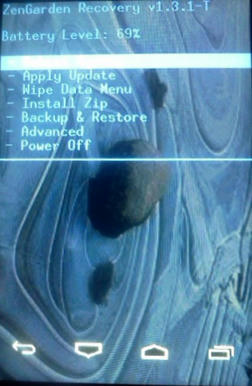
Recommended install methods are terminal/adb or IHO Updater. if you chose to use Flash Image GUI app then rename the recovery to recovery.img.
The source code for both are available here:
None Touch Version Source Code!
IHO Updater Source!
I'm currently redoing IHO Updater to just simply install a chosen zip v.i.a. recovery.
ZenGarden Recovery Hard Key Version had been discontinued due to keeping with the coding of multiple version has become difficult.
Change Log:
- Display installed recovery version under Settings > About phone (required boot into recovery, but currently will not show up).
- Add extra Debugging > Quick Fix option to install zip from data partition if sdcard is none functional(Must run Prepare for New Install at lease one).
- Added Partition Manager with option to convert your existing sd-ext.
- Better Reboot menu.
- Added option to delete a Backup..
- if backup does not pass md5sum verification it is now automatically deleted.
- Multiple install options - Auto install Gapps after installing ROM.
- Boot into Bootloader option added to Power/Reboot Menu.
- Reverted back to storing backups to clockworkmod folder (backups in zencovery folder well be moved to defaulted backup directory automatically. This may take time depending on the size of the the backups and how many there are, so don't freak if it seems like the recovery is stuck).
- Fix Recovery Boot Loop.
- Home Key is menu select (Hard Key).
- Minor fixes for better handling of auto function errors.
- Simplified menu options, moved things around of easier navigation.
- Wipe menu options (Data/Factory Reset, Wipe Cache/Delcik-Cache, Format everything and Format just things needed before updating current ROM).
- Compatible with apps used for updating current ROM i.e IHO Updater, BacksideUpdater, ROMKeeper and ROM Manager).
- S2E/Link2SD compatible.
- Auto Reboot after manual zip install.
- Auto Reboot after manual restore of a backup.
- Auto backup before installing zip when used with a compatible app.
- VM670 and LS670 version.
Menu Layout
Reboot System
- Boot Android
- Reboot Recovery
- Reboot Bootloader (not functional for LS670)
- Cache Dalvik-Cache [*Data/Factory Reset
- Prepare for Update
- Prepare for New Install
- Install Manually
- Install and Reboot
- Install with Gapps
- Install update.zip
- Nandroid Backup
- Verify Backup
- Delete Bakup
- Restore Backup
- Adv. Restore Backup
- Utilities
- Settings
- Debugging
Do not flash radio!!!
Below images are not true, if I can get emulator working right I'll update to better screen shots.
ZenGarden Touch
Flash.zip
If you are stuck in recovery do to a Recovery Boot-Loop or a bad flash, use this flash zip to get out of those problems; just flash in recovery as you would any zip file then reboot recovery.
ZenGarden-Touch-Recovery.zip
md5sum
97876c796e2f1998d839b5cd1dab437e
Image Downloads
Recommended install methods are terminal/adb or IHO Updater. if you chose to use Flash Image GUI app then rename the recovery to recovery.img.
Code:
[FONT="Georgia"][SIZE="3"]adb shell flash_image recovery /path-to-recoveryimage/name of recovery[/SIZE][/FONT]The source code for both are available here:
None Touch Version Source Code!
IHO Updater Source!
I'm currently redoing IHO Updater to just simply install a chosen zip v.i.a. recovery.
Install without sdcard
First format the system, data, boot and cache partitions or run the Wipe/Format Options > Prepare for New Install, then push the zip to the data partition.
After that is done go to Advance Option > Deugging > Quick Fixes and select Install without sdcard. Recovery then will reboot and install the zip file.
Code:
adb shell mount /data/
adb push "pathing to zip/name of zip" /data/
Last edited:



 Facebook
 Twitter
 Instagram