- 11-07-2011, 05:52 PM
Thread Author #1
- 11-08-2011, 01:11 PM #2
Re: How to Unroot/Recover a bricked AT&T Samsung Galaxy S 2
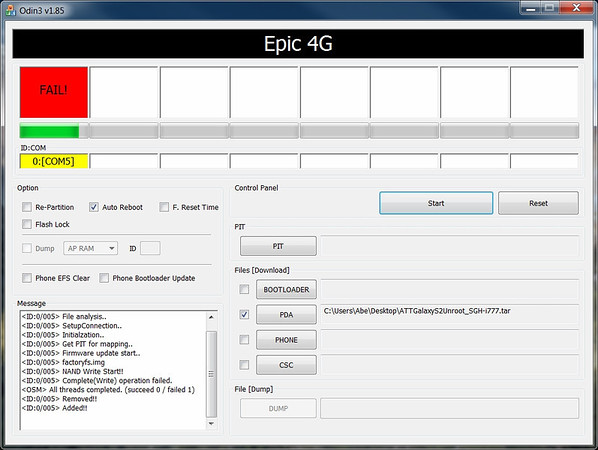
Here's what I get:

But... my Kies does not connect either...
Had to disconnect phone and now shows "Firware upgrade encountered an issue. Please select recovery mode in Kies & try again."
I am plugging it in and retrying the Odin...
Edit: Now shows Pass! OK, rebooting and looks good so far...!
OK... booted up!
You know, the other thing I did this time was to remove my 16GB RiData MicroSDHC card... (for what its worth).Last edited by Mr.Gadget; 11-08-2011 at 01:17 PM. Reason: more info
- 11-23-2011, 07:58 PM #3
- 12-12-2011, 12:11 PM #4
Re: How to Unroot/Recover a bricked AT&T Samsung Galaxy S 2
I'm getting the fail message too and mine doesn't work when I unplug it and try again. What should I do? It looks like my phone won't even go into download mode. When I hold down the volume buttons and power button, I get the normal screen to press up for download mode and down to reset. But when I press up I get the same "firmware upgrade...." screen. I have the S2 Skyrocket, if that makes a diffference.
Last edited by LucasBrown87; 12-12-2011 at 12:30 PM.
- 12-12-2011, 08:55 PM
Thread Author #5
Re: How to Unroot/Recover a bricked AT&T Samsung Galaxy S 2
I'm not sure about that device. Figured it would be the same. You have USB plugged in while doing this, right?
- 12-12-2011, 10:56 PM #6
Re: How to Unroot/Recover a bricked AT&T Samsung Galaxy S 2
yeah, USB is plugged in. I can get to the screen that gives you the option to press volume up for download mode, or volume down to cancel. No matter which one I pick though I get the same "firmware upgrade encountered an issue" screen. My computer is recognizing the device when I plug it in i.e. new hardware found comes up on my task bar, but Kies won't connect to my phone.
- 12-13-2011, 09:04 AM #7
- 12-16-2011, 10:30 PM #8
Re: How to Unroot/Recover a bricked AT&T Samsung Galaxy S 2
I've done this multiple times with no success. When I click start, it only takes about 10 seconds and then reboots phone and is still rooted. i've removed sim and micro sd, rebooted computer many times with no success. I've done this before on other phone with no problems.
Any help would be appreciated. - 12-23-2011, 02:35 PM #9
- 12-27-2011, 04:06 PM #10
- 12-29-2011, 10:31 AM #11
Re: How to Unroot/Recover a bricked AT&T Samsung Galaxy S 2
- 01-03-2012, 01:53 PM #12
Re: How to Unroot/Recover a bricked AT&T Samsung Galaxy S 2
Your screen says "Epic 4G" - the files are for an AT&T SGH-I777, not for ANY other device.
That makes a MASSIVE difference. Do NOT flash anything intended for the I777 on your phone - you are VERY lucky that you did not hardbrick. If you attempt to flash an I777 kernel to your device with CWM, for example, you are almost guaranteed to hardbrick because the Skyrocket's partition layout (and its entire hardware architecture) are completely and totally different from the I777 and I9100. In fact, I think the Skyrocket's bootloader resides where the kernel does on the I777 (it apparently does on the T989, which is very similar to the Skyrocket.) - I know that flashing an I777 kernel in CWM will hardbrick a T989.
In the future: You do not have a Galaxy S II, you have a Skyrocket. Ignore the fact that Samsung slapped the Galaxy S II name before Skyrocket in your phone's name, it does not belong there. The Skyrocket and T-Mobile T989 have NOTHING whatsoever in common with real Galaxy S II devices. Completely different hardware - even the CPU is completely different.
There are some APKs related to updating you can remove. I don't have the list with me at the moment.
- 01-17-2012, 07:23 AM #13
- 01-25-2012, 01:22 PM #14
- 01-25-2012, 01:26 PM #15
Re: How to Unroot/Recover a bricked AT&T Samsung Galaxy S 2
Hi I used this method and I can't get into download mode and I can't get back to stock. I have to keep flashing with this stock. I need to return the phone. Any suggestions. I wish I never rooted the device. I had an iPhone which was easy to jailbreak without any issues to get back to normal I thought this would be harmless. Boy, was I wrong. Thanks
Last edited by btrumbull; 01-25-2012 at 01:32 PM.
- 01-25-2012, 01:28 PM #16
Re: How to Unroot/Recover a bricked AT&T Samsung Galaxy S 2
Hi I used this method and I can't get into download mode and I can't get back to stock. I have to keep flashing with this stock. I need to return the phone. Any suggestions. I wish I never rooted the device. I had an iPhone which was easy to jailbreak without any issues to get back to normal I thought this would be harmless. Boy, was I wrong. Thanks
- 01-26-2012, 09:46 AM #17
- 01-30-2012, 09:14 AM #18
Re: How to Unroot/Recover a bricked AT&T Samsung Galaxy S 2
Is there any benefit or concern with the option to "Wipe Cache Partition"? From what I'm finding on here and Google it doesn't appear that it would do any harm.
Even after rolling back to 2.3.4 from the crazy 2.3.6 and doing a factory reset I'm still not getting the battery life I expect to get from this awesome phone. Wondering if this WCP option would be of help clearing out anything "rogue" sitting out there.
While battery life back on 2.3.4 (recovered) is better than it was on 2.3.6, it's still not what I was getting prior to being put on 2.3.6. - 02-22-2012, 12:54 AM #19
- 02-29-2012, 03:30 PM #20
- 03-22-2012, 01:28 AM #21
- 06-18-2012, 11:47 PM #22
- 07-12-2012, 07:34 PM #23
- 07-18-2012, 06:13 PM #24
- 01-06-2013, 09:47 AM #25


Reply