
[WARN]
Android Central, Creators of Roms,nor myself take any responsibility for any modification you make to your own phone. Even if your phone sprouts legs, steals your car ,uses your credit cards or sleeps with your girl. NOT OUR FAULT
Follow Directions carefully, ask if you need help and above all else never panic.
That being said, HAVE FUN!!
[/WARN]Follow Directions carefully, ask if you need help and above all else never panic.
That being said, HAVE FUN!!
Only use the methods below if:
A) You want a Deodexed Rom or a rom without having to unlock your bootloader.
B) You Have accidently patched the rooting exploit ,unrooted and would like Root access back without having to unlock your boot loader. [/TIP]

Guide: How To Odin Flash Root or Roms
[NOTE]Below are Mirrored downloads to Galaxy Note 2 Odin Flashable Rooted stock rom and Custom Roms. As new Roms become available i will add to this list and I will make the original contents available by linking the names of each rom to their origin.
These files are compressed and will need to be extracted resulting files will end in .tar.MD5 this is the type of file that be used by Odin. If you do not know how to extract a file a quick tutorial can be found HERE. Winrar should work if it does not use 7zip HERE [/NOTE]
Stock Rooted Rom (Original content found HERE)

Stock Rooted and Deodexed Rom (Original content found HERE) This Rom lends itself to modifications better
[Rom] Jelly 'Beans' - Build 1 [12/06/12][I605VRALJB] Custom ROM(Original content found HERE)
Video review of this Rom (THIS IS NOT ME it is DroidModd3rX)
https://www.youtube.com/watch?v=585u6m5ntG0&feature=youtube_gdata_player
Root/Rom Downloads [NOTE]Below are files needed before you can flash any files, please make a folder that you will be able to keep all files in one place so they are easy to find.[/NOTE] 1.)Download Odin and Drivers (Needs to be extracted with in folder you are keeping the files) Here -->
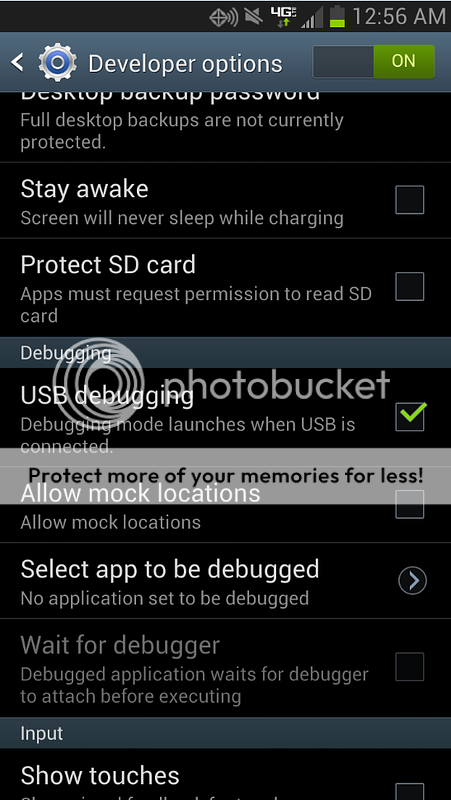
2.)Do not install drivers provided.Disconnect phone from USB if connected. Go to Settings>Developers options>Check off USB debugging mode. Then connect USB and allow phone to install drivers for a min or 2
.
3.)Make sure phone is charged at least 50% before attempting to flash anything. Preparations
Once Preparations have been made we are ready to start
[NOTE]
For Custom Roms only , if installing Rooted stock image please skip this note
If flashing a custom rom you must first Do the following to wipe data from your phone to avoid conflicts and bootlooping:
1.) With your Device off simultaneously press and hold Volume Up/Home/power buttons until you see Android System Recovery at the top of the screen and a green android laying down with a Red triangle above him in the center of the screen.
2.) Scroll down using the Volume down button and Highlight "wipe data factory reset" and press the power button to select
3.)When it says Cache wipe complete at the bottom and "reboot system now" is highlight press the power button to reboot
4.)Do not set up your device upon reboot. Proceed to step 1 of the guide below[/NOTE]
1.) If your Device is plugged into your computer, unplug it now.
2.) If your Device is not powered down, power it down now. Remove any case you may have on your phone.
3.) Still unplugged from your phone connect USB cable to your computer. Preferably to the back of the computer closest to the mother board if available.
4.) Launch ODIN on PC
5.) With your Device off simultaneously press and hold Volume Up/Home then the power button until you see it say "Warning!!" at the top and a tiny yellow triangle at the bottom. At this time press the Volume up button to continue. This will take you to Downloading mode and you will see a green Android.
6.) Plug USB cable into your Device
7.) Drivers will now be installed and Odin will recognize your device by assigning a Port and highlighting the box under ID:COM. (If you do not see a highlight port assigned do not continue and proceed to trouble shooting tab above, port number does not matter, just as long as one is assigned)
8.) In ODIN uncheck Auto Reboot
9.) Click on the PDA button in ODIN
Triple check that you pushed the PDA button..
10.)Choose the FileName.tar.md5 (which ever file you want to flash) in the folder with the files you downloaded
11.)Click the Start button in ODIN. (this should take approx 6 to 8mins,After Pressing Start DO NOT UNPLUG USB until it is Done, if you think it is stuck ask someone in the forums)
12.) When done Odin will display Pass/Reset in upper left hand box If it gets hung up at reset give it 2 minutes to try to get to PASS if it does not change you still should be ok to move onto the next step
13.) Remove battery from your Device then Reinsert battery.
14.) With your Device off simultaneously press and hold Volume Up/Home/power buttons until you see Android System Recovery at the top of the screen and a green android laying down with a Red triangle above him in the center of the screen.
15.) Scroll down using the Volume down button and Highlight "wipe cache partition" and press the power button to select
16.)When it says Cache wipe complete at the bottom and "reboot system now" is highlight press the power button to reboot and ENJOY!
Instructions
Once Preparations have been made we are ready to start
[NOTE]
For Custom Roms only , if installing Rooted stock image please skip this note
If flashing a custom rom you must first Do the following to wipe data from your phone to avoid conflicts and bootlooping:
1.) With your Device off simultaneously press and hold Volume Up/Home/power buttons until you see Android System Recovery at the top of the screen and a green android laying down with a Red triangle above him in the center of the screen.
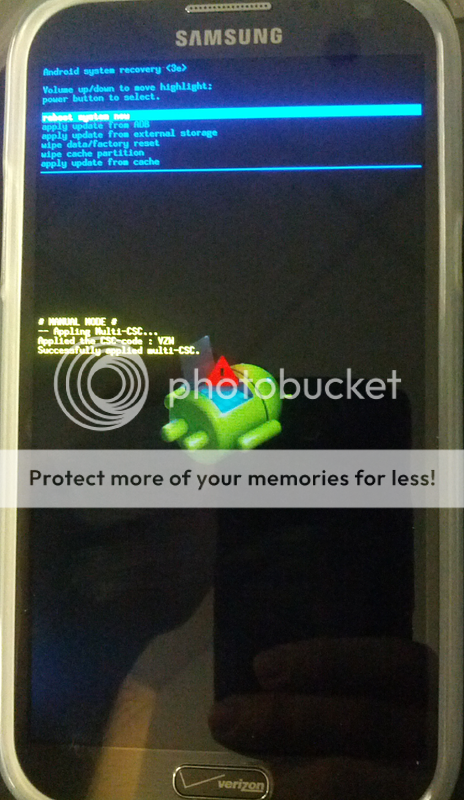
2.) Scroll down using the Volume down button and Highlight "wipe data factory reset" and press the power button to select
3.)When it says Cache wipe complete at the bottom and "reboot system now" is highlight press the power button to reboot
4.)Do not set up your device upon reboot. Proceed to step 1 of the guide below[/NOTE]
1.) If your Device is plugged into your computer, unplug it now.
2.) If your Device is not powered down, power it down now. Remove any case you may have on your phone.
3.) Still unplugged from your phone connect USB cable to your computer. Preferably to the back of the computer closest to the mother board if available.
4.) Launch ODIN on PC

5.) With your Device off simultaneously press and hold Volume Down/Home then the power button until you see it say "Warning!!" at the top and a tiny yellow triangle at the bottom. At this time press the Volume up button to continue. This will take you to Downloading mode and you will see a green Android.

6.) Plug USB cable into your Device
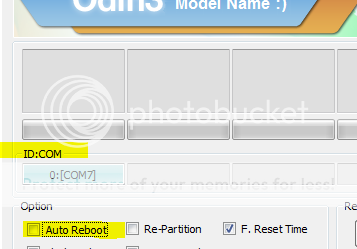
7.) Drivers will now be installed and Odin will recognize your device by assigning a Port and highlighting the box under ID:COM. (If you do not see a highlight port assigned do not continue and proceed to trouble shooting tab above, port number does not matter, just as long as one is assigned)
8.) In ODIN uncheck Auto Reboot
9.) Click on the PDA button in ODIN
Triple check that you pushed the PDA button..
10.)Choose the FileName.tar.md5 (which ever file you want to flash) in the folder with the files you downloaded

11.)Click the Start button in ODIN. (this should take approx 6 to 8mins,After Pressing Start DO NOT UNPLUG USB until it is Done, if you think it is stuck ask someone in the forums)
12.) When done Odin will display Pass/Reset in upper left hand box If it gets hung up at reset give it 2 minutes to try to get to PASS if it does not change you still should be ok to move onto the next step

13.) Remove battery from your Device then Reinsert battery.
14.) With your Device off simultaneously press and hold Volume Up/Home/power buttons until you see Android System Recovery at the top of the screen and a green android laying down with a Red triangle above him in the center of the screen.
15.) Scroll down using the Volume down button and Highlight "wipe cache partition" and press the power button to select
16.)When it says Cache wipe complete at the bottom and "reboot system now" is highlight press the power button to reboot and ENJOY!
Instructions w/ Visual Aids [NOTE]This is a good video demonstration done by DroidModd3rX(NOT ME) on Youtube, please sure to give him a thumbs up and subscribe[/NOTE]
Video FAQ
Q: What is Root?
A: Root, is super user access of your phones operating system. Think of your phone as a desktop computer. Right now you are logged on as a guest account. you can browse things and use applications but if you really want to change anything in your system you can't. What gaining root does is it gives you superuser permission to alter files that you could not before; again thinking of it as a computer you now have an Administrator account.
Q: Does rooting void my warranty?
A: Yes and no. If you walk into verizon with a phone that has Root access and they actually check it they have the right to say this phone was tampered with. But Unrooting is simply done by using the unroot function in the superuser app by chainfire and you will be back to stock. As always you root at your own risk.
Q: Does rooting slow down my phone or drain battery.
A: NO, root is not an application or a running process, gaining root does not do anything but give you permissions that you normally would not have. Basically all you did during the rooting process was move files around. Its what you do with this new found permission that changes things. But as far as just rooting it does not make a difference.
Q: Will i lose any apps or data during the rooting process?
A: No, for the same reason as above. Rooting is basically just moving some files around. Of course there is always a risk of something happening in any process. I would say chances are of causing serious problems is slim to non. Its what you do with this new found permission that changes things. But as far as just rooting it does not make a difference.
Q:How do i Unroot
A: Use a File manager such as Root explorer in the play store, find the following files and remove them /system/xbin/su and /system/app/Superuser.apk.
Q: What is a Custom Rom
A: It is your devices software that has been changed by a developer adding more functionality, speed and ability to make the device the way you want it down to the color of your notification bar. new dialers, new toggles...etc Flashing a new rom will require a data wipe so be aware you will start fresh so make sure you have a titanium backup of all your apps and that your contacts are google syncd or backed up in some manner.
Q: Once i flash a Custom Rom can i go back to stock
A: Sure just run the Rooted stock image with Odin again and unrootFAQ
Problem:Odin application displays one of the following in message box OR Odin is locking up in the middle of the process
All threads completed. (succeed 0 / failed 0)
All threads completed. (succeed 0 / failed 1)
Resolution
90% of problems associated with Odin are due to communication between phone and computer
Problem: Caught in a boot loop at start up
Resolution
Power your Device down , boot into recovery and Wipe data factory restore. then boot up again
Troubleshooting
[NOTE]
*MrRobinson and beanstown106 for creating the original root img and also beanstown created the first custom rom
*droidstyle for his great guide that i sampled from
.Credits
These files are compressed and will need to be extracted resulting files will end in .tar.MD5 this is the type of file that be used by Odin. If you do not know how to extract a file a quick tutorial can be found HERE. Winrar should work if it does not use 7zip HERE [/NOTE]
Stock Rooted Rom (Original content found HERE)
Stock Rooted and Deodexed Rom (Original content found HERE) This Rom lends itself to modifications better
[Rom] Jelly 'Beans' - Build 1 [12/06/12][I605VRALJB] Custom ROM(Original content found HERE)
Video review of this Rom (THIS IS NOT ME it is DroidModd3rX)
https://www.youtube.com/watch?v=585u6m5ntG0&feature=youtube_gdata_player
Root/Rom Downloads [NOTE]Below are files needed before you can flash any files, please make a folder that you will be able to keep all files in one place so they are easy to find.[/NOTE] 1.)Download Odin and Drivers (Needs to be extracted with in folder you are keeping the files) Here -->
2.)Do not install drivers provided.Disconnect phone from USB if connected. Go to Settings>Developers options>Check off USB debugging mode. Then connect USB and allow phone to install drivers for a min or 2
.
3.)Make sure phone is charged at least 50% before attempting to flash anything. Preparations
Once Preparations have been made we are ready to start
[NOTE]
For Custom Roms only , if installing Rooted stock image please skip this note
If flashing a custom rom you must first Do the following to wipe data from your phone to avoid conflicts and bootlooping:
1.) With your Device off simultaneously press and hold Volume Up/Home/power buttons until you see Android System Recovery at the top of the screen and a green android laying down with a Red triangle above him in the center of the screen.
2.) Scroll down using the Volume down button and Highlight "wipe data factory reset" and press the power button to select
3.)When it says Cache wipe complete at the bottom and "reboot system now" is highlight press the power button to reboot
4.)Do not set up your device upon reboot. Proceed to step 1 of the guide below[/NOTE]
1.) If your Device is plugged into your computer, unplug it now.
2.) If your Device is not powered down, power it down now. Remove any case you may have on your phone.
3.) Still unplugged from your phone connect USB cable to your computer. Preferably to the back of the computer closest to the mother board if available.
4.) Launch ODIN on PC
5.) With your Device off simultaneously press and hold Volume Up/Home then the power button until you see it say "Warning!!" at the top and a tiny yellow triangle at the bottom. At this time press the Volume up button to continue. This will take you to Downloading mode and you will see a green Android.
6.) Plug USB cable into your Device
7.) Drivers will now be installed and Odin will recognize your device by assigning a Port and highlighting the box under ID:COM. (If you do not see a highlight port assigned do not continue and proceed to trouble shooting tab above, port number does not matter, just as long as one is assigned)
8.) In ODIN uncheck Auto Reboot
9.) Click on the PDA button in ODIN
Triple check that you pushed the PDA button..
10.)Choose the FileName.tar.md5 (which ever file you want to flash) in the folder with the files you downloaded
11.)Click the Start button in ODIN. (this should take approx 6 to 8mins,After Pressing Start DO NOT UNPLUG USB until it is Done, if you think it is stuck ask someone in the forums)
12.) When done Odin will display Pass/Reset in upper left hand box If it gets hung up at reset give it 2 minutes to try to get to PASS if it does not change you still should be ok to move onto the next step
13.) Remove battery from your Device then Reinsert battery.
14.) With your Device off simultaneously press and hold Volume Up/Home/power buttons until you see Android System Recovery at the top of the screen and a green android laying down with a Red triangle above him in the center of the screen.
15.) Scroll down using the Volume down button and Highlight "wipe cache partition" and press the power button to select
16.)When it says Cache wipe complete at the bottom and "reboot system now" is highlight press the power button to reboot and ENJOY!
Instructions
Once Preparations have been made we are ready to start
[NOTE]
For Custom Roms only , if installing Rooted stock image please skip this note
If flashing a custom rom you must first Do the following to wipe data from your phone to avoid conflicts and bootlooping:
1.) With your Device off simultaneously press and hold Volume Up/Home/power buttons until you see Android System Recovery at the top of the screen and a green android laying down with a Red triangle above him in the center of the screen.
2.) Scroll down using the Volume down button and Highlight "wipe data factory reset" and press the power button to select
3.)When it says Cache wipe complete at the bottom and "reboot system now" is highlight press the power button to reboot
4.)Do not set up your device upon reboot. Proceed to step 1 of the guide below[/NOTE]
1.) If your Device is plugged into your computer, unplug it now.
2.) If your Device is not powered down, power it down now. Remove any case you may have on your phone.
3.) Still unplugged from your phone connect USB cable to your computer. Preferably to the back of the computer closest to the mother board if available.
4.) Launch ODIN on PC
5.) With your Device off simultaneously press and hold Volume Down/Home then the power button until you see it say "Warning!!" at the top and a tiny yellow triangle at the bottom. At this time press the Volume up button to continue. This will take you to Downloading mode and you will see a green Android.
6.) Plug USB cable into your Device
7.) Drivers will now be installed and Odin will recognize your device by assigning a Port and highlighting the box under ID:COM. (If you do not see a highlight port assigned do not continue and proceed to trouble shooting tab above, port number does not matter, just as long as one is assigned)
8.) In ODIN uncheck Auto Reboot
9.) Click on the PDA button in ODIN
Triple check that you pushed the PDA button..
10.)Choose the FileName.tar.md5 (which ever file you want to flash) in the folder with the files you downloaded
11.)Click the Start button in ODIN. (this should take approx 6 to 8mins,After Pressing Start DO NOT UNPLUG USB until it is Done, if you think it is stuck ask someone in the forums)
12.) When done Odin will display Pass/Reset in upper left hand box If it gets hung up at reset give it 2 minutes to try to get to PASS if it does not change you still should be ok to move onto the next step
13.) Remove battery from your Device then Reinsert battery.
14.) With your Device off simultaneously press and hold Volume Up/Home/power buttons until you see Android System Recovery at the top of the screen and a green android laying down with a Red triangle above him in the center of the screen.
15.) Scroll down using the Volume down button and Highlight "wipe cache partition" and press the power button to select
16.)When it says Cache wipe complete at the bottom and "reboot system now" is highlight press the power button to reboot and ENJOY!
Instructions w/ Visual Aids [NOTE]This is a good video demonstration done by DroidModd3rX(NOT ME) on Youtube, please sure to give him a thumbs up and subscribe[/NOTE]
Q: What is Root?
A: Root, is super user access of your phones operating system. Think of your phone as a desktop computer. Right now you are logged on as a guest account. you can browse things and use applications but if you really want to change anything in your system you can't. What gaining root does is it gives you superuser permission to alter files that you could not before; again thinking of it as a computer you now have an Administrator account.
Q: Does rooting void my warranty?
A: Yes and no. If you walk into verizon with a phone that has Root access and they actually check it they have the right to say this phone was tampered with. But Unrooting is simply done by using the unroot function in the superuser app by chainfire and you will be back to stock. As always you root at your own risk.
Q: Does rooting slow down my phone or drain battery.
A: NO, root is not an application or a running process, gaining root does not do anything but give you permissions that you normally would not have. Basically all you did during the rooting process was move files around. Its what you do with this new found permission that changes things. But as far as just rooting it does not make a difference.
Q: Will i lose any apps or data during the rooting process?
A: No, for the same reason as above. Rooting is basically just moving some files around. Of course there is always a risk of something happening in any process. I would say chances are of causing serious problems is slim to non. Its what you do with this new found permission that changes things. But as far as just rooting it does not make a difference.
Q:How do i Unroot
A: Use a File manager such as Root explorer in the play store, find the following files and remove them /system/xbin/su and /system/app/Superuser.apk.
Q: What is a Custom Rom
A: It is your devices software that has been changed by a developer adding more functionality, speed and ability to make the device the way you want it down to the color of your notification bar. new dialers, new toggles...etc Flashing a new rom will require a data wipe so be aware you will start fresh so make sure you have a titanium backup of all your apps and that your contacts are google syncd or backed up in some manner.
Q: Once i flash a Custom Rom can i go back to stock
A: Sure just run the Rooted stock image with Odin again and unrootFAQ
Problem:Odin application displays one of the following in message box OR Odin is locking up in the middle of the process
All threads completed. (succeed 0 / failed 0)
All threads completed. (succeed 0 / failed 1)
Resolution
90% of problems associated with Odin are due to communication between phone and computer
- Reboot your computer
- Redownload the odin package
- Install Drivers you downloaded that are in the folder with Odin
- Use USB ports in the back of the computer, if you already are use a different port
- make sure Odin is the only application running and Antivirus is DISABLED
- If you are using a laptop make sure its plugged in also find the nearest desktop and try from there
Problem: Caught in a boot loop at start up
Resolution
Power your Device down , boot into recovery and Wipe data factory restore. then boot up again
Troubleshooting
[NOTE]
I take no credit for creating or developing anything in this guide. I simply take the time to make it as easy as possible to understand. The people below deserve all the credit for development
[/NOTE]*MrRobinson and beanstown106 for creating the original root img and also beanstown created the first custom rom
*droidstyle for his great guide that i sampled from
.Credits
Guide: How To Odin Flash Root or Roms
[TIP]You can save most your apps and app Data if you Flash the Rooted stock file in Odin. Once you are rooted you can download Titanium Backup from the Play store. Back up all user apps + system data. Then go into the internal storage of your device and copy the Titaniumbackup folder to your external SD card.
Once this is done you can swap roms freely and be sure your apps and their data will be there backedup.
To restore them use Titanium back up again but select "Restore missing apps +Data". If you have questions please ask.[/TIP]
Last edited:



 Facebook
 Twitter
 Instagram