- 06-22-2012, 07:11 PM
Thread Author #1
Galaxy S3 Screenshots: Share them here!
Show off your homescreens in this thread!
Samsung Galaxy S3 runs customized Google Android Ice Cream Sandwich Version. You don’t need to download any app or root your phone to take screenshots of your android phone screen.
In order to take a screenshot you can:
- Palm Swipe To Capture Screen
-Go to Menu->Settings->Motion settings on your phoneYou can capture screen by moving your palm from left to right or right to left. This will take screenshot of the phone screen. Screenshot should be saved under “Gallery” app.
-Under “Hand Motion” settings, check “Palm swipe to Capture” checkbox

You can also capture screenshot by:
- pressing and holding volume down button and click on power button simultaneously for a second or two.
If you use any cool and/or interesting theme's, homescreen replacements, or widgets, please list them in your post also.Last edited by Cyber Warrior; 07-06-2012 at 07:26 AM.
- 07-05-2012, 09:24 PM #2
- 07-06-2012, 06:07 AM #3
Pretty clean homescreens as of now nova launcher prime, beweather
Note if you dont use the motion of moving your hand across screen then to take screenshot its home button+power button


sent by my Galaxy S3Thanked by: - 07-06-2012, 09:15 AM #4
Re: Galaxy S3 Screenshots: Share them here!

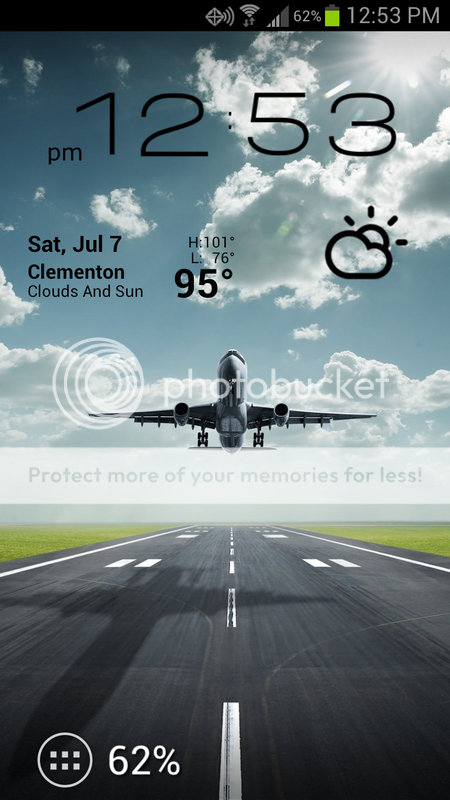
Used for this :
- Poweramp
- WidgetLocker Lockscreen
- Uccw
- Nova Launcher Prime
- TeslaUnread
- GO Power Manager
- Go TaskManager
- And an Android wallpaper

Thanked by 4: - 07-07-2012, 01:55 PM #5
Re: Galaxy S3 Screenshots: Share them here!
I run a three screen setup, but I like to keep my home screen pretty simple, with the busy stuff to the right and the left. Here is what I have so far.
-Beautiful Widgets with the ICS skin.
-Nova Launcher
-Minimalistic Text for the Battery Percentage Widget
-I DLed the wallpaper from Zedge.

Im still fiddlin with it and will likely change it a bunch more time. - 07-07-2012, 05:34 PM #6
- 07-07-2012, 11:01 PM #7
- 07-07-2012, 11:47 PM #8
Re: Galaxy S3 Screenshots: Share them here!
Here is my first of many. One more clock is the clock widget
- 07-08-2012, 10:55 AM #9
Re: Galaxy S3 Screenshots: Share them here!
Can't wait to see more. I am pulled to AT&T for the one X, but I have had all galaxy phones and loved them aside from some small things in the GS1. The nexus left such a bad taste in my mouth I am still spitting, but the spit has run dry. If the GS3 proves to be a decent phone, and the screen is improved, I will be jumping back into the Android scene after a long hiatus. Thank you all for sharing...
- 07-08-2012, 05:25 PM #10
- 07-08-2012, 08:18 PM #11
- 07-09-2012, 10:49 AM #12
- 07-09-2012, 02:52 PM #13
Re: Galaxy S3 Screenshots: Share them here!
My current home screen:
Nova Launcher Prime
Fancy Widgets
SimpText dock icons - 07-10-2012, 04:57 PM #14
- 07-10-2012, 05:29 PM #15
- 07-10-2012, 06:19 PM #16
- 07-10-2012, 07:24 PM
Thread Author #17
Re: Galaxy S3 Screenshots: Share them here!

- Nova Launcher
- Beautiful Widgets 1x1 weather
- Desktop Visualizer for dock icons (ADW Icon pack)
- 07-10-2012, 07:44 PM #18
Re: Galaxy S3 Screenshots: Share them here!
Wow.. just wow. My favorite one by far.
Love the minimalistic layout.Thanked by: - 07-10-2012, 07:48 PM #19
- 07-10-2012, 09:18 PM #20
- 07-10-2012, 10:20 PM #21
- 07-10-2012, 10:56 PM #22
Re: Galaxy S3 Screenshots: Share them here!
Great shots! I am a nerd cause my nephew came over with his tonight and the first thing I had Him try was the palm swipe to take a screenshot! Yeah it made both our days lol
The joys of having a nephew close in age we like the same things! LolLast edited by didiwags; 07-12-2012 at 10:55 PM.
X to Rezound to Galaxy S3 - 07-10-2012, 11:21 PM #23
- 07-11-2012, 12:55 AM #24
- 07-11-2012, 11:03 AM #25
Does widget locker lockscreen negatively impact your battery?
Sent from my DROID BIONIC using Tapatalk


Reply