Desktop Bookmarks will not show up in Chrome on Note 3

cwbcpa

Trusted Member
Mar 21, 2011
1,378
2
0
I have never had this happen before. I cannot get my desktop bookmarks to show up. I have made sure that sync is on in the app and in the phone settings. I have uninstalled updates to Chrome and reinstalled them. I have logged in and out 20 times. What am I missing? I have had Chrome on a lot of android phones and iPhones over the years and never had this issue. I searched the forums and didn't find any advice to do anything that I had not already done.

I am hoping someone can suggest something else. Not having my desktop bookmarks is a big deal for me so i really appreciate it. Thank you.
 
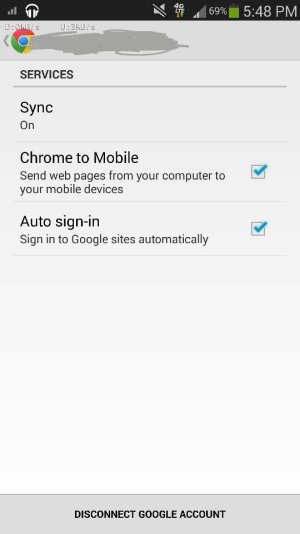
Hi! I know you said you ensured sync was on but was this under the system settings > accounts and then selecting Google? I say check there but also check within Chromes settings as well (below). Are all these sync settings set?

Sent from my T-Mobile Note 3 using AC Forums.
 

Attachments

  • 1393973430761.jpg
    1393973430761.jpg
    33.9 KB · Views: 35
Yep. All sync settings are on and boxes checked. Mobile bookmarks show up that I have saved over time. Nothing under desktop though.

Sent from my SM-N900V using Tapatalk
 
Yep. All sync settings are on and boxes checked. Mobile bookmarks show up that I have saved over time. Nothing under desktop though.

Sent from my SM-N900V using Tapatalk

In Chrome on your desktop, have you signed in and have you checked the settings on the desktop to sync bookmarks (Under Advanced Sync Settings)?
 
For sure you've switched from mobile to desktop???
2eqeta9u.jpg


Sent from my SM-N900V using Tapatalk
 
In Chrome on your desktop, have you signed in and have you checked the settings on the desktop to sync bookmarks (Under Advanced Sync Settings)?

Yes. I just checked again. All boxes are checked. Sync everything is selected.

Sent from my SM-N900V using Tapatalk
 
6udyjyjy.jpg


This is my screen. No folders show up.

Sent from my SM-N900V using Tapatalk
 
Ok. I just checked my iPad. They are not showing up on that either. It must be a setting in Chrome on the desktop.

Sent from my SM-N900V using Tapatalk
 
are you talking when you bookmark something on the computer under google then it is not showing on your phone when you use desktop?

The bookmark I have made on my computer when using google never show on my phone....

I have a number of folders set up with bookmarks on my desktop. I swear that those bookmarks have been on my phone in the past. The last Android phone I used was a moto x and before that a Note 2. I know that I used desktop bookmarks on my Note 2.

Sent from my SM-N900V using Tapatalk
 
I have a number of folders set up with bookmarks on my desktop. I swear that those bookmarks have been on my phone in the past. The last Android phone I used was a moto x and before that a Note 2. I know that I used desktop bookmarks on my Note 2.

Sent from my SM-N900V using Tapatalk

I was not looking at the right place from my phone..

yes it does show on mine.........never realize it before
 
I was not looking at the right place from my phone..

yes it does show on mine.........never realize it before

Yep. It's very useful. I'm baffled right now. I can't figure out why they won't show up. It has to be something on the desktop since they are not showing up on the Note or on the iPad.

Sent from my SM-N900V using Tapatalk
 
Ok I had the same problem but found the solution so I thought I should share. Make sure you disconnect your gmail account from the Chrome browser of your old phone. Once you do that the bookmarks should show up on your new phone.
 
Ok I had the same problem but found the solution so I thought I should share. Make sure you disconnect your gmail account from the Chrome browser of your old phone. Once you do that the bookmarks should show up on your new phone.

This worked. Thank you very much. I really appreciate you posting this. I was so frustrated.

Sent from my SM-N900V using Tapatalk
 
That's bizarre. I have 2 Note 3's, one I use and one is a backup. They are both up to date with the same apps. I never disconnected the account on one I don't use, yet the one I do use syncs fine. I have Chrome bookmarks setup on 3-4 PC's that I use, my MacBook, 2 phones etc...and have no issue syncing.
 
That's bizarre. I have 2 Note 3's, one I use and one is a backup. They are both up to date with the same apps. I never disconnected the account on one I don't use, yet the one I do use syncs fine. I have Chrome bookmarks setup on 3-4 PC's that I use, my MacBook, 2 phones etc...and have no issue syncing.

I agree. I have never had an issue like this before. I can't explain it but it's working fine now.

Sent from my SM-N900V using Tapatalk
 
I have the same problem on my Note 3.Only the mobile Bookmarks show up. Plus the new Chrome ver 37 doesn'
t present an easy solution. My desktop chrome is st up properly.

I don't have syn with my Captivate stock browser, only with my Nexus 7. I would prefer not to even try disconnecting sync with that device. Are there any other solutions?
 
I have never had this happen before. I cannot get my desktop bookmarks to show up. I have made sure that sync is on in the app and in the phone settings. I have uninstalled updates to Chrome and reinstalled them. I have logged in and out 20 times. What am I missing? I have had Chrome on a lot of android phones and iPhones over the years and never had this issue. I searched the forums and didn't find any advice to do anything that I had not already done.

I am hoping someone can suggest something else. Not having my desktop bookmarks is a big deal for me so i really appreciate it. Thank you.
 

Latest posts

Trending Posts

Forum statistics

Threads
960,368
Messages
6,982,237
Members
3,164,506
Latest member
Machetaseo
