08-26-2015 04:55 AM
30 12
tools
  1. roy_geejay's Avatar
    After the latest update for my GS6E (SM-G925I) - G925IDVU2COGA the wallpaper motion effect stopped working can anybody help me?

    Posted via the Android Central App
    08-10-2015 11:10 AM
  2. gummyjelly's Avatar
    I read somewhere on here Samsung took that out because of the battery drain, supposedly was linked to that.
    08-10-2015 12:22 PM
  3. NorthLondonGunner's Avatar
    I noticed this as well after the update. However the option for wallpaper motion is still there when you set the wallpaper which is confusing.

    Posted via the Android Central App
    08-10-2015 01:20 PM
  4. bdmridgeback's Avatar
    5.1.1 on Sprint still has Background motion.
    08-10-2015 03:17 PM
  5. gummyjelly's Avatar
    I noticed this as well after the update. However the option for wallpaper motion is still there when you set the wallpaper which is confusing.

    Posted via the Android Central App
    Where? I don't see an option at all in my end.
    08-10-2015 04:52 PM
  6. roy_geejay's Avatar
    NorthLondonGummer same problem here. The option is available but not works. Just confused!!

    Posted via the Android Central App
    08-10-2015 09:01 PM
  7. TurboHope's Avatar
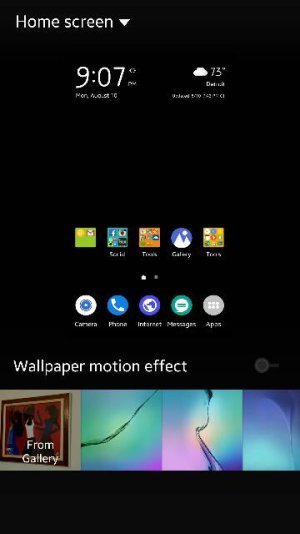
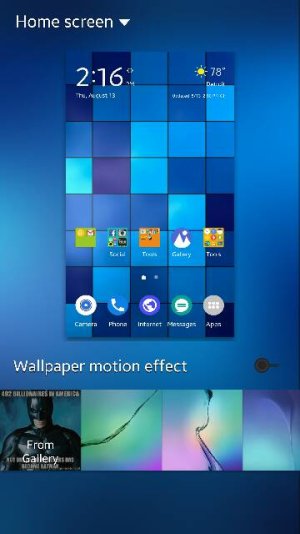
    Look at the bottom right of the picture, just above the wallpapers available. You will see the toggle for the 3D. I got to this by holding my finger down on a blank spot of the home screen then selected the option all the way to the right, wallpaper. This is what i took a picture of. Hope it helps.

    Posted via the Android Central App
    Attached Thumbnails Wallpaper motion effect issue-8398.jpg  
    08-10-2015 09:14 PM
  8. TurboHope's Avatar
    If its there and not working i would suggest either a cache partition wipe and or reset. I know that isnt what you want to hear but....

    Posted via the Android Central App
    08-10-2015 09:15 PM
  9. Denisew 1972's Avatar
    It (the toggle) works for me but when I put my phone into Ultra sleep mode and then take it off in the morning it resets itself to no motion again. Frustrating.

    Posted via the Android Central App
    08-10-2015 10:54 PM
  10. James10101's Avatar
    If Samsung had intentionally removed the wallpaper motion effect I doubt it would still be an option (albeit an option that doesn't work). Therefore it's more likely to be a glitch, on that will hopefully be addressed in the next update. IF it was done intentionally to save battery power then why not just give users the choice rather than forcing them not to have what many feel is a nice visual effect. What next, forced 50% brightness reduction? I doubt that would go down very well.
    08-12-2015 11:14 AM
  11. gummyjelly's Avatar
    Look at the bottom right of the picture, just above the wallpapers available. You will see the toggle for the 3D. I got to this by holding my finger down on a blank spot of the home screen then selected the option all the way to the right, wallpaper. This is what i took a picture of. Hope it helps.

    Posted via the Android Central App
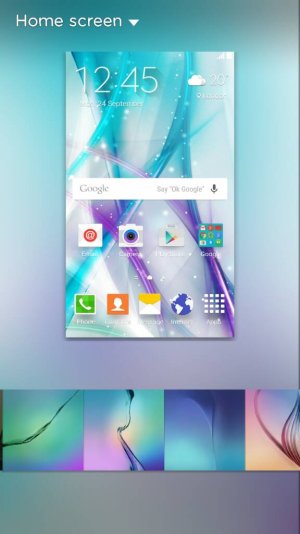
    Thanks but mine isn't there for some reason? I have the latest 5.1.1 update from tmobile. I notice after that 2nd update it didn't do the motion anymore.
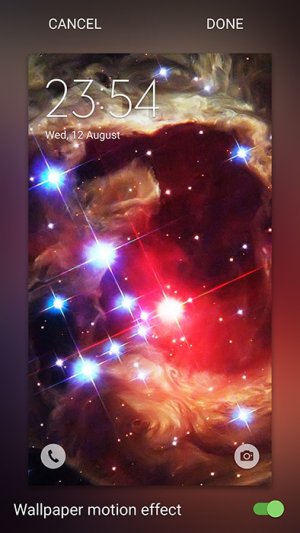
    Attached Thumbnails Wallpaper motion effect issue-1439416717595.jpg  
    08-12-2015 05:58 PM
  12. James10101's Avatar
    Thanks but mine isn't there for some reason? I have the latest 5.1.1 update from tmobile. I notice after that 2nd update it didn't do the motion anymore.
    The way I bring up the option is:

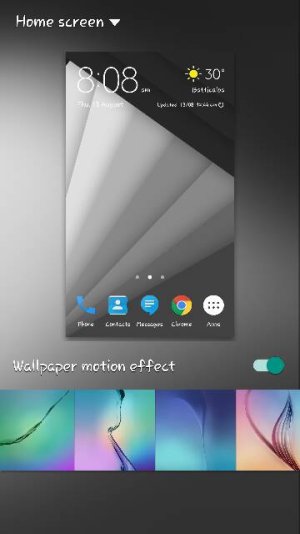
    Gallery - Select a picture - MORE - Set As Wallpaper - Choose any (eg. Home and lock screen) then you should see the same as below, even though it doesn't work.

    Wallpaper motion effect issue-screenshot.jpg
    08-12-2015 07:12 PM
  13. Denisew 1972's Avatar
    Love the wallpaper James! I may have to go find that one...

    Posted via the Android Central App
    08-12-2015 08:52 PM
  14. roy_geejay's Avatar
    I did the same but no sign of improvement. I am confused. If Samsung doesn't want it they should've removed the toggle

    Posted via the Android Central App
    Attached Thumbnails Wallpaper motion effect issue-12735.jpg  
    08-12-2015 10:39 PM
  15. James10101's Avatar
    Love the wallpaper James! I may have to go find that one...

    Posted via the Android Central App
    Thanks Denise! I can't post links but google "pocket-lint 61 Samsung Galaxy S6 wallpapers" and you will see it : )
    Denisew 1972 likes this.
    08-13-2015 06:21 AM
  16. gummyjelly's Avatar
    The way I bring up the option is:

    Gallery - Select a picture - MORE - Set As Wallpaper - Choose any (eg. Home and lock screen) then you should see the same as below, even though it doesn't work.

    Click image for larger version. 

Name:	Screenshot.jpg 
Views:	47 
Size:	100.8 KB 
ID:	190945
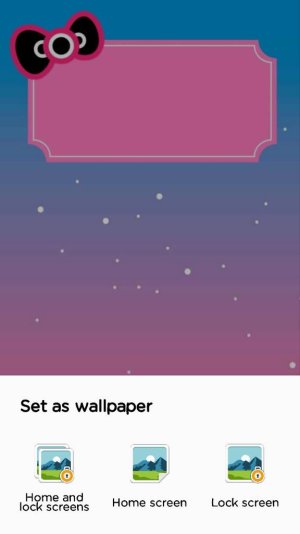
    I just tried that way and it looks completely different than yours.
    Attached Thumbnails Wallpaper motion effect issue-1439475967930.jpg  
    08-13-2015 10:26 AM
  17. gummyjelly's Avatar
    I just tried that way and it looks completely different than yours.
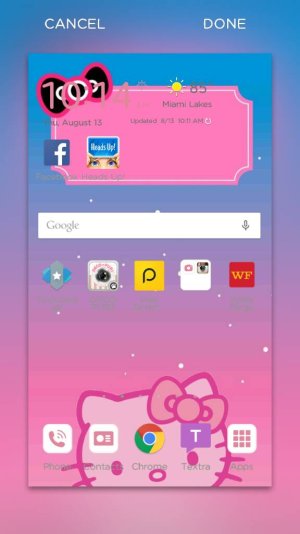
    Oops wrong screen shot. Doesn't give me the option at all for the motion. Must be a glitch from new update or Samsung doesn't want us to have it.
    Attached Thumbnails Wallpaper motion effect issue-1439476086199.jpg  
    08-13-2015 10:28 AM
  18. James10101's Avatar
    Yes that's the right screen. Very odd unless it's a country/ provider thing? I'm Uk and sim/ contract free.
    08-13-2015 10:31 AM
  19. gummyjelly's Avatar
    Yes that's the right screen. Very odd unless it's a country/ provider thing? I'm Uk and sim/ contract free.
    I'm on t-mobile.
    08-13-2015 11:36 AM
  20. TurboHope's Avatar
    On sprint it still is there, hope you figure it out

    Posted via the Android Central App
    Attached Thumbnails Wallpaper motion effect issue-8525.jpg  
    08-13-2015 02:29 PM
  21. Ahmed ElShazly1's Avatar
    I have the same issue here i updated s6 edge to the latest 5.1.1 and the wallpaper motion stopped with the toggle on. Its so annoying
    08-19-2015 04:08 PM
  22. Denisew 1972's Avatar
    Found it! And a few more to boot, awesome!

    Posted via the Android Central App
    Attached Thumbnails Wallpaper motion effect issue-14861.jpg  
    08-23-2015 11:18 AM
  23. NorthLondonGunner's Avatar
    Just got an update today (~220mb) which, amongst other things, fixed the wallpaper motion. The update basically brought the software up to par with the S6 edge+, including the new icon pack and Apps Edge.

    Posted via the Android Central App
    08-23-2015 01:48 PM
  24. Muhamad Aidil Armen's Avatar
    same happen to me.
    its happen after the upgrading.

    08-23-2015 10:56 PM
  25. Dee Hoang's Avatar
    Just got an update today (~220mb) which, amongst other things, fixed the wallpaper motion. The update basically brought the software up to par with the S6 edge+, including the new icon pack and Apps Edge.

    Posted via the Android Central App
    Hello there, is your S6 edge a international version or something ? I haven't got any new update after the upgrading to 5.1.1 with that wallpaper motion error. Could you please take some screenshots here ? Like the camera features, the Apps Edge,... Thx
    08-24-2015 04:19 AM
30 12

Similar Threads

  1. Can I get some help with a battery issue?
    By amit ja in forum Hardware Hideaway
    Replies: 0
    Last Post: 08-10-2015, 10:41 AM
  2. battery issue
    By amit ja in forum Ask a Question
    Replies: 1
    Last Post: 08-10-2015, 09:23 AM
  3. Can I get some help with a battery issue?
    By amit ja in forum Hardware Hideaway
    Replies: 1
    Last Post: 08-10-2015, 08:46 AM
  4. WiFi connect issues and slow email after last GS4 update
    By AC Question in forum Ask a Question
    Replies: 0
    Last Post: 08-10-2015, 12:43 AM
  5. Replies: 3
    Last Post: 08-10-2015, 12:31 AM
LINK TO POST COPIED TO CLIPBOARD