1.29 OTA Update Red Exclamation Mark

ChazTyldsley

Active member
Jan 23, 2013
41
0
0
Just tried installing the 1.29 OTA update for the UK P4U Unlocked One and I get the red exclamation mark as soon as the installation appears to start. Everything stock, never rooted.

I have to hard reset to get the phone to reboot. Tried redownloading but no luck. Phone was plugged into a pc the first time I tried it so I thought that could be the issue but still no luck when unplugged.
 
So did you manually applied the ota and have you unlocked your bootloader?

Not even sure what unlocking the bootloader is, so no! I've had the phone 3-4 weeks now, bought it off-contract after I dropped my Lumia 920. I'm simply trying to do the OTA update through the settings menu after checking for updates. Tried 5-6 times now and every time after the phone reboots to perform the update I get a red exclamation mark in a triangle and have to hard reset to get back into using the phone normally.

I've not done anything special with the device. Deleted the preinstalled music, Thor video, hints & tips videos. And regularly use Clean Master to clear app cache's and kill some tasks. That's about as advanced as it gets - nothing's been altered, it's all stock!
 
Not even sure what unlocking the bootloader is, so no! I've had the phone 3-4 weeks now, bought it off-contract after I dropped my Lumia 920. I'm simply trying to do the OTA update through the settings menu after checking for updates. Tried 5-6 times now and every time after the phone reboots to perform the update I get a red exclamation mark in a triangle and have to hard reset to get back into using the phone normally.
That is very odd if the phone is pulling down the update from the settings app it should flash without issue. I don't know I would check the m7 forums on xda to see if others are having the same issue and a workaround
I've not done anything special with the device. Deleted the preinstalled music, Thor video, hints & tips videos. And regularly use Clean Master to clear app cache's and kill some tasks. That's about as advanced as it gets - nothing's been altered, it's all stock!
 
Just done a full Factory Reset (which was the only suggestion I got on the XDA forums) and still getting the red exclamation mark. I'm all out of ideas...

EDIT - Just done a factory reset from the recovery menu (power + volume up hold whilst on the red exclamation mark screen) and then redownloaded the update and it's worked! Thank the lord. Hope this thread helps others which face this issue.
 
maybe return the phone. Can be an hardware issue...

Appreciate the help, you must have posted just after I edited my post above. But it looks like a full factory reset from the recovery menu then redownloading the update has sorted it! Now to see how good HTC's backup is...
 
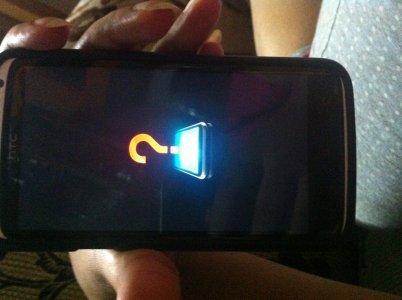
Please help me , i have a htc one x plus , i see a red question mark while updating phone android version after downloading the update . the phone after showing the red question mark switches on and the update is not installed . photo.jpg
 
Please help me , i have a htc one x plus , i see a red question mark while updating phone android version after downloading the update . the phone after showing the red question mark switches on and the update is not installed . View attachment 84111

Try doing what the op did. Factory reset from the recovery menu, redownload the update.
 

Trending Posts

Forum statistics

Threads
962,954
Messages
6,992,279
Members
3,164,953
Latest member
mostafamu