Activate sprint nexus 5

Brian Low

Well-known member
Aug 19, 2013
302
0
0
Just got my replacement nexus 5 from google and im trying to activate it on sprint. I thought it would be as simple as dropping in your sim card like it would be for t-mobile but it wont see my sim card. I read online i need to put in a MSN and MSID or something like that. Any ideas?
 
When I got my LG G3 and stuck a SIM in it, I was very pleased to find it set up all the correct APN and MMS settings automatically, whereas with other phones I've had to enter them manually and it's not always straightforward. Are you referring to those settings here, or something else?

Posted via Android Central App
 
Just got my replacement nexus 5 from google and im trying to activate it on sprint. I thought it would be as simple as dropping in your sim card like it would be for t-mobile but it wont see my sim card. I read online i need to put in a MSN and MSID or something like that. Any ideas?

You need the MEID # which is the IMEI # minus the last digit. :D
 
When I got my LG G3 and stuck a SIM in it, I was very pleased to find it set up all the correct APN and MMS settings automatically, whereas with other phones I've had to enter them manually and it's not always straightforward. Are you referring to those settings here, or something else?

Posted via Android Central App

im assuming thats what im referring to. Need to activate so i can just use the phone as a phone. mms, phone calls, LTE/3G etc.
 
where can i get those? can i just get them online on the sprint account?
That's the tag on the back of a new phone(IMEI# minus last digit). Or Settings>About phone>Status> scroll down to MEID#. You'll need the numbers off of sim also.
 
Thanks all. I got all of that but for some reason it says I'm not authorized to do whatever it is I need to do. My phone says Sprint on the bottom so I know my phone is seeing the sim card. Have to call customer support tomorrow I guess unless anyone has an idea

Posted via Android Central App
 
As far as I remember when setting up my N5 (as a UK user) I went Settings > More > Mobile Networks > Access Point Names. I had to get the details of what settings to enter from my network provider's website, but which settings to enter are not always immediately obvious....had some trouble doing my Lumia 1020, for example.

Posted via Android Central App
 
Thanks all. I got all of that but for some reason it says I'm not authorized to do whatever it is I need to do. My phone says Sprint on the bottom so I know my phone is seeing the sim card. Have to call customer support tomorrow I guess unless anyone has an idea

Posted via Android Central App

Oh, says Sprint on the bottom. Just noticed that bit, so probably my suggestions not relevant because presumably phone already set up for Sprint. 🐢

Posted via Android Central App
 
As far as I remember when setting up my N5 (as a UK user) I went Settings > More > Mobile Networks > Access Point Names. I had to get the details of what settings to enter from my network provider's website, but which settings to enter are not always immediately obvious....had some trouble doing my Lumia 1020, for example.

Posted via Android Central App

It's funny. That setting WAS there temporarily after I did a PRL and profile update. I tried to get into that setting but all it would do is stay on the "searching for service" screen and wouldn't budge. I ended up leaving that setting and it disappeared. Haven't seen it except for that one time. I feel like I need to go in there and change something but that setting is no longer there.

Posted via Android Central App
 
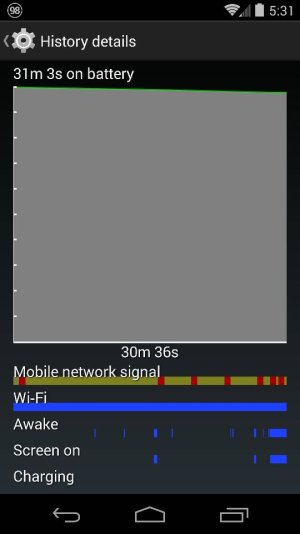
So I got the phone to connect to the network. I was stupid and didn't change from global to lte/3g. I don't know if there's anything else I really need to do but I am constantly dropping signal in my room (the bars turn into a black triangle and it says searching for service). On my first nexus 5 I never had that happen to me in my house. Makes me think either the device is bad or I am missing something in the settings.

Posted via Android Central App
 
Since the phone is new and probably not very much on it yet, you might care to consider a factory reset....or indeed might very definitely not care to. But it might just help. Also, could it be a bad SIM problem?
I'm not very confident of either diagnosis but can't think what else to suggest at the moment.

Posted via Android Central App
 
Sigh... I'm pretty sure it's not the sim card. I have the same sim card that was in my previous nexus 5 and that worked fine. Never dropped signal before. I finished talking to a sprint rep about an hour ago and they reset my network or w/e and it seemed to work. But it came back as shown in the picture... Guess I'll have to call google for another replacement...

Posted via Android Central App
 

Attachments

  • 2495.jpg
    2495.jpg
    34 KB · Views: 9
Out of curiosity, how is it when set to 2G?
Also, on my UK N5, I have mine set to 3G (my signal being of that type), and I don't have the LTE/3G option you mention. Can you not set to 3G only?

Posted via Android Central App
 
Haven't tried on 2G which I am assuming is the 1x option. But on 3G it's fine, I don't drop signal or anything. It's only when connected to LTE. I know it's been an issue with the nexus 5 but I thought I did something wrong when activating through sprint.

Posted via Android Central App