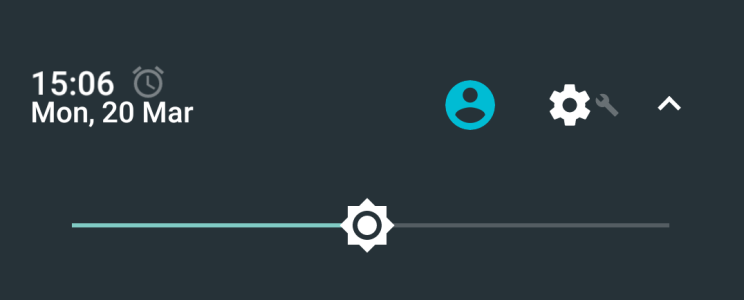
Alarm icon doesn't show time of alarm

gadgetchannel

New member
Mar 14, 2014
3
0
0
My Moto G4 Plus has updated to Android Nougat 7.0 today and I have found that the icon which appears when there is an alarm set no longer shows the time of the next alarm when I pull down the notification shade. The lock screen still shows the time of the next alarm. The icon also does nothing when tapped when, in Marshmallow, it used to open the alarm clock app to allow the alarm to be edited. Does anybody know if this is a feature which has been removed in Nougat or if there is a setting I need to enable for this to work?
 
Welcome to the forums. It's not due to Nougat. I just tested with the stock Google Clock app on my Pixel, and I am shown the alarm time when I pull down the notification shade.
 
Is your Pixel on Nougat 7.1 (or even 7.1.1)? If so, then my Moto G4 Plus has only been updated to 7.0 so I wonder if this makes a difference?

This is what I am seeing when I pull down the notification shade:

NotificationShadeAlarmIcon.png
 
I also noticed that the date was showing below the time rather than to the right (like screenshots I've seen online). In case they were related I decided to try going to Settings > Display and changing Display Size to Small instead of Default and found that the alarm time appeared and the date was to the right of the time. However, this made everything seem tiny on my phone, so I've switched it back. Sounds like it may be an issue to do with screen resolution.
 

Latest posts

Trending Posts

Forum statistics

Threads
963,273
Messages
6,992,981
Members
3,164,995
Latest member
kctraci1