Alarm volume on built-in clock app

Lady Grinning Soul

Well-known member
Jun 2, 2014
76
1
8
I am trying to control the volume on the Clock app that comes with the Note 4. More specifically, I am trying to lower the volume when the alarm goes off. When I go into Settings > Sound > Volume, I can turn use the Ringtone slider to turn the sound on the clock completely off. But at even the minimum Ringtone setting, the volume of the alarm is blastingly loud.

Is there some other place to control this? What am I not seeing?

Thanks.
 
Hello there!

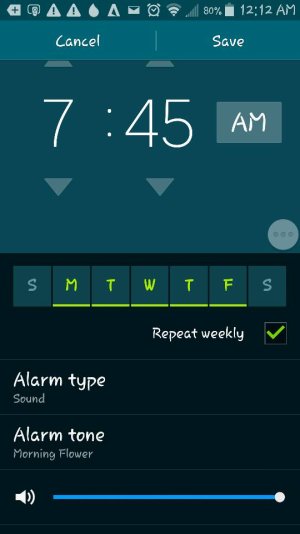
Go into the alarm settings, it has a separate volume slider for the alarm volume.
 
Okay, correction:
When you are in the alarm app, choose an alarm, there's where you'll find the volume slider.
See the screenshot below.
1421298861351.jpg
 
Hi thanks for the reply.

I should have been more clear. I'm trying to control the volume of the Timer, which doesn't have a settings menu.
 
What I'm trying to do is control the volume of the Timer mode of the default Clock (under the hourglass icon.)

If I set the volume using the left-side sliders to all the way off, of makes no sound -- as expected.

If I set it up one press to vibrate, it vibrates -- as expected.

But if I set it up just one more press, the volume jumps all the way to blasting, no matter what tone is used. This makes it almost unusable.

I'm looking for an independent volume for the timer. AFAICT, it's not affected by any of the controls under Settings --> Sound --> Notifications.
 

Latest posts

Forum statistics

Threads
962,695
Messages
6,991,396
Members
3,164,901
Latest member
racoo