
Hello everyone,
Ever wanted to copy some text in an app on Android but you could not ? This problem happens quite often actually, as the standard Android long press copy function does not work in some of the biggest Android applications: Facebook, Tweeter, YouTube, Instagram, SnapChat. For example, try to copy a Youtube's video description. You will find out that it is not possible.
However, we at Camel Corporation have found a solution. A proper solution that does not involve taking a screenshot and using OCR (character recognition) or going on the browser version of the app.
Our new app, called Universal Copy, enables you to copy (almost) any text from any application in only three simple taps.
First, install Universal Copy from the Play Store : https://forums.androidcentral.com/e...d=com.camel.corp.universalcopy&token=zPlIXKwn
Follow the steps to activate the app's accessibility service.
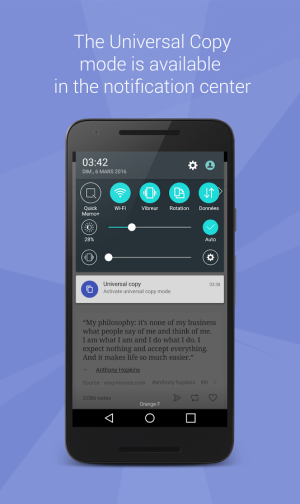
Then, when you are in an app and want to copy some text :
Let us know if you find this app useful, and dont hesitate to contact me if you have any feature request!
Murin,
for the Camel Corp Team
Ever wanted to copy some text in an app on Android but you could not ? This problem happens quite often actually, as the standard Android long press copy function does not work in some of the biggest Android applications: Facebook, Tweeter, YouTube, Instagram, SnapChat. For example, try to copy a Youtube's video description. You will find out that it is not possible.
However, we at Camel Corporation have found a solution. A proper solution that does not involve taking a screenshot and using OCR (character recognition) or going on the browser version of the app.
Our new app, called Universal Copy, enables you to copy (almost) any text from any application in only three simple taps.
First, install Universal Copy from the Play Store : https://forums.androidcentral.com/e...d=com.camel.corp.universalcopy&token=zPlIXKwn
Follow the steps to activate the app's accessibility service.
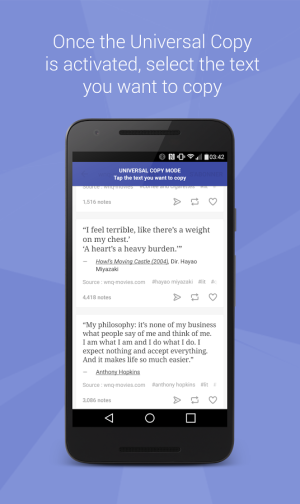
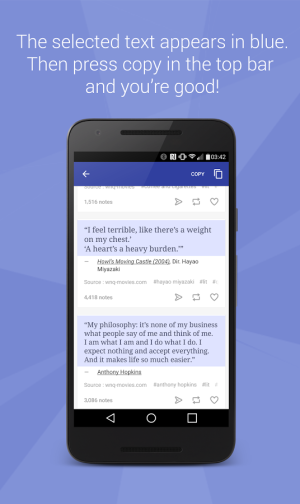
Then, when you are in an app and want to copy some text :
- open your notification drawer
- click on "Activate Universal Copy mode"
- tap the text(s) you want to copy
- click on "Copy": the selected text will highlight and will be copied to your clipboard!
Let us know if you find this app useful, and dont hesitate to contact me if you have any feature request!
Murin,
for the Camel Corp Team
Attachments
Last edited by a moderator:



 Facebook
 Twitter
 Instagram