Battery draining fast when idle

Cougary

Member
Nov 4, 2018
12
0
0
I got Samsung Galaxy A50 before 2 weeks. Battery is great, 4.000mAh and I can easy get 8 to 9h on screen time but I think I can get better score (I have always turned on: 4G, Always on display, GPS and sync and screen brightness is around 30-40% always) but big part of discharging is when phone is idle. It use too much battery when idle, and I don't know why. I don't have much apps (mostly social apps like whatsapp or facebook). Yes, auto update is off, I don't have any live wallpaper or app that is running in backround always (only Samsung Health but it didn't use battery in backround on old phone).
 
Check the battery usage by app. If Phone or Idle is using a lot, you have a weak signal. The only thing you can do to fix that is to switch to a carrier that has a better signal where you usually are.
 
Yeah as above, check battery usage in device care. You should find the culprit there, I had an issue yesterday and it was the Google app that was draining my battery.
 
I got Samsung Galaxy A50 before 2 weeks. Battery is great, 4.000mAh and I can easy get 8 to 9h on screen time but I think I can get better score (I have always turned on: 4G, Always on display, GPS and sync and screen brightness is around 30-40% always) but big part of discharging is when phone is idle. It use too much battery when idle, and I don't know why. I don't have much apps (mostly social apps like whatsapp or facebook). Yes, auto update is off, I don't have any live wallpaper or app that is running in backround always (only Samsung Health but it didn't use battery in backround on old phone).
That's very good battery with 8 to 9 hours SOT with what almost a day battery , your on par with the Note 9 , so I don't think you have anything to check out .
 
Hi

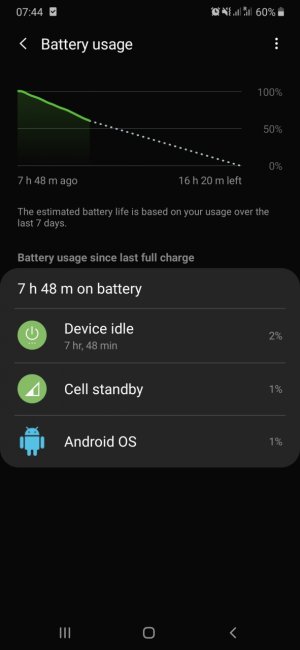
I am having the same issue on my Galaxy A50 phone.

I have updated to the latest software but still have this problem.

It's draining about 40% at night when the phone stays idle.

I have tried to check on the Battery Usage, but it doesn't show which app or where the 40% of battery have been used.

Device Idle 2%
Cell Standby 1%
Android OS 1%

So where the other 36% were used? No clues... strange...
 

Attachments

  • Screenshot_20190919-074403_Settings.jpg
    Screenshot_20190919-074403_Settings.jpg
    74.5 KB · Views: 11
Simple solution. If you are running PIE you can go to settings then Apps and select the app or apps you think may be draining your phone go to usage and you will see "Battery" disable "allow background activity" this can be done for any app you don't want running in the background using up your battery.

this can be done for individual apps.