Best S Pen features

bulrich

New member
Jan 15, 2014
3
0
0
I'm trying to use the s pen more. What are peoples favorite Uses for it?

Posted via Android Central App
 
I personally love the air command memo feature and the actions tab in the memo itself.

Sent from my SM-N900V using Tapatalk
 
Memo is most used for me. Then is scrap book and then screen write.

Sent from my SAMSUNG-SM-N900A using Tapatalk
 
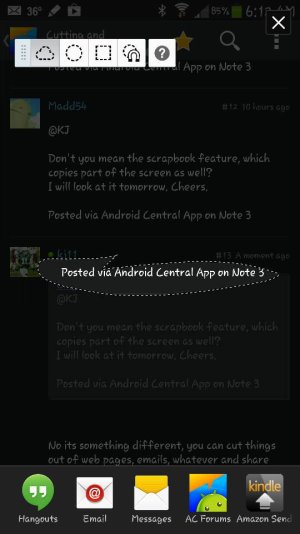
I just discovered easy clip, it's pretty sweet. It's not an air command option. To do it hold the button down and draw a circle or box around something you want to "clip" and then you can share it as an image to any number of apps

Sent from my SM-N900V using AC Forums mobile app
 

Attachments

  • 1389871985018.jpg
    1389871985018.jpg
    47.2 KB · Views: 64
I'm trying to use the s pen more. What are peoples favorite Uses for it?

Posted via Android Central App

Action memo as small food shopping list.I have my note set to launch action memo when I remove the pen.

Posted via Android Central App
 
Pen window is excellent with Officesuite and chrome...
I also like easy clip... particularly when I need to convert unselectable text to text to copy...
Hold button...encircle the text...then I choose smart ocr app free.
S note isn't bad...Papryus is nice...fiinote is powerful.
 
For me Action Memo, Scrapbook ... ups seems I use all of them heavily each day. S-Pen is great 😊

Sent from my SM-N9005 using Tapatalk
 
I just discovered easy clip, it's pretty sweet. It's not an air command option. To do it hold the button down and draw a circle or box around something you want to "clip" and then you can share it as an image to any number of apps

Sent from my SM-N900V using AC Forums mobile app

that's great....thanks...
 
Pen window is excellent with Officesuite and chrome...
I also like easy clip... particularly when I need to convert unselectable text to text to copy...
Hold button...encircle the text...then I choose smart ocr app free.
S note isn't bad...Papryus is nice...fiinote is powerful.

Thanks, smart ocr is very cool! Finally a copy paste option for text. This is exactly what I was looking for.

Posted via Android Central App
 
Definitely the Easy Clip function for me although I can see S Find coming in handy. I've started using Action Memo and Scrapbook more as well.
 
Action memo and the clip tool are what I find myself using the most when I use the S-Pen. I like being able to clip what I want to send someone instead of just doing a screen shot.
 
Action memo and the clip tool are what I find myself using the most when I use the S-Pen. I like being able to clip what I want to send someone instead of just doing a screen shot.
There are many things the S pen is good for. But the one major feature I can't type here so you'll have to visualize it :) Kinda like what your doing to my mom there....
 
In note2, when am in S-Note I press the button to toggle between presets. This is not working in Note3. Pressing button is opening Air command. Is there a solution?.
 
I saw on another thread where someone mentioned this feature that has come in handy. When looking at certain things on the phone, mostly native phone apps, like a picture in gallery. If you hover your pen over a picture the little blue circle will light up and pulse. If you click your s pen it brings up a different menu to share , edit, etc. Very cool. I've only used it to share pictures, but it is very handy