
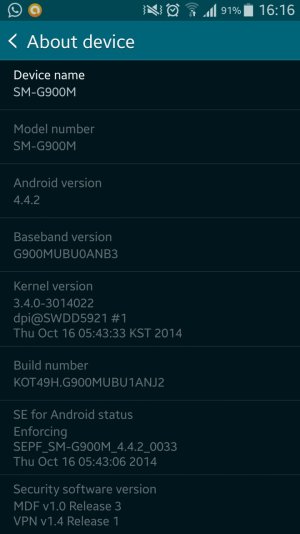
Please help, I've tried with different versions of Odin and with the correct file from Chainfire and I can't root my S5, it keeps failing on the Odin part of the process.
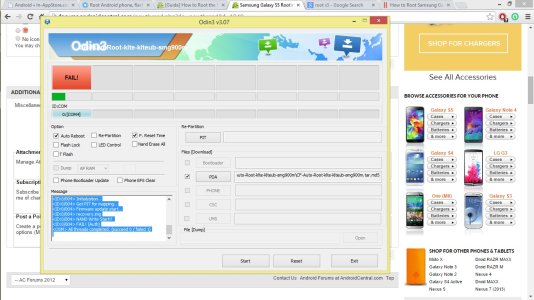
Odin's feedback:
<OSM> Enter CS for MD5..
<OSM> Check MD5.. Do not unplug the cable..
<OSM> Please wait..
<OSM> CF-Auto-Root-klte-klteub-smg900m.tar.md5 is valid.
<OSM> Checking MD5 finished Sucessfully..
<OSM> Leave CS..<ID:0/004> Added!!
<ID:0/004> Odin v.3 engine (ID:4)..
<ID:0/004> File analysis..
<ID:0/004> SetupConnection..
<ID:0/004> Initialzation..
<ID:0/004> Get PIT for mapping..
<ID:0/004> Firmware update start..
<ID:0/004> recovery.img
<ID:0/004> NAND Write Start!!
<ID:0/004> FAIL! (Auth)
<OSM> All threads completed. (succeed 0 / failed 1)
Phone's feedback:
UDC START
SECURE CHECK FAIL : recovery
I'm totally clueless, any help or guide will be truly appreciated :-*
:-*
Sources I've tried:
galaxys5root . com
forums.androidcentral . com/samsung-galaxy-s5-rooting-roms-hacks/388887-guide-how-root-samsung-galaxy-s5.html
Odin's feedback:
<OSM> Enter CS for MD5..
<OSM> Check MD5.. Do not unplug the cable..
<OSM> Please wait..
<OSM> CF-Auto-Root-klte-klteub-smg900m.tar.md5 is valid.
<OSM> Checking MD5 finished Sucessfully..
<OSM> Leave CS..<ID:0/004> Added!!
<ID:0/004> Odin v.3 engine (ID:4)..
<ID:0/004> File analysis..
<ID:0/004> SetupConnection..
<ID:0/004> Initialzation..
<ID:0/004> Get PIT for mapping..
<ID:0/004> Firmware update start..
<ID:0/004> recovery.img
<ID:0/004> NAND Write Start!!
<ID:0/004> FAIL! (Auth)
<OSM> All threads completed. (succeed 0 / failed 1)
Phone's feedback:
UDC START
SECURE CHECK FAIL : recovery
I'm totally clueless, any help or guide will be truly appreciated
:-*Sources I've tried:
galaxys5root . com
forums.androidcentral . com/samsung-galaxy-s5-rooting-roms-hacks/388887-guide-how-root-samsung-galaxy-s5.html




 Facebook
 Twitter
 Instagram