Change folder color and zfont

sweetypie31

Well-known member
Dec 18, 2011
4,640
507
113
Ok y'all I'm having a slow moment. How do i change the folder color ? I see in home up where you can have the folder to match the icon background but I don't want that.

Also is there another app like zfont available that's working with the s26? I know I have to give them time to update zfont ,but im impatient and I want to change my font now. The ones in the store are ugly. Lol
 
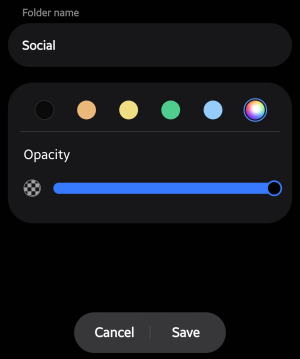
Press and hold the folder, then choose settings
I did that but this is what came up
eadeb86f0d7a75d43a507fc1c3118017.jpg
 
Ok y'all I'm having a slow moment. How do i change the folder color ? I see in home up where you can have the folder to match the icon background but I don't want that.

Also is there another app like zfont available that's working with the s26? I know I have to give them time to update zfont ,but im impatient and I want to change my font now. The ones in the store are ugly. Lol
Copilot told me that Samsung patched the loop-hole that allowed Zfont to work, but it did give me a DIY method that needs to be done locally for every device to work. I haven't tried it yet. I will try to dig it up.
 
  • Like
Reactions: sweetypie31
What launcher are you using? This is what pops up with stock launcher.
 

Attachments

  • Screenshot_20260314_211836_One UI Home.png
    Screenshot_20260314_211836_One UI Home.png
    117.1 KB · Views: 20

Trending Posts

Forum statistics

Threads
962,128
Messages
6,989,170
Members
3,164,776
Latest member
Casperxx99