
Changing video recording quality
- Thread starter Sam12Ash
- Start date
You are using an out of date browser. It may not display this or other websites correctly.
You should upgrade or use an alternative browser.
You should upgrade or use an alternative browser.

- Dec 4, 2012
- 35,752
- 832
- 113

- Mar 9, 2012
- 169,743
- 11,166
- 113
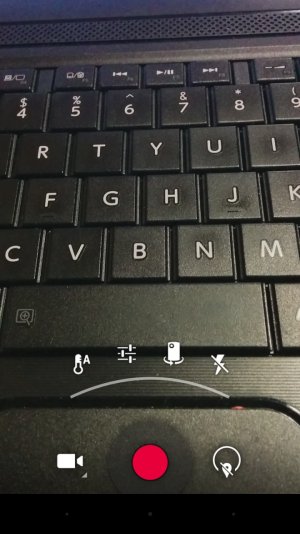
This is what I see when I use the video camera on my Nexus 5. See the Settings button to the right of the shutter button? If I tap that, I get that arc of options. If I tap the settings icon (the one that looks like switches), I then get the option to change the resolution. Do you see any of that?
- Dec 4, 2012
- 35,752
- 832
- 113
This is what I see when I use the video camera on my Nexus 5. See the Settings button to the right of the shutter button? If I tap that, I get that arc of options. If I tap the settings icon (the one that looks like switches), I then get the option to change the resolution. Do you see any of that?
I don't have a settings button like that either B. Diddy.
This is what I see when I use the video camera on my Nexus 5. See the Settings button to the right of the shutter button? If I tap that, I get that arc of options. If I tap the settings icon (the one that looks like switches), I then get the option to change the resolution. Do you see any of that?
View attachment 101296
Unfortunately no I don't see this option on the moto x. I tried all available settings that appear.
Posted via Android Central App
How long is the video? I emailed a 7 second one to myself and it worked.
5 seconds. I must be doing something wrong if you emailed one that was 7 seconds.
Posted via Android Central App
- Mar 9, 2012
- 169,743
- 11,166
- 113
Oh hey, here's a thought--have you tried going to Hangouts (or whatever Messaging app you have), initiating a text message with your recipient, and tapping the camera icon there? In Hangouts, you should get an option to take a photo or take a video, and I'm pretty sure the video resolution will default to pretty low, since it's intended for a SMS/MMS.
- Dec 4, 2012
- 35,752
- 832
- 113
5 seconds. I must be doing something wrong if you emailed one that was 7 seconds.
Posted via Android Central App
I sent mine through ESFile explorer. Perhaps that is the difference.
From a Sprint Moto X using AC Forums app

patruns
Well-known member
- May 21, 2011
- 3,242
- 89
- 48
Oh, sorry--wish I had an X to fiddle with, but can only rely on my N5. You'd think that the camera app for the N5 and the X would be more or less the same, considering they're both for quintessential Google products. Oh well ...
Makes me wonder how you change the photo resolution settings on a Moto. Whatever way that is i would think would also work when in video mode.
Sam12Ash, can you post a screen shot of the video screen?
Makes me wonder how you change the photo resolution settings on a Moto. Whatever way that is i would think would also work when in video mode.
Sam12Ash, can you post a screen shot of the video screen?
I will once I'm on my computer but its as close to an empty screen as you can get. There's no option screen available.
Posted via Android Central App



Space.com is part of Future plc, an international media group and leading digital publisher. Visit our corporate site.
© Future Publishing Limited Quay House, The Ambury, Bath BA1 1UA. All rights reserved. England and Wales company registration number 2008885.
 Facebook
 Twitter
 Instagram