Cleaning up "Other" storage

Nobody

Member
Feb 7, 2026
5
0
1
Screenshot_2026-02-03-05-46-20-94_fc704e6b13c4fb26bf5e411f75da84f2.jpg

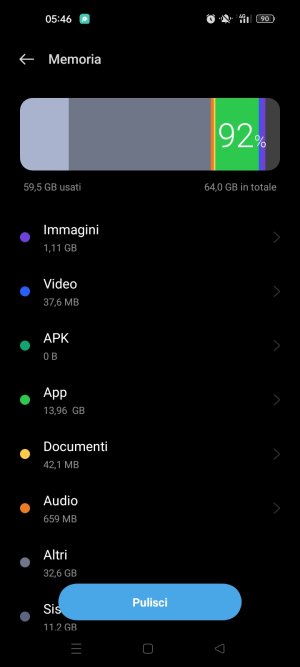
I think that this screenshot is quite self-explanatory. Problem is about "Altri" (Other) storage. I don't know how to clean up to free some space. I already used apps like x-plore, sd maid, fx, ccleaner and cx file explorer and the storage app of the phone. I already know that "other" isn't a real directory and it contains cache of apps and some other stuff. It's been days i'm looking for a solution. I also clean cache from the app managment menu, but I notice that every time I update every app from the store, it takes a lot of space ( > 500MB). Consider that I use the phone very little, few photos, few apps, some music and one or two videos, .
I read somewhere that before there was an option "wipe data and cache" from the recover menu (vol down + on/off button) but it's not there anymore. I'd like to avoid the restore to factory condition option.
My phone is an Oppo A53 and Android version is 12.
 
If you tap on the 'Other' section, does it 'expand' to show you some of those files? The 'problem' with that section is that it can come from all over your phone. Clearing the cache (don't do data unless you want to completely wipe something to a 'factory' state!) from the phone's menu would only clear the temp files for the phone's system. You would still need to deal with each apps temp files PER APP (if you go to each app's properties, you'll see a Storage section where you can individually wipe data/cache... Again, if you wipe data, it'll basically return the app to a 'clean install' state and all your app data will be lost, not just the temp cache data). And on top of that, you can have, well, other types of files elsewhere on your phone that don't 'fit' the general media/app criteria. You mention you only use a few apps, but you have quite a lot of app data installed, maybe put some of those into 'hybernation' or uninstall what's not needed? Updates these days are data-intensive, so yeah, that temp partition for app updates and even regular media/web browsing can get pretty large pretty fast!
 
  • Like
Reactions: Golfdriver97
@SpookDroid got most of it, but I think Other can be items that are marked to be deleted. If you have a file manager, you can check the trash and see if that is holding large files.

Otherwise, I would almost say reset. If you have everything synced, and know your account and password, a reset shouldn't be that bad anymore.

Back in the early days of Android....yes. PITA. But, I'll be honest, I don't know of any other way to clear that portion of the storage.
 
Thanks for your replies.
If you tap on the 'Other' section, does it 'expand' to show you some of those files? The 'problem' with that section is that it can come from all over your phone. Clearing the cache (don't do data unless you want to completely wipe something to a 'factory' state!) from the phone's menu would only clear the temp files for the phone's system. You would still need to deal with each apps temp files PER APP (if you go to each app's properties, you'll see a Storage section where you can individually wipe data/cache... Again, if you wipe data, it'll basically return the app to a 'clean install' state and all your app data will be lost, not just the temp cache data). And on top of that, you can have, well, other types of files elsewhere on your phone that don't 'fit' the general media/app criteria. You mention you only use a few apps, but you have quite a lot of app data installed, maybe put some of those into 'hybernation' or uninstall what's not needed? Updates these days are data-intensive, so yeah, that temp partition for app updates and even regular media/web browsing can get pretty large pretty fast!
If only it would be so simple...Unfortunately I can't tap on Other: that's my main concern. I've already try to deal with each app, except for system ones: i wiped only cache but i noticed that data weren't so huge in dimensions.
I think that those other types of files are the main problem and i don't know how to deal with them.
I have 24 apps i use regularly, including 3 little games: then there is the android and google stuff which i rarely use.
@SpookDroid got most of it, but I think Other can be items that are marked to be deleted. If you have a file manager, you can check the trash and see if that is holding large files.

Otherwise, I would almost say reset. If you have everything synced, and know your account and password, a reset shouldn't be that bad anymore.

Back in the early days of Android....yes. PITA. But, I'll be honest, I don't know of any other way to clear that portion of the storage.
With a file manager (cx file explorer) the trash is empty. Thanks to it i can see every single app at least: there's a lot of system stuff, more than 300, but i don't know which of them is safe to delete.
About reset my main concern is that if every update is so data-intensive as Spookdroid says, in a short period of time, i would have the same problem.
 
About reset my main concern is that if every update is so data-intensive as Spookdroid says, in a short period of time, i would have the same problem.
I'm not sure how to counter that. It looks like you have 64GB of total storage; Either one (or more) of the apps you have installed doesn't do well with getting rid of garbage, OR you need a bare minimum 128GB for your next phone.

You can use the reset to trim your apps to see if one is out of control?
 
Try couple these steps always back your device up

Clear cache sometimes Data is needed these apps build up cache
Play store
Play system /services


Delete OTA leftovers (Oppo specific)
Sometimes ColorOS leaves update files behind.
Check: Settings>About phone> Storage If you see “System update files”, delete them

You can go into safe mode while doing this so apps don't build up cache.

The recovery you mentioned no clear cache option sometimes it can be hidden behind the clear data option see when u tap that if cache option appears
 
For me, tapping on "other" will show me some of the files and then allow me to decide to delete them. However, it won't show me all of them. I can tell because the ones it'll show add up to way less than it says exist. For me, that's with the built in MyFiles file manager app for Samsung, after I select "analyze storage".

I'd love it if some of the built-in apps and functionality of Android gave more depth of control for some of the memory settings, so users/owners can more easily manage (or at least more easily determine) how their device's memory is being consumed. Unfortunately, it's very true what Golfdriver points out that nowadays Android phones with less than 128GB can easily get filled up even if not a heavy user.
 
I'm not sure how to counter that. It looks like you have 64GB of total storage; Either one (or more) of the apps you have installed doesn't do well with getting rid of garbage, OR you need a bare minimum 128GB for your next phone.

You can use the reset to trim your apps to see if one is out of control?
Maybe it's one or more of my apps as you said: reset for now is not a solution because there are some vocals messages on whatsapp i need to keep in chronological order because they remind me a person i lost in 2024.
Try couple these steps always back your device up

Clear cache sometimes Data is needed these apps build up cache
Play store
Play system /services


Delete OTA leftovers (Oppo specific)
Sometimes ColorOS leaves update files behind.
Check: Settings>About phone> Storage If you see “System update files”, delete them

You can go into safe mode while doing this so apps don't build up cache.

The recovery you mentioned no clear cache option sometimes it can be hidden behind the clear data option see when u tap that if cache option appears
Already tried clearing cache.
I have no system update files to delete. The recovery menu have on ly three option: if i tap, nothing happens.
For me, tapping on "other" will show me some of the files and then allow me to decide to delete them. However, it won't show me all of them. I can tell because the ones it'll show add up to way less than it says exist. For me, that's with the built in MyFiles file manager app for Samsung, after I select "analyze storage".

I'd love it if some of the built-in apps and functionality of Android gave more depth of control for some of the memory settings, so users/owners can more easily manage (or at least more easily determine) how their device's memory is being consumed. Unfortunately, it's very true what Golfdriver points out that nowadays Android phones with less than 128GB can easily get filled up even if not a heavy user.
Yes, I read on other sites that with Samsung phones there is the option to tap on "other". Unfortunately that's not my case.
100% agree with the second part of your message: it's the main reason why i disliked smartphones, because even if it seems that you have full control on it, it's not true. I grew up with pc, where "you can go" in every part of your drive and see or delete everything: it's a risk you can take, but at least you can do it.

Buying another phone when this one is perfectly funtioning imho it's crazy. What i've done is uninstall every app i don't use regularly, even some google garbage: I got about 1 GB. And for the future i'll update only system apps and the apps i use daily.
When the time comes (I hope as late as possible), i will buy another phone. It seems to me that it's something similar to what happened with windows 11 and its crazy system requirements. Perfectly functioning machines which become not useful anymore: some time ago someone talked to me about planned obsolescence. I didn't believe it, but now I'm changing my mind.
 
Maybe it's one or more of my apps as you said: reset for now is not a solution because there are some vocals messages on whatsapp i need to keep in chronological order because they remind me a person i lost in 2024.

Already tried clearing cache.
I have no system update files to delete. The recovery menu have on ly three option: if i tap, nothing happens.

Yes, I read on other sites that with Samsung phones there is the option to tap on "other". Unfortunately that's not my case.
100% agree with the second part of your message: it's the main reason why i disliked smartphones, because even if it seems that you have full control on it, it's not true. I grew up with pc, where "you can go" in every part of your drive and see or delete everything: it's a risk you can take, but at least you can do it.

Buying another phone when this one is perfectly funtioning imho it's crazy. What i've done is uninstall every app i don't use regularly, even some google garbage: I got about 1 GB. And for the future i'll update only system apps and the apps i use daily.
When the time comes (I hope as late as possible), i will buy another phone. It seems to me that it's something similar to what happened with windows 11 and its crazy system requirements. Perfectly functioning machines which become not useful anymore: some time ago someone talked to me about planned obsolescence. I didn't believe it, but now I'm changing my mind.
Try an app like this


Trending Posts

Forum statistics

Threads
961,002
Messages
6,984,511
Members
3,164,625
Latest member
babarsaeedfari
