Clearing "pinned" music from device in Play Music

krmurrayjr

Member
Dec 9, 2012
13
0
0
I've been an Android user since the G1, but this one has me stumped.

I have a Nexus 4 with a considerable amount of "pinned" music in the Play Music app taking up storage space. This pinning seems to have taken on a life of its own, and I'm finding that the app is permanently storing music locally that I never wanted downloaded.

So my question is this: what's the best way to completely clear everything that's been "pinned" so far, and start over? I knew how to unpin music in the app before the recent design refresh, but now I'm not seeing it anywhere. Is there a way to just unpin everything through the app? Or can I use a file manager or connect the device to a PC and just delete the music files?

Thanks in advance for any tips!
 
Just click the pin icon again until it goes grey and angled instead of orange and vertical. Works for magazines too, they were taking up my 16gb!! Good luck.
 
In Google Music, hit the menu button, then Settings/Clear Cache, and let us know if that works.
 
I have been trying to unpin some music I downloaded, But when i click te blue pin it just says "this music is only stored on this device."
I can't figure out how to access it from the computer. I don't know what to do.

Help?
 
Did you download the music from Google Play? Have you tried opening Google Music, tapping the menu button, then tapping Settings/Clear Cache, as mentioned above?
 
I have tried all that is posted and the music is still pinned to my galaxy 10.1. It took me factory resetting the my device twice to realize this was the problem of storage keep running out on my 16gb note 10.1.:-\
 
Once in the "Pinned" album or song, click on the menu (vertical three dots in front of the name) of each song and choose "Delete". Doing this didn't remove the songs in the Google Play Music website, so no need to worry. It just cleared the "Pinned" music from the phone.
 
To remove all of the songs in Google Music, you'll need to go to app manager and clear data. That will remove everything but the app itself. I have to do this sometimes before I make a nandroid to have enough room on my phone for the backup. When you restart the app, you'll have to login your account and all of your library and playlists will still show but none of it will be stored on the device.
 
How do I get rid of all the pinned music from my device?
I have cleared the cache, I have cleared the data, my Play Store library is totally empty, but it's still all there on my phone. I want to start over because there's a ton of stuff that I don't want available there anymore. There's no "Delete" option on my phone and I can't unpin anything. How do I get rid of the music on my phone?

ETA: I even tried deleting the songs individually, but they don't delete.
I have never used such a frustrating service. Google help has been useless. My fingers are crossed that you have some ideas
 
Welcome to Android Central! How do you know it's still on your phone? Does it show as pinned in Google Play Music? If so, what happens if you unpin a particular song or album?

What device do you have? It might be worth doing a system cache partition wipe, if it's possible (not all devices give you the option).
 
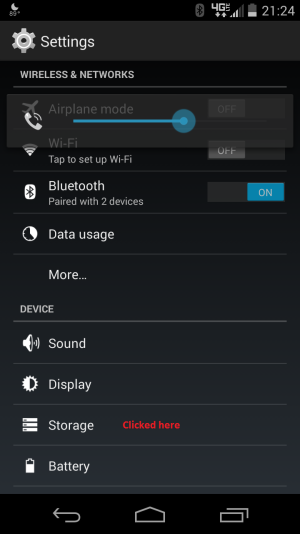
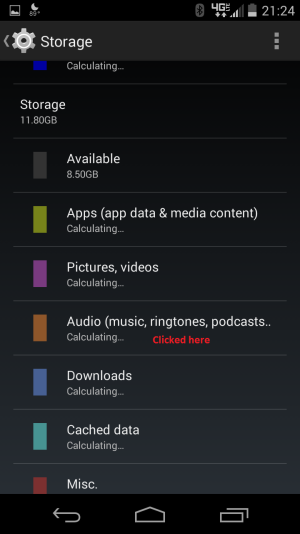
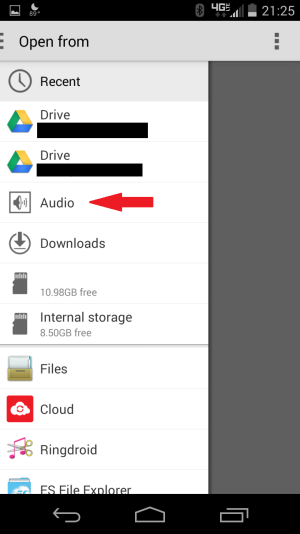
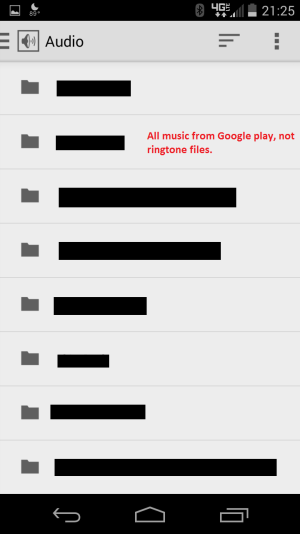
It's still showing up in the app, I can find the files listed when I search "Settings>Storage>Audio" but I can't actually find the files on my phone to physically delete them.
I went to the App settings and cleared the cache and the cleared the data, both of which did basically nothing at all. I can't unpin any of the songs, and I can't delete them either. I have a Droid Razr HD.
 
Try uninstalling all updates for Google Play Music, then updating again.
 
That was one of the very first things I'd ever tried, and I just tried it again.
It doesn't work. It's all still there and I can't individually delete, or even unpin any of it.
 
Files "pinned" from Google Play Music do not show up under Audio in the Storage menu, their usage shows up under Apps. If you're seeing it under Audio then the files are from a different source (such as copied over to your phone). Try using a file manager like ES File Explorer that allows you to search for files and use that to search for the song title or just *.mp3.
 
I've tried searching with Astro, and through connection with my computer. Neither turn up any files.
Searching under Apps in Storage has the Google Play app, of course, but no actual music files. Merely the app info.

The music files show up under Audio in storage, but there's no file path for me to trace where they're located otherwise, and I can't modify/select/delete them from there.

I will attempt ES File Explorer


ETA: Downloaded ES File Explorer. Same thing as Astro. Can't find anything at all.
 
I've tried searching with Astro, and through connection with my computer. Neither turn up any files.
Searching under Apps in Storage has the Google Play app, of course, but no actual music files. Merely the app info.

The music files show up under Audio in storage, but there's no file path for me to trace where they're located otherwise, and I can't modify/select/delete them from there.

I will attempt ES File Explorer

ETA: Downloaded ES File Explorer. Same thing as Astro. Can't find anything at all.

Hm, very odd. Can you post some screenshots of what you're seeing in the storage menu?
 

Trending Posts

Forum statistics

Threads
963,288
Messages
6,993,006
Members
3,164,998
Latest member
Ashok Dharshan