Coming from a 32GB phone to the Galaxy S5

GuyWith4Kids

Well-known member
Oct 3, 2013
194
0
0
I really want to buy this phone but I am struggling to make 16GB work. I only have a couple games and mostly work, news, weather, etc apps. I have a 32GB phone now and I have uninstalled every app I do not regularly use and subtracted my music and photos from the useable storage and I still can't get it to fit into the 10GB useable...

How are you guys making the 10GB work?

Posted via Android Central App
 
Sounds like all of the things you are using could easily be moved to an sd card. With a 16 gb card and the phone, you would have the same room. The S5 can support an SD card up to 128 GB.
 
Sounds like all of the things you are using could easily be moved to an sd card. With a 16 gb card and the phone, you would have the same room. The S5 can support an SD card up to 128 GB.

What do you recommend I move? I already took out pictures, music, podcasts, etc from my calc.

Posted via Android Central App
 
Apps can't be moved to a SD card in most cases.

Posted via Android Central App

Don't move apps to sd. You will have nothing but problems. Follow this.....

Internal Storage - Apps and App data
External Storage - Multi-media and/or personal files

....If you find yourself needing more Internal space because the apps (and app data) you use are too big and filling up your internal storage space, then you DEFINITELY need a 32gb (or bigger!) phone.
 
Don't move apps to sd. You will have nothing but problems. Follow this.....

Internal Storage - Apps and App data
External Storage - Multi-media and/or personal files

....If you find yourself needing more Internal space because the apps (and app data) you use are too big and filling up your internal storage space, then you DEFINITELY need a 32gb (or bigger!) phone.


Completely and utterly false. 90% of my apps are on my SD card and they work instantly and without lag. My phone has zero lag and performs perfectly 100% of the time without any issues.

You don't need a 32gb phone, that's ridiculous.
 
Completely and utterly false. 90% of my apps are on my SD card and they work instantly and without lag. My phone has zero lag and performs perfectly 100% of the time without any issues.

You don't need a 32gb phone, that's ridiculous.

Take the sd card out of your phone and then tell me how your phone behaves! What I'm saying is that if for any reason you have a hard impact on your phone or your sd card fails, you WILL have corrupt issues with your devices because it will be searching for app data files in your sd card.
 
i have a note 3 32gb and am thinking about switching to S5 for the better camera since that is all i use to take pictures. i have all my music and pictures stored on a SD card. lots of you seem to forget that while yes the cheep ones will get damaged, there are water resistant and dust and shock resistant ones out there. while they will cost more they work much better and there less chance of you losing all your files and stuff. i have yet to come across a problem with my card and the apps that are on it! i just looked at what is on mine i have used only 2 gb on the apps that are on my phone i have 23 gb left! please look into better SD cards before you write them off!
 
i have a note 3 32gb and am thinking about switching to S5 for the better camera since that is all i use to take pictures. i have all my music and pictures stored on a SD card. lots of you seem to forget that while yes the cheep ones will get damaged, there are water resistant and dust and shock resistant ones out there. while they will cost more they work much better and there less chance of you losing all your files and stuff. i have yet to come across a problem with my card and the apps that are on it! i just looked at what is on mine i have used only 2 gb on the apps that are on my phone i have 23 gb left! please look into better SD cards before you write them off!

Which one are you using?

Posted via Android Central App
 
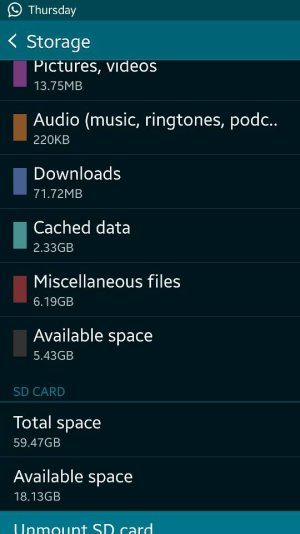
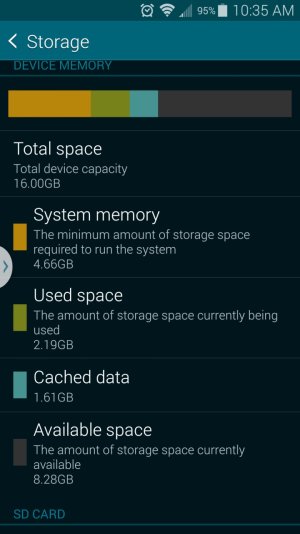
I thought I would need 32GB as well. After waiting a few weeks I finally gave in and bought the 16. To my surprise I still have 5GB left of internal after moving everything to my sd. Very pleased so far.
 

Attachments

  • 1400167740276.jpg
    1400167740276.jpg
    46.6 KB · Views: 37
I thought I would need 32GB as well. After waiting a few weeks I finally gave in and bought the 16. To my surprise I still have 5GB left of internal after moving everything to my sd. Very pleased so far.

Holy Cow! You have your pictures and video on your internal storage? WHY?!?!?! Just think of the space you would have if that was moved....
 
Yeah I word not even consider the s5 without 32 GB of internal storage. I see the SD card as a augmentation of the storage, not a replacement for internal storage.

Sent from my Moto X!
 
Yeah I word not even consider the s5 without 32 GB of internal storage. I see the SD card as a augmentation of the storage, not a replacement for internal storage.

Sent from my Moto X!

Why? There's no difference in 8GB, 10GB, 500GB, a Terabyte unless you use it. A 32GB S5 isn't going to run any better than my phone, I have more internal storage than I will ever use.
 
i have the Sandisk Ultra 64gb. i was on there site to make sure what i said was true and it is. it is waterproof, dust proof, and shock proof! but did cost a pretty penny $65 Canadian. but i haven't have any trouble with it at all.. and if my phone goes in water at least my pictures and music and videos are safe!
 
I really want to buy this phone but I am struggling to make 16GB work. I only have a couple games and mostly work, news, weather, etc apps. I have a 32GB phone now and I have uninstalled every app I do not regularly use and subtracted my music and photos from the useable storage and I still can't get it to fit into the 10GB useable...

How are you guys making the 10GB work?

Posted via Android Central App

Depending on some apps, they can be moved to the SD card. But it's not recommended, because it may load slower. In general, SD card is ideal to store music, pics and video. Otherwise, keep the apps on the phone.
 
Depending on some apps, they can be moved to the SD card. But it's not recommended, because it may load slower. In general, SD card is ideal to store music, pics and video. Otherwise, keep the apps on the phone.

I have a ton of apps on my SD card and they all load in the second I touch the icon, there's zero wait for loading. Maybe some people use cheap SD cards or something.
 

Trending Posts

Forum statistics

Threads
963,273
Messages
6,992,979
Members
3,164,995
Latest member
kctraci1