copy, cut, paste function

paulinepdm

New member
Jan 5, 2013
3
0
0
I am having great difficulty using copy/paste function with text on websites using my N4. I have searched and instructions say there is a action bar that comes up. I am able to isolate and highlight text, but can't find a copy/cut function. In emails I think I can, but not on websites. Can anyone enlighten me on this? Thanks
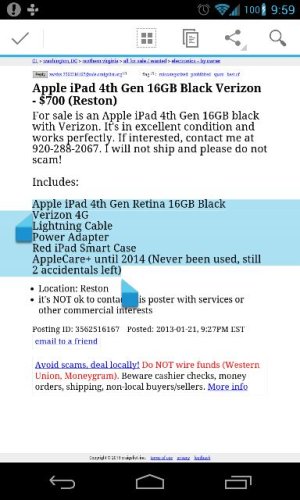
 
Hate to reveal how dumb I am, but you are right and my silly experience might just help someone else, ---so I was "testing" the function, and did what you show above, realize now that after highlighting, you have to click on the icon(3rd from right above) which I did before. But I then was opening my gmail to compose to test the copy paste "and" I realize I was trying to paste into the To: line, not the compose area and couldn't get the "paste" message. Thank you for clearing this up. I love my N4 ----
 
I'm still struggling unfortunately. Can select the text from the browser but get stuck then. The third icon from the left opens a selection like messaging, email etc. But if I want to copy a phone number and call it or website, I cannot figure out how to do it...
:'(
 
I'm still struggling unfortunately. Can select the text from the browser but get stuck then. The third icon from the left opens a selection like messaging, email etc. But if I want to copy a phone number and call it or website, I cannot figure out how to do it...
:'(
It's the second one that looks like a piece of paper.

And FYI for most phone numbers you just have to tap them in the browser and it will take you to the dialer automatically.

Sent from my Nexus 4
 

Latest posts

Trending Posts

Forum statistics

Threads
960,715
Messages
6,983,361
Members
3,164,550
Latest member
witnessloc20
