Copy & paste function

Yes. Just tap and hold onto the text. highlight specifically what you want to copy and you will see some buttons at the top of the screen. The button that shows two pieces of paper means copy

Posted via Android Central App
 
And the icon with the scissors is cut. The icon with the 4 squares surrounded by a dotted square is select all. The icon of just the clipboard is paste.

You can press and HOLD any of the icons to see a popup of what they do without actually causing any action.
 
Does anyone know how to make the copy icons stay there? They flash on briefly, then the text entry box fills the screen an no amount of long pressing will let me copy. I have a large registration code to copy i keep making mistakes trying to drag along its entire length and have been trying to copy the thing for hours now.
 
Another handy feature on the S4 is that in certain apps (Messaging is one of them), when you are ready to paste text, pressing and holding brings up a little dialog with Paste and Clipboard. Tapping Clipboard will open a little scrollable window with the last 20 items that were copied to the clipboard. Tap one of them to paste. This could allow you, for instance, to copy items from several different messages to the cliplboard and then paste them into one other message, or into a memo or Calendar event.
 
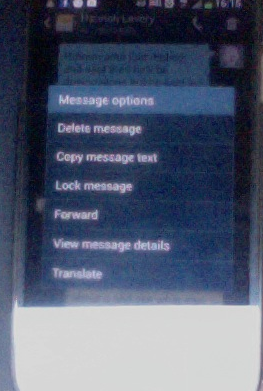
Hi there, dono what on earth I'm doing wrong but when I tap and hold on a message (in the messagin app) a "Message Options" dialogue box pops up giving me the following options - delete, copy message text, lock message, forward, view message details and translate. If I press copy message it copies the entire message. In other words it won't allow me to simply select one word. I understand I might be totally retarded, but just can't figure it out...

Screen shot 2013-11-19 at 4.16.01 PM.png
 
Can't comment on your mental capabilities :) , but that unfortunately is the way the stock messaging app works. I haven't tried other apps from the Play Store, but I know there are some, and some of them might have the ability to select and copy text in a message.

What I do for a workaround when I don't want to copy the whole message is to hit Forward. This creates a new message that includes the original message text. Here you can select and then copy as much or as little of the text as you want. Then Menu > Discard to get rid of the forwarded message.
 
A big problem I have with copy and paste on my S4 is that it rarely works with photos or sceenshots.

Posted via Android Central App
 

Forum statistics

Threads
960,243
Messages
6,981,587
Members
3,164,446
Latest member
brianatem32