Copy Text Message (SMS only)

Hasan Dinc

New member
Mar 11, 2018
4
0
0
The S9 default messaging app does not allow to copy the text messages.

When you long press on the text, it provides 2 options only. Delete the message or view details of the message.

Anyone having the same issue?
 
The S9 default messaging app does not allow to copy the text messages.

When you long press on the text, it provides 2 options only. Delete the message or view details of the message.

Anyone having the same issue?
I haven't gotten mine yet .. but that would be annoying.
 
The S9 default messaging app does not allow to copy the text messages.

When you long press on the text, it provides 2 options only. Delete the message or view details of the message.

Anyone having the same issue?
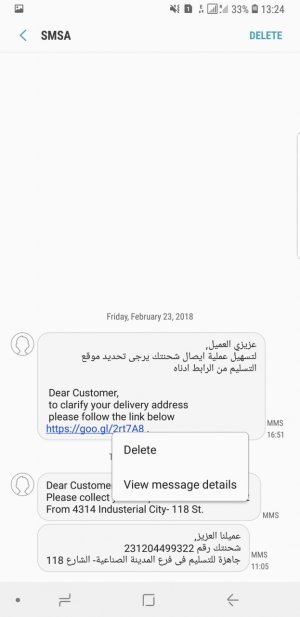
So when you press, what options do you see? This is the Note 8 options.
e155c295dee61310fc6a5d845f8b2d56.jpg
 
I'm wondering if US-based models have different options than those overseas.
 
I use Thumb Keyboard 4 and Google's text app on my S7 Edge Plus and it has been great. Hoping there's a seemless transition to the 9plus.
 
Mine has lots of options when i long press a message in default text app
Delete
Copy Text
Forward
Share
Star Message
Send to reminder
Copy to sim
View message details

I have UK version bought direct from Samsung
 
Same here ... it's ****ed up. For all people saying their's is fine that's on S7 S8 etc right well duh we know that. Just STFU. My Samsung AUstralia phone is the same..... Delete or View. Saying use Textra etc also is a BS answer... the reason to use standard is so its integrated like in phone you flick a contact right to call and left to text. Also really Samesung need to know its a problem so they can fix it. This is running Oreo you guys...
 
Same here ... it's ****ed up. For all people saying their's is fine that's on S7 S8 etc right well duh we know that. Just STFU. My Samsung AUstralia phone is the same..... Delete or View. Saying use Textra etc also is a BS answer... the reason to use standard is so its integrated like in phone you flick a contact right to call and left to text. Also really Samesung need to know its a problem so they can fix it. This is running Oreo you guys...
Why so hostile. I have a S9 plus and I have all those options. No need to be all hostile.
1ac4f96d52f6137c818f4f3ce5c2187a.jpg
 
Yeah me too, just have the delete and message details options. Bought direct from Samsung in the UK. Very very annoying.

UPDATE:
I've just discovered that text messages received where the number or contact is displayed, I get the correct pop up menu. However, if the number is masked, such as from Waze, Apple etc then there's only the two options.
 
Last edited:
Samsung capture.jpg

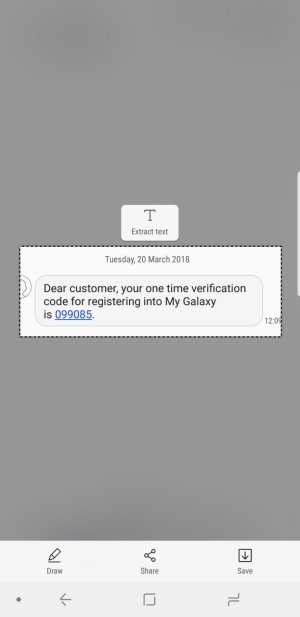
You can use the smart select feature to copy the text when needed. select it and say extract text. Does a good job. Still samsung should have had a default option. Google anyway provides it, dont know why samsung omitted it.
 
Chomp is a great texting app that gives all sorts of options when you long press on a message. Copy, forward, etc.
 
I have the same problem. A solution that worked for me was to ask Bixby to copy the text from the message.
 

Forum statistics

Threads
960,272
Messages
6,981,667
Members
3,164,457
Latest member
thelostwanderer