Creating Non-App Shortcut?

anon(238680)

Well-known member
Mar 22, 2011
4,838
13
0
On my SIII I could create a non-app shortcut, like a sub-setting, by holding on the screen. S7 blank area hold is similar, but I don't see any way to create a shortcut, just adding widget. The Edge panel for shortcuts appears very limited and does not include any settings. I would like to shortcut the setting for turning the AOD on and off.
 
I'm not sure if this will work with the S7 but worth a try. Long press on the home screen, tap on widgets, scroll down until you find "settings", tap & hold and drag it to the screen, check the different options available on that list.

If it doesn't work you could try using a custom launcher like Nova and search for such an option under Shortcuts or Activities.
 
Last edited:
I'm not sure if this will work with the S7 but worth a try. Long press on the home screen, tap on widgets, scroll down until you find "settings", tap & hold and drag it to the screen, check the different options available on that list.

Unfortunately Settings isn't listed. There are actually very few widgets available, most of them from apps I installed. Found that very surprising, along with the omission of shortcuts from a long press. Progress I guess.
 
Anyone find anything?
I recall way back in the days, there was such app that you could install from the store that would allow you to create shortcuts of anything in the settings sub-menu. Most apps I've researched today just allow you to make a shortcut of another app or a setting toggle(which we don't need more of). I for example would like to make a shortcut of "night clock" or stuff like this.
 
Only way I have been able to do this is through another launcher. I use Nova and really like it.
 
Only way I have been able to do this is through another launcher. I use Nova and really like it.

Appreciate your response. Thanks

Tried Nova and using the gesture shortcuts, there's still nothing that would allow me per say to make a shortcut to my desktop of a sub-settings. For example, id like to make a shortcut of the applications manager, so don't have to go to settings>applications>Applications manager.
 
Last edited:
Maybe try Tasker? Power Toggles almost does what you're asking, but it won't go as far as a subsetting.
 
Appreciate your response. Thanks

Tried Nova and using the gesture shortcuts, there's still nothing that would allow me per say to make a shortcut to my desktop of a sub-settings. For example, id like to make a shortcut of the applications manager, so don't have to go to settings>applications>Applications manager.

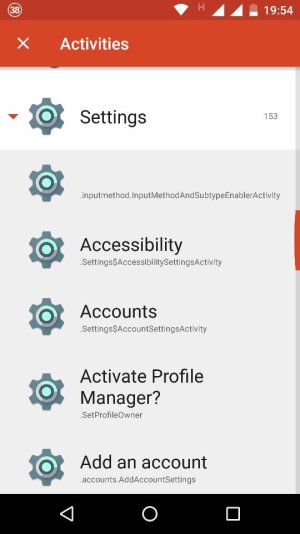
Have you already tried in shortcuts - Nova Activities - settings? I I'm not sure about your phone but in mine I can get more than 120 options in there, with access to almost any submenu in the settings.
 
Look, this is just the beginning of the list. There are 153 options!
 

Attachments

  • 1458168984371.jpg
    1458168984371.jpg
    40.7 KB · Views: 23
Maybe try Tasker? Power Toggles almost does what you're asking, but it won't go as far as a subsetting.

Ill check it out. Its not really a big deal but i remember there was an app that used to do this, i think it was called 'anycut'. Thanks

Have you already tried in shortcuts - Nova Activities - settings? I I'm not sure about your phone but in mine I can get more than 120 options in there, with access to almost any submenu in the settings.

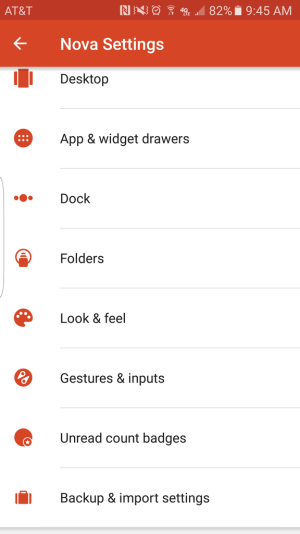
this is what i get when i open up settings. Not sure if mine's any different, can you guide me through it a bit. I open settings then i get the menus pictured below.
Screenshot_20160317_094510.png
 
Last edited:
Never mind i got it. I was in this activity screen once but it took a little it to load and exit out of it. This is where i search for settings and it gives me about 254 items. Thanks :D
 
Never mind i got it. I was in this activity screen once but it took a little it to load and exit out of it. This is where i search for settings and it gives me about 254 items. Thanks :D

Glad you find it! Yeah, opening the Activities can take a little while :) Just remember that they can be linked to a gesture, a swipe up action or creating an specific shortcut.
 
Glad you find it! Yeah, opening the Activities can take a little while :) Just remember that they can be linked to a gesture, a swipe up action or creating an specific shortcut.

Thats also how i was seeing them as gestures. Thanks once more.
 
Glad you find it! Yeah, opening the Activities can take a little while :) Just remember that they can be linked to a gesture, a swipe up action or creating an specific shortcut.

I'm still confused. How do you get to the Activities in Nova?
 
I'm still confused. How do you get to the Activities in Nova?

Go through the process of placing a widget on the homescreen. Look for Activities in the Nova section--drag and drop that to the homescreen. Then you'll see the menu that Javier P showed.
 
Anyone find anything?
I recall way back in the days, there was such app that you could install from the store that would allow you to create shortcuts of anything in the settings sub-menu. Most apps I've researched today just allow you to make a shortcut of another app or a setting toggle(which we don't need more of). I for example would like to make a shortcut of "night clock" or stuff like this.

I think that was bettercut ? I still have it somewhere, will have to see if it works.