dark mode

night mode can access on notifications panel swipe left long press the icon
 
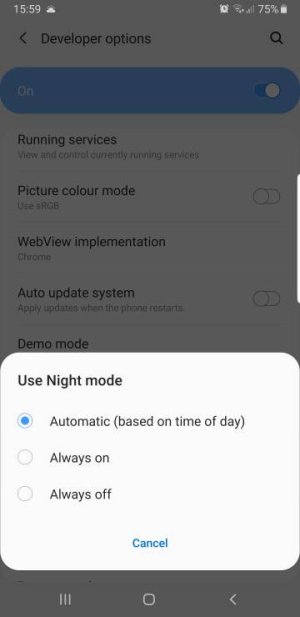
I noticed in "Developer Mode" there's an option for "Use Night Mode" and it gives you choices of "Automatic (based on time of day)", "Always On" or "Always Off". Yesterday afternoon I selected "Automatic" just to see what it would do and sure enough, at Sunset, it switched to Dark Mode. However, I got up this morning and at 8:45 AM, it was still in Dark Mode? I had to shut it off manually! I just put it back in "Auto" again and will let it go tomorrow to see if it ever shuts off...
 
As long as you don't use a theme it should work fine. I found it on the second page of navigation shortcuts
 
I noticed in "Developer Mode" there's an option for "Use Night Mode" and it gives you choices of "Automatic (based on time of day)", "Always On" or "Always Off". Yesterday afternoon I selected "Automatic" just to see what it would do and sure enough, at Sunset, it switched to Dark Mode. However, I got up this morning and at 8:45 AM, it was still in Dark Mode? I had to shut it off manually! I just put it back in "Auto" again and will let it go tomorrow to see if it ever shuts off...
...it shut off at 9:00 AM so it works. There are no provisions to set your own times however. Looks like Dark Mode = 9:00 PM to 9:00 AM IF you use that Auto function in "Developer Mode". Otherwise, just use your "On/Off" button in settings and do it yourself. 9:00 AM is a bit late for dark but hey...
 
What exactly does the dark mode do? Can someone post a screen shot for us non Pie saps...lol
 
Ok, I was just curious, there is a lot of chatter about it...wanted to see what the big fuss was
 

Trending Posts

Members online

No members online now.

Forum statistics

Threads
961,006
Messages
6,984,524
Members
3,164,626
Latest member
mustapapa