Device memory problems

ChemMan

Well-known member
May 7, 2013
677
0
0
So I try to check my email and get an error message about not enough memory. Settings says 400 Meg free. How do I fix this problem?
 
So I try to check my email and get an error message about not enough memory. Settings says 400 Meg free. How do I fix this problem?

What email app? Have you cleared the phone cache as well as the email app cache?
 
Using the stock email app and what is this email cache you speak of? :-X

Many Apps have an internal data cache. If you go to Settings>Applications>Application Manager>click on the email app listing you should get a screen that shows information about the app including the cache and data functions. Click the clear button for the Cache and you clear temp message files. Click the clear button for the Data and you clear the cache and all other data including the settings for the App.

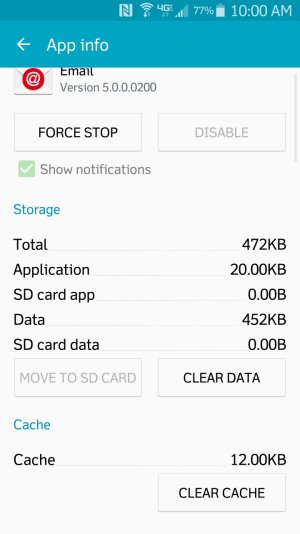
Screenshot_2015-06-18-10-00-06.jpg
 
So does anyone use an app to find and delete large users of memory space? Think I have to much stuff on my phone, got lots of Gear VR stuff.
 

Trending Posts

Forum statistics

Threads
959,847
Messages
6,980,368
Members
3,164,316
Latest member
Ltcharensey
