Do not want to restore...

RionDunn

Well-known member
Mar 12, 2014
420
0
0
Hi all,

I'm going to be getting an S5 and I'm coming from the N5. I've been reading a lot about restore options and I'm getting confused. When I get my new S5 I'll want to sign in with my Google account, but I do not want all my info coming from my N5 to my S5. I want to have a clean slate with the S5. I obviously want my contacts, but messages and app I do not want.

I'm concerned when I sign in with my Google account on the S5 that it will restore a complete copy of my N5. Is there going to be a restore option that I will be greeted with during this process, in which I can make sure this will not be fully restored?

Let me know!

Sent from my Nexus 5 using AC Forums mobile app
 
Hi all,

I'm going to be getting an S5 and I'm coming from the N5. I've been reading a lot about restore options and I'm getting confused. When I get my new S5 I'll want to sign in with my Google account, but I do not want all my info coming from my N5 to my S5. I want to have a clean slate with the S5. I obviously want my contacts, but messages and app I do not want.

I'm concerned when I sign in with my Google account on the S5 that it will restore a complete copy of my N5. Is there going to be a restore option that I will be greeted with during this process, in which I can make sure this will not be fully restored?

Let me know!

Sent from my Nexus 5 using AC Forums mobile app

Well, I would say in this case why don't you backup contacts in your PC and then create another Gmail account for your s5 use new gmail account with your s5 and backup you contacts from PC in this way apps and messages isn't going to bother you.
 
When you log into a new phone with your Google account, Google services like Contacts, Calendar, Gmail, and Hangouts will be synced, but I don't believe SMS/MMS messages will be synced.

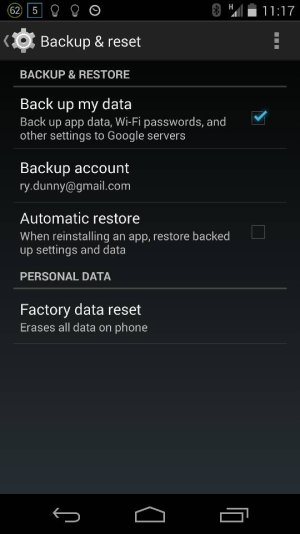
I'm not sure about this, but I think that on your older phone, if you go to Settings>Backup & Reset and uncheck Automatic Restore, then apps won't automatically install from Google Play on a new phone. But this behavior has not been consistent in my experience.

Posted via Android Central App--please excuse the brevity and any typos!
 
When you log into a new phone with your Google account, Google services like Contacts, Calendar, Gmail, and Hangouts will be synced, but I don't believe SMS/MMS messages will be synced.

I'm not sure about this, but I think that on your older phone, if you go to Settings>Backup & Reset and uncheck Automatic Restore, then apps won't automatically install from Google Play on a new phone. But this behavior has not been consistent in my experience.

Posted via Android Central App--please excuse the brevity and any typos!

This. :)

Sent from my T-Mobile Note 3 using AC Forums.
 
Thanks man. I appreciate it.

So if I unchecked auto restore in in the backup and restore section of settings, then once I have added my Google account on the S5 my contacts will come over but apps will not?

Attached is a pic of the setting unchecked. Is this correct for the situation I am inquiring about?

1399303074120.jpg

Sent from my Nexus 5 using AC Forums mobile app
 
I think that's correct, but I'm not 100% sure that's what will happen. You could try it, and if apps start installing, you could always do a factory reset afterwards.

Posted via Android Central App.
Please excuse any typos or autocorrect derps.
 

Trending Posts

Forum statistics

Threads
962,715
Messages
6,991,535
Members
3,164,906
Latest member
Screwgoogle