Does my S5 have a battery problem?

boeing186

Member
Feb 6, 2015
6
0
0
I recently got my AT&T S5 and I was a little disappointed with the battery life, mainly because of the reviews I've been reading - some reviewers were talking about their S5 dropping only single-digits, if not 25% or less, after an hour or so of playing a games and/or surfing. However when I play my games (Simcity and Boom Beach only) they manage to drop about 10% in 10 minutes. Right now they are consuming about 12-20% each according to my battery and I'm not sure if that's a lot or not. But I also disabled a lot of apps I don't need, turned off 4G, turned on the battery saver, and set the screen brightness to low (almost minimum). Standby's ok - on airplane mode it doesn't drop a percent in 10-11 hours while I sleep.
So my main questions are 1) is my battery average or not; 2) is 12-20% a lot or not; 3) am I doing something wrong?
 
Welcome to Android Central! How's your cell signal? Weak signal is a battery killer.

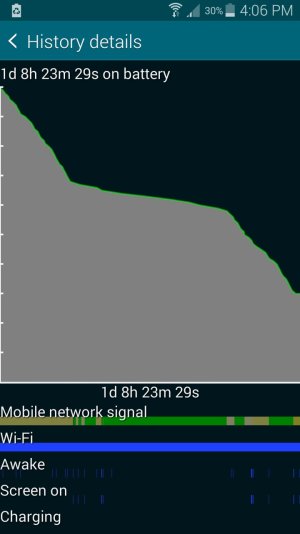
It would help to see more stats. Charge up to 100%, then let it drain to 20-30% with normal usage, without charging in between. Then show us:

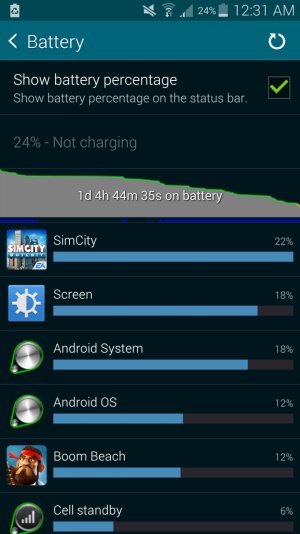
1. The main Settings>Battery screen.
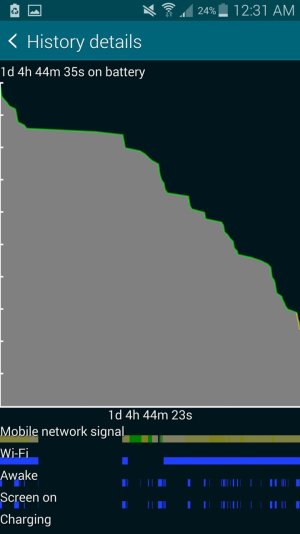
2. The fullscreen battery graph screen (which shows Awake time and Cell Signal Strength).
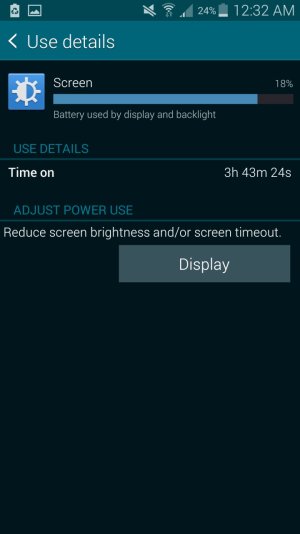
3. The Screen category (to see total Screen On time).
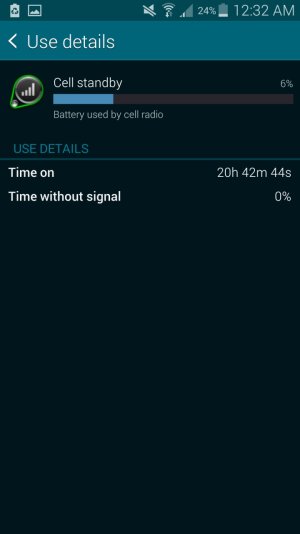
4. The Cell Standby category, if present (to see Time Without Signal).

http://forums.androidcentral.com/am...ide-how-post-screenshots-android-central.html

In the meantime, review this guide: http://forums.androidcentral.com/ambassador-guides-tips-how-s/298919-guide-battery-saving-tips.html
 
Ok, below are the screenshots. Thanks for helping me, btw
 

Attachments

  • Screenshot_2015-02-07-00-31-41.jpg
    Screenshot_2015-02-07-00-31-41.jpg
    151.9 KB · Views: 21
  • Screenshot_2015-02-07-00-31-51.jpg
    Screenshot_2015-02-07-00-31-51.jpg
    90.7 KB · Views: 21
  • Screenshot_2015-02-07-00-32-04.jpg
    Screenshot_2015-02-07-00-32-04.jpg
    87.1 KB · Views: 21
  • Screenshot_2015-02-07-00-32-13.jpg
    Screenshot_2015-02-07-00-32-13.jpg
    64.7 KB · Views: 19
And may I mention that the blank area with no signal nor activity on the left side of the graph is when I was sleeping. I put it on airplane mode so that's why it's blank
 
Some games can really drain battery. Can you compare with anyone else who plays SimCity?

Posted via Android Central App.
Please excuse any typos or autocorrect derps.
 
I thought I might ask some questions about battery life after looking around the forum. Got an S5 late December. I actually like the battery life...was only loosing about 15% per day...I'm not really that big of a user. But recently, something changed, and at work, I'd loose 30-40% (logged into work WiFi) but then come home and get back to the 15% kind of drain (again, logged into home WiFi). Attached is my screen shot of the situation...the two steep slopes are at work while the shallow slope is at home.

My question is about the line for Mobile Network Signal that boeing186 posted, also seen in mine. Can someone explain what all the different colors mean in that graph? Green, yellow, etc.

Thanks...Kurt
 

Attachments

  • Screenshot_2015-02-05-16-06-08.jpg
    Screenshot_2015-02-05-16-06-08.jpg
    92.6 KB · Views: 8
You can improve your battery life immensely if you will install MacroDroid and have it turn WiFi and DATA off when the screen is locked.

I get 2-3 days per charge cycle.
My wife's S5 gets 8-9 days per charge cycle (her phone is not used except as a phone)

see my signature for hints, it is very easy to set up the macros, PM me if you want hands on help.

This was the app I was looking for! I was hoping Samsung had something like this preinstalled but I couldn't find anything. Thanks!
 
Some games can really drain battery. Can you compare with anyone else who plays SimCity?

Posted via Android Central App.
Please excuse any typos or autocorrect derps.

Unfortunately I don't know anyone else who plays the game on an S5
 
The green areas on the Mobile Network Signal indicates a strong signal, whereas the yellow areas indicate a weaker signal. If you ever see a red area that indicates a very poor signal; probably one bar.

And I do remember reading that a weak signal can lower the battery life. I'm not sure why but that appears to be the reason as to why it's decreasing so rapidly at work
 
The green areas on the Mobile Network Signal indicates a strong signal, whereas the yellow areas indicate a weaker signal. If you ever see a red area that indicates a very poor signal; probably one bar.

And I do remember reading that a weak signal can lower the battery life. I'm not sure why but that appears to be the reason as to why it's decreasing so rapidly at work

Thanks...I figured it had something to do with signal strength. I wonder why the phone worked fine in my office for the month of January and then started this decline.

BTW...the reason that the battery life goes down is what I've heard...the phone software tries hard to find a tower and so pumps up the power to search for weaker signals.

Kurt
 

Latest posts

Trending Posts

Forum statistics

Threads
962,024
Messages
6,988,760
Members
3,164,763
Latest member
Marg