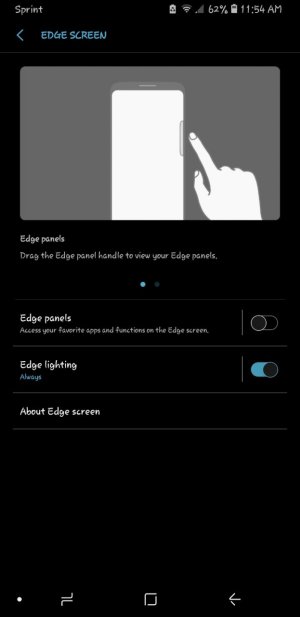
Edge lighting

Abbers727

Well-known member
Sep 21, 2015
372
2
18
Maybe I just don't get it. I have edge lighting on 'always' and on certain apps, like email. I don't see it lighting up even when I get an email notification when I'm using my phone so dunno what I did wrong.

I downloaded edge lighting + from galaxy store for more effects to choose from.
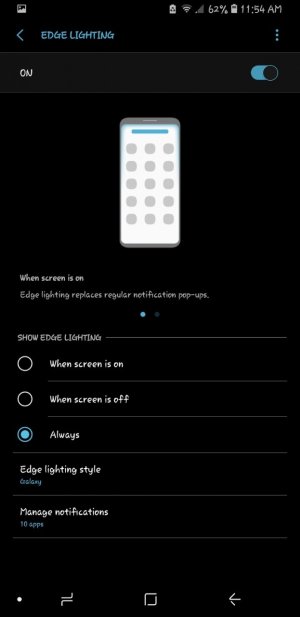
Screenshot_20180821-115410_Edge%20screen.jpgScreenshot_20180821-115404_Edge%20screen.jpg
 
Have you set the color to a visible color?
Have you set the width of the border to something wide enough to notice?
 
Have you set the color to a visible color?
Have you set the width of the border to something wide enough to notice?

I think maybe because I choose a dark purple with the glow effect. I have it as wide enough as one can make it to be noticable.

I changed it to basic effect so maybe that'll be more visible with the dark purple. I'll have to kind of wait and see.
 
Not all apps trigger the edge lighting.
For example whatsapp does not trigger it unless you enable pop up view.
I am using glimpse notifications because of that.
 
Not all apps trigger the edge lighting.
For example whatsapp does not trigger it unless you enable pop up view.
I am using glimpse notifications because of that.
How do you activate the pop up view??

I have (stock) email, (stock) messages, textra, messenger Lite, galaxy apps, Google play store, reminder, Uber, Uber eats, Sprint voicemail.

I allow notifications for all those apps.
 
Hi sorry its in settings, notifications.
If you install glimpse notifications from play store you can make any app trigger edge lighting
 
Hi sorry its in settings, notifications.
If you install glimpse notifications from play store you can make any app trigger edge lighting


It still doesn't do it when the screen is off. But I've noticed it do it when the screen is on. I don't know if it's because I have the LED indicator.

I'll have to try that.
 
Settings, display, edge screen, edge lighting set to always or when screen is off.
I have the led indicator on as well.
 
@Lucianus_luficerus - How do you adjust the settings to enable the edge lighting?

I'm still not sure why it's not working when the screen is off.
 
It was working with the screen on once or twice. But it's not now. I have pop up view enabled. It's set for always.
 
Alright so here's the explanation.

The edge lighting works only for some apps like Messages or Snapchat because when you get a normal, basic notification from them, the screen usually lights up. When you get notifications from whatsapp, messenger, email or whatever, you only hear the sound/vibration, without the screen actually waking up. Edge lighting is kinda the substitute of waking up screen.

Also, the glimpse notification app works but sucks for one reason and one reason only (at least for me): when you get the nice & cute floating preview of the message, at the top, it actually says something like "Glimpse Notification: Whatsapp: Mom: hey, how are you?" ( just an example but I actually dislike the 'glimpse notif' being there everytime).
 

Latest posts

Trending Posts

Forum statistics

Threads
961,064
Messages
6,984,808
Members
3,164,636
Latest member
layahhhh