Fix wrong location?

littlebigman

Well-known member
Apr 3, 2013
55
2
8
Hello,

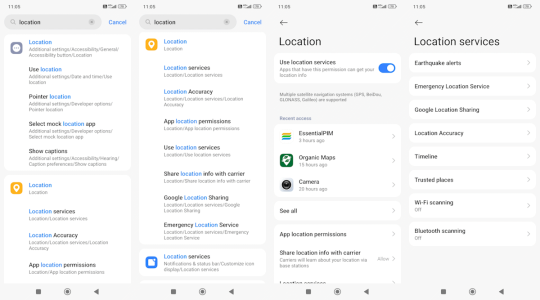
Using the following settings, the two pictures I took yesterday were way off, as in 4km away from the actual location :-/

How should I configure my Xiaomi Redmi Note 14 for accurate location?

Thank you.
 

Attachments

  • Xiaomi.wrong.location.png
    Xiaomi.wrong.location.png
    88.7 KB · Views: 7
I don't really see any settings in those images, but I also don't have Xiaomi to know what their settings look like. Anyway, I have questions before trying to offer advice.

When did you notice this issue, is it new or has it been happening for a while?

Where are you seeing this location issue? What app are you in, what actions are you taking, how and when do you see this?

If you aren't using Google Maps when you see this, what is your location in Google Maps?

What happens if you navigate with Google Maps or your favorite navigation app?

Have you ever used a spoofing app, to spoof your location? Are you using a VPN? If you're using or have used either, have you turned them off? What is the result?

If you've used either of the above and have turned them off and still have this issue you may have to disable them totally. To disable an app go to Settings>Applications>[insert app name]>Force stop>Disable app.

Is your location ever correct? Does this happen all day everyday or is it sometimes? If it is sometimes, have you ever noticed if it happens more or less after a phone restart? Restart your phone and test immediately, and let us know what you find.

I don't really have any specific advice beyond what I hope you gleaned from my questions. We could ask to have this moved to the Xiaomi threads where other users with your device might have some insight or suggestions. We'll tag a moderator and see what they think, @mustang7757 @Laura Knotek? In the meantime, please try the things I laid out for you, and answer our questions for more advice.

Let us know what you find.
 
Despite having a Xiaomi similar to yours, there's little I can offer.

Have you tried leaving Location using WiFi On.

I rely on Google Maps Timeline a lot to see what time I was at a certain place, and it's not very accurate. It could be the more limited number of GPS sources mine is able to use.
I had a problem 10 years ago where Maps put me in another country, Franxe, and later Pakistan iirc, but it sorted itself out.

Look at the Camera - Aop Info - Location, as well as Location - Location Services - Accuracy, which you may have done. Location for the Camera can only be set to Only When in Use, or Ask every tine etc.

You have a different Map app showing. Fo you rely on Google Maps and the default Camera app?
 
I noticed that too, that the OP has WiFi location disabled, which is supposed to make your location more precise but even without it 4k is a lot.

Something else that Madd62 brought to mind is your location always off in the same amount? Is it always ~4k?

Is it always off in the same direction? For instance, if live on the outskirts of city and your location shows up as the other edge of the city, does it ever show your location to be off in the other direction where you're outside of the city?
 
  • Like
Reactions: Madd62

Trending Posts

Forum statistics

Threads
961,840
Messages
6,987,574
Members
3,164,720
Latest member
siratguidance56