? for Sview case owners

dezbert

Member
May 12, 2011
6
0
0
I just got the Sview flip case/cover and noticed that when you open the cover it brings you to the last thing you were doing, not the lock screen. This could be an open app, a settings screen or home screen, anything. I don't mind the convenience of it, but it's not very secure. I think I've gone through every setting, but there must be something I've over looked.

Any one else experience this? Can it be changed?
 
I haven't noticed this, but you may be correct. I'm in the habit of tapping the power button to lock the screen everytime I put it down. Did this with my previous phone (LG Nitro) so I guess I'm in the habit of it.

I agree that it's a security risk. Wonder if there's a way to turn it off. Sorry, no answers for you but at least I bumped you back to the top. :)
 
If I hit the power button then close the cover, I still open to the last thing I was doing(app,home screen, settings, etc). I have NovaLauncher installed, but can't find anything in its settings either.

Thanks for the bump
 
I never heard of this problem.
Have you checked your settings for the S-View?

Every time I open mine it takes me to the home page. And now that I have the screen locked, it takes me to it so I can unlock it and the home page comes after that

Sent From a Galaxy S4 Away!
 
It takes a while for the screen to time out. My screen is set to time out after 2 minutes.When I close my S View cover the window feature stays on for about 30 seconds. Then after about a minute if I open my cover it will go to my lock screen. If I were to open the cover immediatley after I had closed it goes back to the last screen I was on.

Posted from my Galaxy Tab 2 10.1
 
@STARGATE where are the settings for s-view?
Just switched back to touchwiz and I'm having the same problem
 
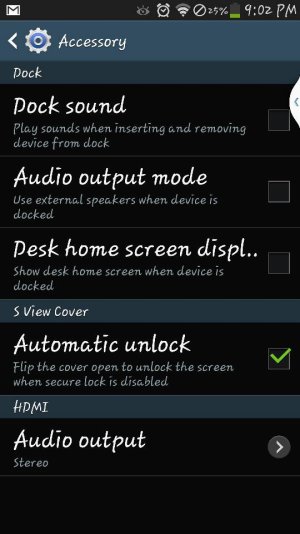
My bad, it's been a while since I looked on the Settings for Accessories I thought there were more but actually there's only one option. See screenshot.

Sent From a Galaxy S4 Away!
 

Attachments

  • 1377651857626.jpg
    1377651857626.jpg
    59.6 KB · Views: 34
I tried this out because I was curious. If you enable the sview cover it removes all security (pin, pattern, etc). The purpose of an sview cover is to pick up where you left off and continue your work and when you're done simply time out by closing the cover. In my opinion I would like to go back to my original slim case and stock back piece but I misplaced them. I don't like taking pictures with the sview cover its like holding an opened mini book.

Posted via Android Central App
 
I tried this out because I was curious. If you enable the sview cover it removes all security (pin, pattern, etc). The purpose of an sview cover is to pick up where you left off and continue your work and when you're done simply time out by closing the cover. In my opinion I would like to go back to my original slim case and stock back piece but I misplaced them. I don't like taking pictures with the sview cover its like holding an opened mini book.

Posted via Android Central App

I don't know why it removed the security settings for you?! :confused::eek:

Mine doesn't do that, I open the S-View cover and I still have to draw my security pattern. :thumbup::)

I actually close the cover to the back and push it up at the same time in order to take pictures trough the S-View "window". It works just fine! :thumbup::D:beer::beer::D

Sent From a Galaxy S4 Away!
 
I know where the setting are for the S view cover. Go onto general settings and then scroll down and click on accessory. Thats where you will find "some" settings for the S view.