
Inbox Indicator shows the number of inbox messages directly in notification bar. You don't have to open notification drawer or app anymore just to see how many unread messages you have!
Many popular apps are compatible with Inbox Indicator: Gmail, Email, Skype etc.
This is how it looks like:
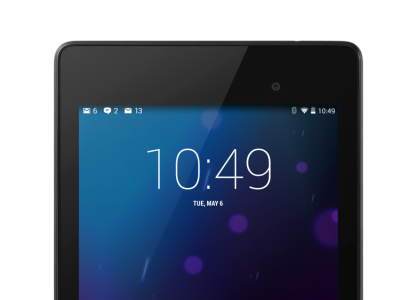
You can disable Inbox Indicator on per app basis.
Configure only once:
1. Install Inbox Indicator
2. Open Settings -> Security.
3. Open "Notification Access" in "Device Administration" section.
4. Enable Inbox Indicator.
Inbox Indicator doesn't collect any personal information. No permissions/root required. Free, no ads.
https://forums.androidcentral.com/e...id=net.cornplay.inboxindicator&token=zygSe-VR
Please note, this app is only for Android 4.4 and higher.
Many popular apps are compatible with Inbox Indicator: Gmail, Email, Skype etc.
This is how it looks like:
You can disable Inbox Indicator on per app basis.
Configure only once:
1. Install Inbox Indicator
2. Open Settings -> Security.
3. Open "Notification Access" in "Device Administration" section.
4. Enable Inbox Indicator.
Inbox Indicator doesn't collect any personal information. No permissions/root required. Free, no ads.
https://forums.androidcentral.com/e...id=net.cornplay.inboxindicator&token=zygSe-VR
Please note, this app is only for Android 4.4 and higher.



 Facebook
 Twitter
 Instagram