FX File Explorer. Web access seems to ne running all the time.

everway9

Well-known member
Aug 6, 2017
211
0
0
Hi everyone. :)

I wasn't quite sure where to post this but here goes.

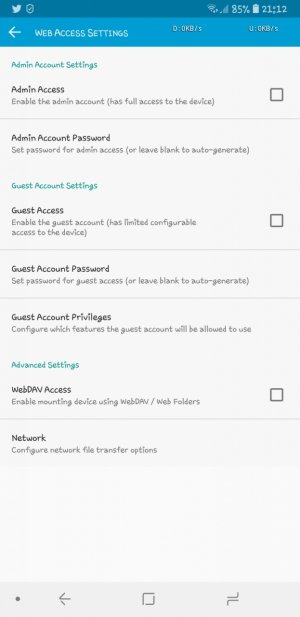
I have FX File Explorer installed on my Galaxy Note 8. None of the web access settings are enabled but something seems to be running.

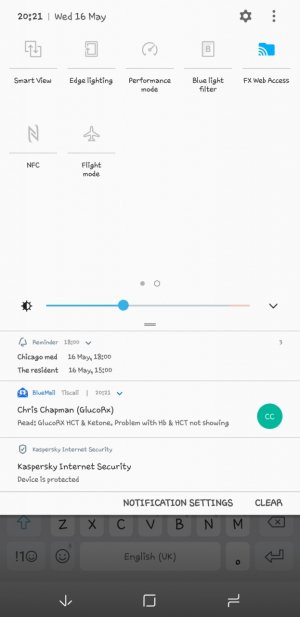
When I swipe down from the top of the screen and view the function toggle switches the FX Web Access one is lit up in blue. (See attached image). It won't let me turn it off. All the other toggle switches can be turned off, but not the FX Web Access.

I'm totally confused by this and was wondering if anyone could explain why this is the case?

Many thanks in advance. :)
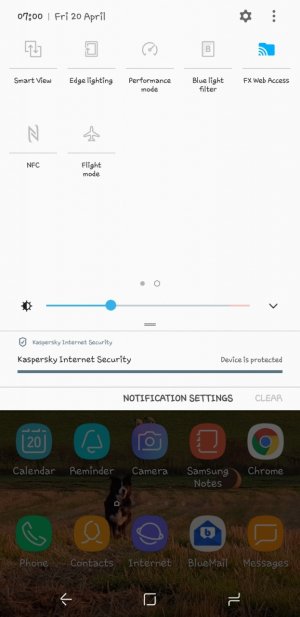
Screenshot_20180420-070003_Samsung Experience Home.jpg
 
If the app is running you have to turn it off (close it) by exiting it in the app or by tapping the back button when you're in the app. It accesses the web when it's running. (You might be able to turn off web access in the app's settings, but evidently they didn't write it so you could do that from the pulldown. Email android@nextapp.com if you want to suggest that they change that.)
 
If the app is running you have to turn it off (close it) by exiting it in the app or by tapping the back button when you're in the app. It accesses the web when it's running. (You might be able to turn off web access in the app's settings, but evidently they didn't write it so you could do that from the pulldown. Email android@nextapp.com if you want to suggest that they change that.)

Thanks for your reply.

Yes, I double checked and the app is definitely not running. All of the web access settings are disabled too.

Screenshot_20180420-211215_FX.jpg


It's not a big problem to me. I'm just confused as to why the quick action toggle button is permanently turned on.

I'll contact the developers and see what they say.

Thanks again. :)
 
Directions can be found under FX-Home - Help - Advanced Features - Web Access - Stopping Web Access - Tap on Stop Button.

This runs in my ground as well, but it is slightly grayed out when off.
 
Directions can be found under FX-Home - Help - Advanced Features - Web Access - Stopping Web Access - Tap on Stop Button.

This runs in my ground as well, but it is slightly grayed out when off.

Hi @stevehowedgf

Thanks for posting that. At least I can now confirm web access is definitely not running. But it's strange that the quick accezs toggle button is still blue.

Screenshot_20180516-202105_Samsung Internet.jpg
 
I finally gave up trying to find a reason why the toggle was permanently blue.

I realised that I could remove the quick access toggle by clicking on the 3 little dots in the top right of the screen and selecting button order then dragging the fx web access button off the menu.

I also now know it's called the 'quick settings panel' and not the quick toggle buttons. :D

Thanks everyone for posting. :)
 

Members online

Forum statistics

Threads
963,057
Messages
6,992,583
Members
3,164,979
Latest member
CathyAus