Contact from my contact list send out periodic group text to which we respond. Today my replies are not going through. Other texts to different people go through okay.
When you force stop, everything cached between clearing cache and stopping is still cached - and the app gets no time to clear it. Opening the app again loses the cached data. (Actually, stopping the app does.) The data's still there, the space is still allocated, but the app doesn't know about it, resulting in lost cache data. (It's only cleared on a reboot.)
When you force stop, everything cached between clearing cache and stopping is still cached - and the app gets no time to clear it. Opening the app again loses the cached data. (Actually, stopping the app does.) The data's still there, the space is still allocated, but the app doesn't know about it, resulting in lost cache data. (It's only cleared on a reboot.)
Actually when you clear its data which will automatically clear cache , it erases any account or information on it , kinda freeze the app , now force stop is to end it process, it won't gather any information until you tap the app open .
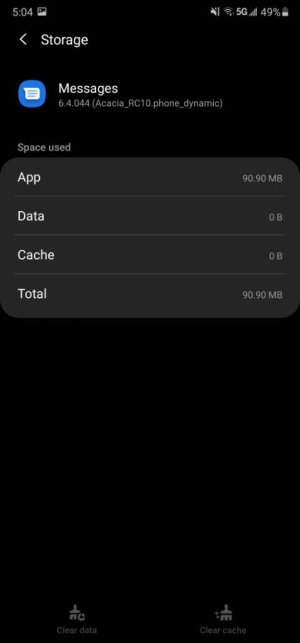
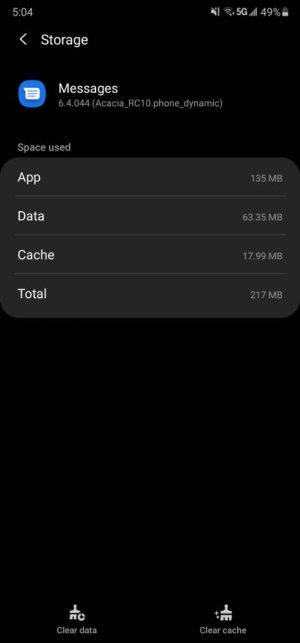
Example me clearing dat/cache it erased everything then went to force stop and back in storage was 0 until I open the app.
First picture >cleared everything
2nd picture i open the app
I have - and watched the cache as I did (in Android Studio, to see what's actually happening). Clearing the cache on a running app clears it for such a short time that you can't see it. Opening it again, whether you stopped it or not, doesn't change things. Stopping it first, then clearing the cache, then opening it, leaves the cache clear (actually null) until you open it.
I have - and watched the cache as I did (in Android Studio, to see what's actually happening). Clearing the cache on a running app clears it for such a short time that you can't see it. Opening it again, whether you stopped it or not, doesn't change things. Stopping it first, then clearing the cache, then opening it, leaves the cache clear (actually null) until you open it.




 Facebook
 Twitter
 Instagram