Gmail notifications constant problem

  • Thread starter Thread starter Android Central Question
  • Start date Start date
A

Android Central Question

I posted about Gmail notifications over 2 years ago, got no solution, now I'm posting about it again. It has been ongoing all of that time.

The last Samsung forced-update (Android 12) hosed my phone and reset ALL settings. Now I have to set permissions and other settings for ALL my apps. My next phone will not be Samsung.

Now the Gmail reminder notification is set and I cannot find a way to turn it off. (Actually I can turn it off but only by turning ALL Gmail notifications off).

Please help me turn this awful reminder off.
 
Welcome to Android Central! Can you clarify what Gmail reminder notification you're talking about? Are you talking about the Notification Reminder setting that's specific to Samsung phones? www.samsung.com/au/support/mobile-devices/notification-reminder/. Or are you talking about Gmail "nudging" you about recent emails to see if you want to respond to them?

Please register on this forum, which will allow you to engage in discussion more easily, as well as post images. https://forums.androidcentral.com/ask-question/409154-join-android-central-community.html
 
Which exact Samsung model?
You only want certain notifications in Gmail to come in ? Long press the gmail app then tap info >scroll to notification then tap >notification category tap and you can adjust what you want or none at all.
 
Hello Diddy
I am registered, 4 years, I thought I logged in yesterday, apparently not, now I'm logged in. In my profile I have Galaxy S10 specified.

Thank you, thank you. Going to your link I find:

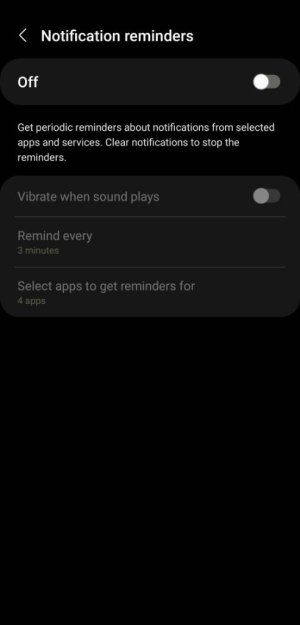
Accessibility>Advance settings>Looking for something else? Notification reminders

"Get periodic reminders about notifications from selected apps and services. Clear notifications to stop the reminders". Then "Select apps to get reminders for" >>> I had three checked: Gmail, Messages, and Messenger. I have left Messenger checked since posts generally need quick attention.

Thanks again Diddy.
 
Hello mustang
It is a galaxy S10, I'm logged in now, been a member for 4 years, didn't know one could post without being logged in.

Unless I'm wrong, your directions are for just various kinds of Gmail notifications, not reminders. There once was a specific reminder notification setting in Gmail but it is no longer there. It is in Accessibility now for the S10. However, I could be thinking of the Sony Xperia, my previous phone.

The forced Samsung updates with very little information (may be bug fixes, may be enhancements, may be security) are getting to me. This upgrade to Android 12 really hosed my system, reset everything. I think I'll go to another brand.
 
Hello mustang
It is a galaxy S10, I'm logged in now, been a member for 4 years, didn't know one could post without being logged in.

Unless I'm wrong, your directions are for just various kinds of Gmail notifications, not reminders. There once was a specific reminder notification setting in Gmail but it is no longer there. It is in Accessibility now for the S10. However, I could be thinking of the Sony Xperia, my previous phone.

The forced Samsung updates with very little information (may be bug fixes, may be enhancements, may be security) are getting to me. This upgrade to Android 12 really hosed my system, reset everything. I think I'll go to another brand.
Hi , yeah you must of not been logged in when you posted , I see you been a member for few years :)

I see so it's a reminder not notification, only thing I can say is notification reminder?Screenshot_20211128-160229_Accessibility.jpg
 
Hello Diddy
I am registered, 4 years, I thought I logged in yesterday, apparently not, now I'm logged in. In my profile I have Galaxy S10 specified.

Thank you, thank you. Going to your link I find:

Accessibility>Advance settings>Looking for something else? Notification reminders

"Get periodic reminders about notifications from selected apps and services. Clear notifications to stop the reminders". Then "Select apps to get reminders for" >>> I had three checked: Gmail, Messages, and Messenger. I have left Messenger checked since posts generally need quick attention.

Thanks again Diddy.

Ok, so did that work for you?
 
Yes, I should have been clearer about that. A notification says you have mail. If you don't deal with the notification for 10 minutes the notification reminder will beep. It is very annoying.
 
Sure did. Thanks again. Question: The time is shown on Android Central as GMT+3 I think. Where are you located?

I'm in California. You can edit your timezone by going to the forum desktop website, clicking the gear icon in the upper right next to your inbox notifications, then Settings>Edit Profile.
 

Trending Posts

Forum statistics

Threads
960,210
Messages
6,981,497
Members
3,164,434
Latest member
harsha