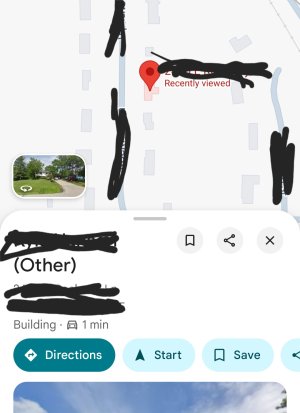
Question Google Maps labeling Contacts addresses as Other instead of Home

ricardoburnsy

Well-known member
May 29, 2025
182
9
18
1000065190.jpg
I saved a new contact in my Google Contacts app and included their home address. The address is saved under the Home label. In my Google Maps app, I allow my Contacts home addresses to appear. However, the new contacts home address does not appear on Maps. When I search for their name, their address displays with their name but it is labeled as Other in Maps even though they're address is saved as Home in Contacts. Because the address is labeled as Other in Maps it does not appear with a blue pin and their name. It seems like Maps has a flaw.
 
Like I said, not sure why it won't do it for your account other than some sort of sync issue or your addresses not being saved correctly to your Google account or being stored/overwritten in multiple locations (i.e. if you have several accounts added to your Contacts). If it's a sync issue, only thing I can think of is to either contact Google (good luck with that!), or remove your account and re-add it to force the re-sync.

Edit: Just thought of something to try. What happens if you add a new 'dummy' contact with that address as Home but through the web page (contacts.google.com), NOT your phone?
 

Latest posts

Trending Posts

Forum statistics

Threads
963,176
Messages
6,992,789
Members
3,164,985
Latest member
Tfunz