GPS issues

iain555

Active member
Nov 18, 2013
39
0
0
Hi guys never really used the gps much since I bought the phone back in November last year. I usually use the google maps to look for address. But as soon as I click 'start navigation' on google maps it doesn't seem to be picking up a gps signal. So I downloaded waze on the play store and the same thing occurred.
Any idea what could be wrong with my phone?

At the moment my phone is running the latest kit kat software.
 
You should give the model of your phone because some have had issues and some haven't. I know AT&T had issues but don't know if they were fixed since I don't have that model. You can download GPS Status and Toolbox app and reset your GPS and download GPS data and see if it is picking up satellites and how long it takes to get a fix.
 
I have this problem on my rogers note 3, the gps just won't pick up a signal

Posted via Android Central App on my Note 3
 
Both of you also check in that app if your compass looks correct. If not you can use that app to calibrate it.
 
Have you gps enabled in the phone settings. They is a power saving mode which use wifi and 3g to estimate your location but isn't accurate for navigation or a high accuracy mode which does use gps.
 
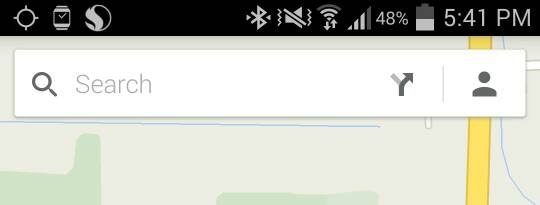
That GPS icon in the top left will just keep blinking, it won't become solid white (which only happens when the GPS has a fix on your location). One time I left google maps on for 3 hours to see if it would eventually work, 3 hours later it is still blinking and my battery if pretty much dead.

Posted via Android Central App on my Note 3
 
I forgot to add the photo lol. Its the GPS icon in the top left

Posted via Android Central App on my Note 3
 

Attachments

  • Screenshot_2014-07-10-17-41-57~2.jpg
    Screenshot_2014-07-10-17-41-57~2.jpg
    10.2 KB · Views: 81
Install the GPS Status and Toolbox app. The app will show you if the device is seeing satellites or not. If it sees more than 4-5 satellites (green bars) but doesn't get a GPS fix, it's software. If it sees no sats, it's likely going to be hardware...

Are you using a case, and if so, have you tried to get a GPS fix without the case?
 
Install the GPS Status and Toolbox app. The app will show you if the device is seeing satellites or not. If it sees more than 4-5 satellites (green bars) but doesn't get a GPS fix, it's software. If it sees no sats, it's likely going to be hardware...

Are you using a case, and if so, have you tried to get a GPS fix without the case?

Yea I have installed a GPS app, can't remember the name. But it tells me there are 21 satellites but it won't latch onto a single one of them. This happens about 75% of the time. The other 25% my GPS works completely normal and gets usually 12/13 of the 21 satellites. This all started with the KitKat update. That update completely ruined my phone from battery to GPS to god knows what else

Posted via Android Central App on my Note 3
 
Have you done a Wipe Cache Partition or a device reset?

Yea I wipe my phone about once ever 3 weeks because it's gets slow and battery life becomes poor

Posted via Android Central App on my Note 3
 
If you can't nail down the app that's causing the issue, a reset would likely fix the problem.
 
Same issue here since the update. I've got a Sprint phone, running 4.4.2. GPS app sees a dozen or more sats, but rarely lets me navigate in Google maps. Usually a restart solves it, tempoarily.
How/where do I do the Wipe Cache Partition? And what's involved with a Device Reset? Do I lose data, etc.? Thanks.

Sent from my SM-G900P using AC Forums mobile app
 
Hi guys. Sorry the phone is a UK Note 3 non rooted

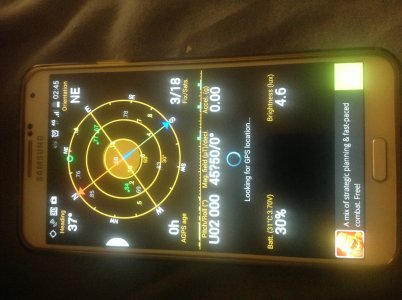
So far I've downloaded the GPS Status app and it's been searching for a location for the past 10mins :( image.jpg

And yes the gps icon on the top left keeps blinking as well
 
You had 3 sats in view and it was trying to lock on to a bunch more, but it seems that wherever you were at the time, your device couldn't get a clear view of the sky...have you tried it outside in clear view of the sky?
 
Thanks FBA I've tried walking about using the sat nav but still no joy. Please tell me my last resort is not to factory reset my phone :(
 
I have had Google Now on a few days for the first time. Just for a try as I have a new unlimited data plan.

So whenever I open Maps now it already has me exactly. (Wifi is off)

Is that the whole point?
Let us know where you are and you can have instant fixes.

The privacy issue still concerns me so possibly temporarily useful for me.
Google+ is disabled so no public profile.

I do understand G Now can help enormously, particularly for severe weather and public warnings, in the US at least.


Sent from my SM-N9005 using Tapatalk Pro
 
Anyone know how I can get these actions done? Appreciate it.

Same issue here since the update. I've got a Sprint phone, running 4.4.2. GPS app sees a dozen or more sats, but rarely lets me navigate in Google maps. Usually a restart solves it, tempoarily.
How/where do I do the Wipe Cache Partition? And what's involved with a Device Reset? Do I lose data, etc.? Thanks.

Sent from my SM-G900P using AC Forums mobile app
 

Forum statistics

Threads
960,247
Messages
6,981,596
Members
3,164,446
Latest member
brianatem32