gps slow to lock when using navigation

jaekim717

Well-known member
Sep 19, 2010
131
2
0
hey,

anyone else experiencing really slow locks for the gps when using navigation? it seems to lock on fine when just using google maps, but when i go to use the navigation feature, it takes forever. i will even turn on wifi, gps, and it takes at least 5 mins. i can see on the map it knows exactly where i am but i get a message on the bottom of the screen saying, 'searching for gps'. anyone know of how to fix this? do i have a problem with the hardware/gps on my phone?

thanks,

jae
 
so does anyone have any advise on how to resolve this issue other then trying to get it exchanged?
 
Check out GPS Test Plus: http://market.android.com/details?id=com.chartcross.gpstestplus on the Play Store - there's a free version that may help you out. If I remember correctly, there's also a way to delete the current almanac (database of GPS satellites) and refresh it which should also help.

The SGSIII should be better than most phones since it also uses the Russian GPS satellites.

Sent from my rooted, debloated, deodexed Sinclair ZX-80 running CM -0.001 using Tapatalk 2
 
Take GSDer's advice, it downloads GPS Assistance data which supposedly speeds up the GPS lock time since it looks at additional satellites it normally isn't aware of, or so I've read. I mainly use it to calibrate the compass but it works very well and is free. GPS lock on works perfect for me, but I only use Google Maps and use it's own Navigation so everything has worked fine.


Rev.
 
you gotta be on a govt watchlist with that kinda phone knowledge!!!lol

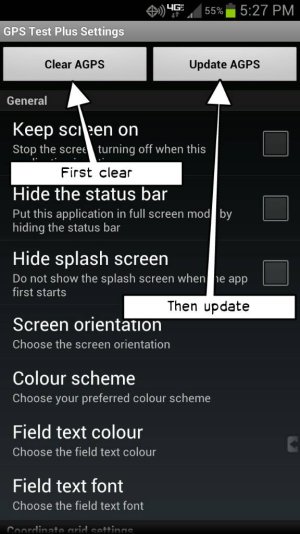
any chance you ca walk me through getting new data base on my note 2?
 
Re: you gotta be on a govt watchlist with that kinda phone knowledge!!!lol

If you're in a car, it will probably take longer to lock than if you're outdoors, because the metal roof blocks some of the signal from the satellites. But if it really locks faster, in the same location, on maps than in nav, open maps first, then once it locks in switch to nav.
 
jenbot2009,
Once you install the app that I listed above (or the free version of the same app), start the app, access the Settings, thenuploadfromtaptalk1367216039899.jpgSent from my rooted, debloated, deodexed Sinclair ZX-80 running CM -0.001 using Tapatalk 2