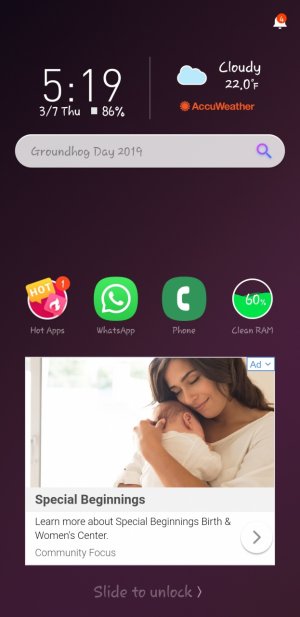
Help after new update

Meggybear

New member
Mar 7, 2019
1
0
0
So my phone did an update and now it has this random screen and I cant figure out how to turn it off or even what it is
 

Attachments

  • Screenshot_20190307-051917_Horoscope Pro.jpg
    Screenshot_20190307-051917_Horoscope Pro.jpg
    143 KB · Views: 14
Check the notification icon on top, it should tell you which app it is coming from (and yes, this is from an app, not your phone's system). There might even be a settings or preferences option in that icon too to turn it off. These lockscreen replacements often come as a very shady part of apps like File Managers and Battery Savers, so check for those options. Most times it is described as a 'power saving' or 'power management' option in their Settings. When these apps update, sometimes they might revert the setting back to active (again, shady).
 
This
So my phone did an update and now it has this random screen and I cant figure out how to turn it off or even what it is
This is from an App that gives you ads. Usually it gets in your phone after watching pornography. Go through each one of your apps in the settings and delete one by one the app you do not recognize you downloaded and boom problem solved.
 
This This is from an App that gives you ads. Usually it gets in your phone after watching pornography. Go through each one of your apps in the settings and delete one by one the app you do not recognize you downloaded and boom problem solved.
Those ads can come from any number of "free" apps like file managers, memory "cleaners", many free games... even when installed directly from the Play Store. It's actually less likely to come from website drive-by downloads, unless the phone is set to install apps from the browser - which should be a no-no.