Help for HTC One Battery. Snapdragon BatteryGuru

audio6996

Well-known member
May 6, 2013
46
0
0
Qualcomm, famous Snapdragon processors manufacturer fitted to the majority of mobile market (including the HTC One), has just published an Android application specifically dedicated to optimize your battery : "Snapdragon BatteryGuru".

This application will intelligently learn your habits data synchronization, update social networks and even the places / times when you turn your WiFi connection. So BatteryGuru knows when to update your calendars and other saving up your battery while meeting your needs.
- Via HTC HubFr.com
Watch the video : Snapdragon
Download App : https://forums.androidcentral.com/e...=com.xiam.snapdragon.app&hl=en&token=EbiA1m1u
 
This has been out for some time now. I downloaded it a few weeks ago and it does seem to be working as advertised.
 
Yeah, I somehow missed this. I'm downloading now and will report back my *perceived* improvement. Not sure how to measure it actually.
 
Love this app. It really helps standby battery life. I don't need FB & other accounts to auto update in the background that often.
 
Where do you tell Gmail to sync? I'd like to set it to only sync every few hours rather than always. Just can not seem to find it for some odd reason. Any help? Thanks
 
Where do you tell Gmail to sync? I'd like to set it to only sync every few hours rather than always. Just can not seem to find it for some odd reason. Any help? Thanks

In the mail app, go to Gmail, Settings, then Sync, Send, & Receive. It's in there.
 
I have the Gmail app.

Sent from my HTC One

Wow, I just checked out the Gmail app. Does that ever suck that you can't even manage your own gmail account as well as the native HTC email app, or what? Seriously, I am stunned that Google has this app out there in this condition.

OK, moving on... is there anything about the gmail app that is a "must" for you that the native app doesn't have? I know, some have mentioned the "resize" feature, but that's a non-issue for me. If there are no issues, maybe switching would work for you. (?)
 
How bad of battery life are people getting? I'm not an extremely heavy user but coming from the Nexus 4 this has been a huge improvement for battery life. I easily get through a whole day now without power save mode enabled

Sent from my HTC One
 
Since BatteryGuru also handles data connectivity, do you enable or disable Sleep mode in Power settings?
 
I tried it for a week but then my HTC starting acting flaky and getting hot. I deleted it and using the stock Power Saver. I can go most of the day without recharging.
 
Anyone have a comparison between this and JuiceDefender?
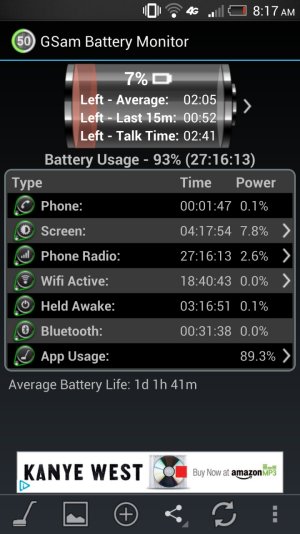
Haven't tried JD on the HTC One but I read that JD has wakelocks that causes battery drain. So far BatteryGuru has been great! Getting about an extra hour of screen time! These are my settings...
BatteryGuru App settings:
-Enable everything except for Manage Wi-Fi! Wi-Fi doesn't seem to work properly with this app.
-After learning phase, you will have an option to "Turn off mobile data" in Inactivity Period Power Boost
-For "App Refresh Settings" I have every app using the "Only when you open it" option. You can try the '"Based on how you use it" option to see how it works for you.

Phone Settings/Power Settings
-Enable "Power saver" BUT UNCHECK Data Connection. BatteryGuru is already doing that for you.
-Enable "Sleep mode"
-Uncheck "Fast boot"

The rest:
I have Sync on, BT Off most of time, Twitter, Facebook, Instragram, and Kakao Talk(Instant Messaging).

Screenshot_2013-06-18-08-17-04.jpg
 
-Enable everything except for Manage Wi-Fi! Wi-Fi doesn't seem to work properly with this app.

el bos - what exactly did you notice? I saw that was turning on WiFi when there was a too-poor-to-be-useful Signal available at work, and I was frequently having to turn it off. After installing Llama, I was then concerned about possible conflict with Llama settings.
 

Trending Posts

Members online

Forum statistics

Threads
960,469
Messages
6,982,507
Members
3,164,520
Latest member
gruptysh