HELP! I Can't Attach photos to my Text!

TV417

Well-known member
Oct 31, 2015
76
0
0
Ever since The MM update on my Note 5 it stopped working. I called my Carrier, T-mobile, they walked me through The Factory Reset. It worked for a few days and now it's back to not attaching again. I checked Google and see that many others have had this problem too.

Posted via the Android Central App
 
What messaging app are you using?

What do you mean when you say you "can't attach photos"?

And, please remember - it is impossible to attach anything to a text (specifically, SMS). Only MMS will let you add attachments, so make sure your messaging app is not defaulting to some sort of SMS-only mode.
 
Hmm.. If you've checked your settings and everything appears fine, try sending a picture message to yourself. Sometimes that's been known to kick start things for me when I've had the same problem in the past..
 
You may wish to try selecting the photo and then choose to share it via Text Message. This should open the message app with the photo already attached. Then add the typed message and send.
 
What messaging app are you using?

What do you mean when you say you "can't attach photos"?

And, please remember - it is impossible to attach anything to a text (specifically, SMS). Only MMS will let you add attachments, so make sure your messaging app is not defaulting to some sort of SMS-only mode.

Ok..... Thanks! All of my Texts says MMS by it.

Posted via the Android Central App
 
You may wish to try selecting the photo and then choose to share it via Text Message. This should open the message app with the photo already attached. Then add the typed message and send.

I tried that, it don't work either. This is so frustrating.

Posted via the Android Central App
 
Hmm.. If you've checked your settings and everything appears fine, try sending a picture message to yourself. Sometimes that's been known to kick start things for me when I've had the same problem in the past..

This is Crazy. I was able to send a picture message to myself. But still not to anyone else. This is bad because my Business depends on it.

Posted via the Android Central App
 
Do you get an error message when the photo does not send via the default Samsung Messages app?
 
No there was no APN Reset, just a Factory reset.

Posted via the Android Central App

If your APN is not setup correctly, you will not be able to send or receive MMS messages. Did you check it, using the link I provided above?
 
If your APN is not setup correctly, you will not be able to send or receive MMS messages. Did you check it, using the link I provided above?

I'm scared to do it without supervision so I'm going to call T-mobile back about it and ask about the APN. Thanks for your help. Maybe that's the probkem.

Posted via the Android Central App
 
Ever since The MM update on my Note 5 it stopped working. I called my Carrier, T-mobile, they walked me through The Factory Reset. It worked for a few days and now it's back to not attaching again. I checked Google and see that many others have had this problem too.

Posted via the Android Central App

Glad I'm not the only one.

Just recently I was trying to text some flight information to my dad and anytime I attached a pic, it was converted to some text that had nothing to with the pic. I would verify with my dad to see if he received the picture, but he never did nor the goofy converted text.

I tried this with different people and was getting the same result. However, when I text a pic to my wife, it was sent normal.

I also noticed when I try to attach a pic via text, the selected pic would immediately unselect.

So yeah, something buggy happened.
 
Glad I'm not the only one.

Just recently I was trying to text some flight information to my dad and anytime I attached a pic, it was converted to some text that had nothing to with the pic. I would verify with my dad to see if he received the picture, but he never did nor the goofy converted text.

I tried this with different people and was getting the same result. However, when I text a pic to my wife, it was sent normal.

I also noticed when I try to attach a pic via text, the selected pic would immediately unselect.

So yeah, something buggy happened.

Its driving me crazy. I use my phone for business. An earlier post said I need new APN settings, I have to call T-mobile about that.

Posted via the Android Central App
 
Its driving me crazy. I use my phone for business. An earlier post said I need new APN settings, I have to call T-mobile about that.

Posted via the Android Central App
So I think I resolved the issue on my phone, Note 5.

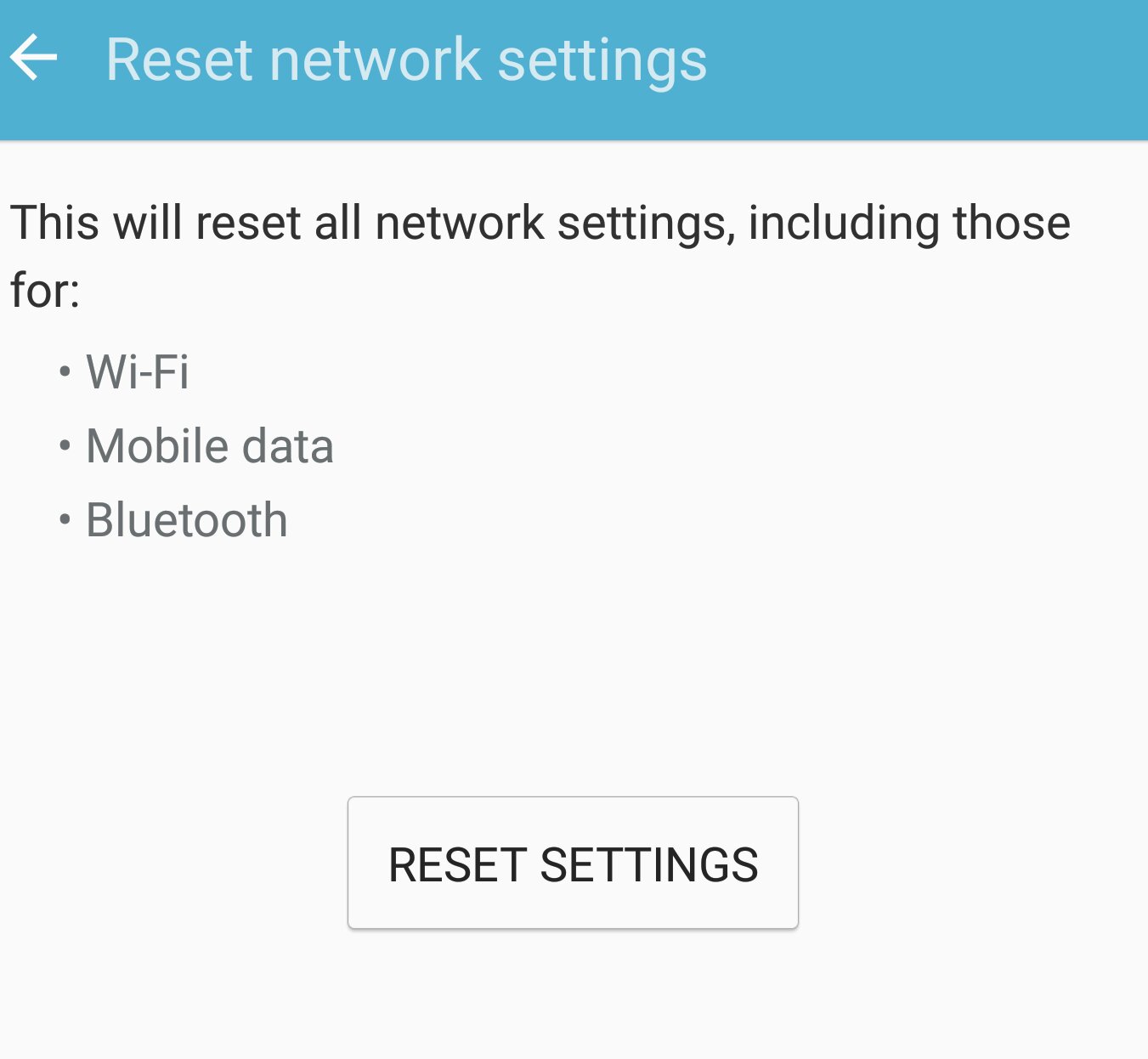
I went into reset options and reset the network settings. The I restarted the phone and text started to work right.

When this is done, I have to set all my wifi, Bluetooth and whatever other connections I had before.

2488196bd87305f49e1d3f9cda4df37a.jpg
 
On my Note 5, you go to Settings-->Backup and Reset-->Reset Network Settings. This is where you'll see the reset button.

Thanks, I called T-mobile again, I gave them your suggestion and he walked me through. So far it's working again. Fingers crossed!! Thanks for your help.

Posted via the Android Central App

 
Thanks, I called T-mobile again, I gave them your suggestion and he walked me through. So far it's working again. Fingers crossed!! Thanks for your help.

Posted via the Android Central App
It happened to me again but it only happens when I want to share a screenshot when using the s pen. Every now and then the issue goes away. Just weird.
 

Trending Posts

Forum statistics

Threads
962,623
Messages
6,991,171
Members
3,164,887
Latest member
tahirmehmoodkhokhar786