
how do i fixed wifi disconnted issues with my phone
- Thread starter y2jman
- Start date
You are using an out of date browser. It may not display this or other websites correctly.
You should upgrade or use an alternative browser.
You should upgrade or use an alternative browser.
anon(79257)
Well-known member
- Oct 31, 2010
- 279
- 5
- 0
i have tired to tun off wifi and bluetooth scanner change router to ipv6 to ipv4 still get disconnected problems
don't know what to do
Make note of your ip settings on your router, first. Secondly, determine your DHCP settings on your router. Make sure that your router settings match your settings on your device.
i thought that my brother will disable ipv6 apprently he doesn't want to on netgear router not sure he will make me a guest or not
i just don't know if i can handle keeping this phone that i got activated yesterday and every waking few mins or so when phone is in idle i pick it up saying wifi not connected and have to tap to connect it
i wished it will stay connected on wifi all day long and it doesn't meh
i just don't know if i can handle keeping this phone that i got activated yesterday and every waking few mins or so when phone is in idle i pick it up saying wifi not connected and have to tap to connect it
i wished it will stay connected on wifi all day long and it doesn't meh
well i'm hoping that sometime today my brother can find someway to make sure wifi stops disconnected a giving amount of time on router side aka netgear if not bye bye phone i think should had waited not gotten this phone last sat i even asked sale guy if going to have any wifi issues i took the guy word for it what happens get it this past weds activated thurs night verizon and then whamo wifi being disconnected every since thurs night
anon(79257)
Well-known member
- Oct 31, 2010
- 279
- 5
- 0
It's most likely not a phone issue, but a user issue. I'm discerning that, from your posts. I hope your brother can figure it out, for you.
It's most likely not a phone issue, but a user issue. I'm discerning that, from your posts. I hope your brother can figure it out, for you.
well my brother only rebooted router and apprently ipv6 has been disable so i don't know what to do
if i have to get a new phone what do you recommend droid maxx 2 droid turbo 2 lg5 that blackberry priv i know htc 10 is new but i don't think its out yet there's always iphone but i dread not using sd card
it might be dumb idea to go down to s5 eh
anon(79257)
Well-known member
- Oct 31, 2010
- 279
- 5
- 0
well my brother only rebooted router and apprently ipv6 has been disable so i don't know what to do
if i have to get a new phone what do you recommend droid maxx 2 droid turbo 2 lg5 that blackberry priv i know htc 10 is new but i don't think its out yet there's always iphone but i dread not using sd card
it might be dumb idea to go down to s5 eh
I recommend learning your phone. Just my take.
I recommend learning your phone. Just my take.
i don't understand even when wifi wants me to connect with mobile data off i'm still getting notifcations like email text etc etc taking it back tomorrow night btw
i don't understand even when wifi wants me to connect with mobile data off i'm still getting notifcations like email text etc etc taking it back tomorrow night btw
If you are still getting notifications your wifi just might be connected. Maybe go to your wifi settings and turn network notifications off... and maybe see if you can turn smart network switch off. Do you have wifi calling? It could be that... (I'm unfamiliar with Verizon's version even though it should be the same).
Another thing with your network you could turn AC band (5Ghz) on and try to only connect to that one. Have it forget the N-band (2.4 Ghz) I found that helped with my devices. Also!!!! APPLE DEVICES> Netgear seems to be the worse with managing these because for some reason Apple devices don't always stick to the routers DHCP settings. So you can manually set this in the netgear router to make apple be 40 ip addresses away from your other devices. and then have all the apple devices forget your network then reconnect. I did have this as a Wifi problem with my phone...but it was also my xbox and tablets and a few computers.
If you do take back your phone (I would still recommend no because I do think the S7 is the best out there) I would suggest HTC 10.... (especially since they brought physical buttons back) I would stay away from LG...Not too impressed with it.
well how come i still see configure to connect wifi network which is secure tap here?
wifi calling has never been activated i don't understand ac band part
i did called verizon they said htc 10 not going to get until 3 weeks you don't think a droid maxx 2 or droid turbo 2 is good? what about blackberry priv? i doubt i want to downgrade try to find galaxy s5 phone i know verizon don't have it anymore btw this is my 1st so called samsung phone always been droid man
i'm trying to stick with having a phone with sd card since iphones doesn't have one
i'm losing my mind every couple of mins goes by i check phone wifi disconnects have to tap connect
wifi calling has never been activated i don't understand ac band part
i did called verizon they said htc 10 not going to get until 3 weeks you don't think a droid maxx 2 or droid turbo 2 is good? what about blackberry priv? i doubt i want to downgrade try to find galaxy s5 phone i know verizon don't have it anymore btw this is my 1st so called samsung phone always been droid man
i'm trying to stick with having a phone with sd card since iphones doesn't have one
i'm losing my mind every couple of mins goes by i check phone wifi disconnects have to tap connect
Last edited:
well how come i still see configure to connect wifi network which is secure tap here?
wifi calling has never been activated i don't understand ac band part
i did called verizon they said htc 10 not going to get until 3 weeks you don't think a droid maxx 2 or droid turbo 2 is good? what about blackberry priv? i doubt i want to downgrade try to find galaxy s5 phone i know verizon don't have it anymore btw this is my 1st so called samsung phone always been droid man
i'm trying to stick with having a phone with sd card since iphones doesn't have one
i'm losing my mind every couple of mins goes by i check phone wifi disconnects have to tap connect
For AC router settings. Go to your router settings, then click wireless and look for something that says 5ghz. Enable it. If you don't have it your router may not support that issue. Try also running router updates.
Also I would try to stay with s7 if possible. But if not, avoid droids or anything by Motorola. I don't like the Droid and do think you be better off with the Priv. However that may not fix your problem.
How old is your router?
Attachments
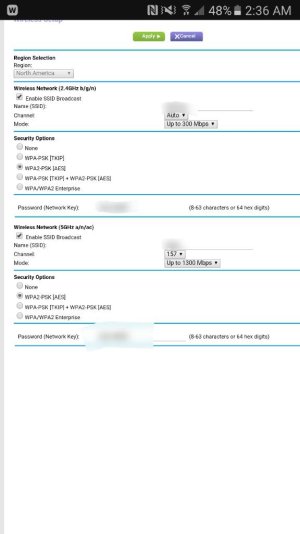
turn off legacy dhcp client din't help wifi still disconnected oh btw the wifi that i'm suppose to be connected to has a strong signal and secure so i don't know what's happen
my phone which was very old had problems was droid 4 that i updgraded to this phone last thurs night at verizon which never had a problem with wifi disconnect at random times when in idol like i i'm having this phone at least it did stay connected on wifi all day and night
my phone which was very old had problems was droid 4 that i updgraded to this phone last thurs night at verizon which never had a problem with wifi disconnect at random times when in idol like i i'm having this phone at least it did stay connected on wifi all day and night
Last edited:
just did me an experiment s7 wifi connection is faulty
i got out my old phone droid 4 that i upgraded from last thurs night to verizon activated s7 while it was on charge and connect to wifi using same network that i was connected to on s7
weill awhile ago s7 gave me the old disconnect want to reconnect tap here i check my droid 4 it was still connected to wifi
so that's tells me s7 faulty and doesn't want to stay on wifi at least its not a charter problem despite guy asked some woman yesterday saying charter been experience wifi issues nor its my router or modem
i will get me a new phone today hopefully couldn't yesterday but alas i found out s7 doesn't like a stable good wifi unlike old device droid 4 meh
i got out my old phone droid 4 that i upgraded from last thurs night to verizon activated s7 while it was on charge and connect to wifi using same network that i was connected to on s7
weill awhile ago s7 gave me the old disconnect want to reconnect tap here i check my droid 4 it was still connected to wifi
so that's tells me s7 faulty and doesn't want to stay on wifi at least its not a charter problem despite guy asked some woman yesterday saying charter been experience wifi issues nor its my router or modem
i will get me a new phone today hopefully couldn't yesterday but alas i found out s7 doesn't like a stable good wifi unlike old device droid 4 meh

JHStewart1023
Well-known member
- Mar 4, 2016
- 577
- 0
- 0
Re: just did me an experiment s7 wifi connection is faulty
You might just have a faulty unit mine stays connected better than the iphone that I have so I would get that checked out.
Posted via the Android Central App
You might just have a faulty unit mine stays connected better than the iphone that I have so I would get that checked out.
Posted via the Android Central App
so i figure out why i wans so called being disconnected wifi all the time
when verizon activated my phone last thurs night and when they put everything on another same phone i assumed it was refurbished tues night
they turn on wifi notifications notify me when wifi is available or connected
as soon as i came home weds around 9:45 i saw wifi connection secure tap wifi i actually thought it ment that i wasn't on wifi which apprently i was so i turn it off this afternoon before my brother said do a screen capture he told me i was still on wifi and because i had that enable that's why it kept popping up this was right before i was able to give up and get droid turbo 2 tonight
i know i asked you guys about my wifi situation but nobody told me about wifi notifcations notfi me when wifi is available or connected which i was going in insane ver since last thurs night and last night on 2nd device
i wished i knew before hand i feel stupid its a shame i cannot get original phone back since they shipped it back to samasung this afternoon all i had to do turn wifi notifications off meh
when verizon activated my phone last thurs night and when they put everything on another same phone i assumed it was refurbished tues night
they turn on wifi notifications notify me when wifi is available or connected
as soon as i came home weds around 9:45 i saw wifi connection secure tap wifi i actually thought it ment that i wasn't on wifi which apprently i was so i turn it off this afternoon before my brother said do a screen capture he told me i was still on wifi and because i had that enable that's why it kept popping up this was right before i was able to give up and get droid turbo 2 tonight
i know i asked you guys about my wifi situation but nobody told me about wifi notifcations notfi me when wifi is available or connected which i was going in insane ver since last thurs night and last night on 2nd device
i wished i knew before hand i feel stupid its a shame i cannot get original phone back since they shipped it back to samasung this afternoon all i had to do turn wifi notifications off meh


Trending Posts
-
 Android 17 QPR1 Beta 1
- Started by wyelkins
- Replies: 2
-
-
Question Phone not autofilling password/passkey for only one app
- Started by Scooch
- Replies: 2
-

-

Members online
Total: 10,280 (members: 8, guests: 10,272)
Forum statistics

Space.com is part of Future plc, an international media group and leading digital publisher. Visit our corporate site.
© Future Publishing Limited Quay House, The Ambury, Bath BA1 1UA. All rights reserved. England and Wales company registration number 2008885.
 Facebook
 Twitter
 Instagram