
I posted this in the Evo Hacks section a few days ago. Since you don't actually have to be rooted or anything to do this setup I figured I'd post this here.
If you're gonna make a post anything along the lines of "if you wanted a WM7 look then why don't you get a WM7 phone" just leave now. If you feel this way then obviously you don't understand the beauty of customization with Android where anyone can do anything you want.
This is a Windows Mobile 7 homescreen theme. It's fairly easy to do. You need the following: Launcher Pro Plus (not sure how to do it with ADW, but I'll look into it) and Desktop Visualizer (free in the market). Here are the instructions..
Instructions:
1. Download the icons that you wish to use. I have some of my custom ones here that I've done myself. Make sure that the files are in your SD card. I suggest making a specific file for the icons. (I can definitely do some custom requests as well for anyone that's interested. I can also supply some links to download other icon packs.)
2. Install LauncherPro (and activate Plus features to be able to resize the widgets properly)
3. Install Desktop Visualizer
4. In LauncherPro settings, under Advanced set homescreen rows to 5
5. Create a Desktop Visualizer widget (4X1 for horizontal 1x2 for vertical) choose an image, choose the action you want it to do, then resize to correct dimensions (3x1 horizontal or 1x2 vertical)
6. Align them as you wish

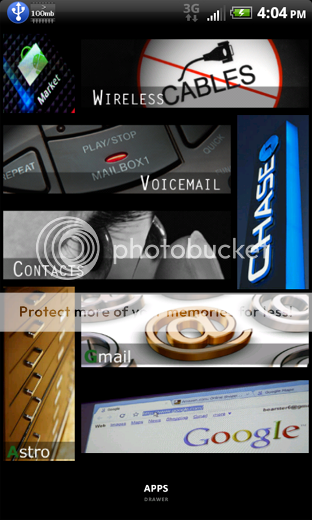

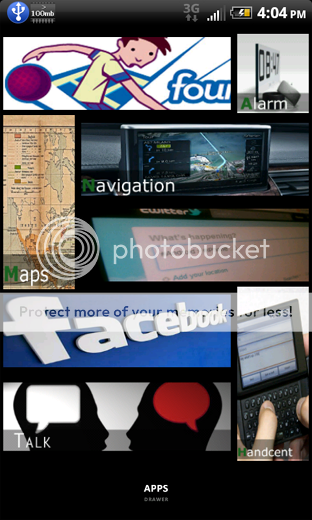

It's not for everyone obviously. But it's a completely different look than the traditional icons and widgets. The best part is it's so easy to make these I can (or you can) change them up whenever and however you want in terms of the actual icon and even the size. For those wondering about performance, I've actually seen better performance than before. I used to have tons of actual widgets and while it was smooth, there was some slight lag once in a blue when first waking the phone but that was because using SetPCU I had the screen of profile set to minx/max 245. Even though technically these are all widgets, they're widgets that don't really do anything except link to whatever app or action you choose. So the performance is great. Again, any requests just post them. List them like this:
1) what app or action you plan on using it for
2) horizontal or vertical
3) Text description or plain
4) An idea of what look you're trying to get
I'm gonna attach some icons that I've personally made to start anyone off that may want to try this out. If you want to make your own it's REALLY easy. Using Photoshop or GIMP, just create a new image. If you want to make a horizontal image, the image size is width 472 x height 150. To do vertical the image size should be 225x542. To make one like the alarm (1x1 widget size) then set the image size to 110x122. Create whatever actual image you want however you want, then save it as a PNG file. Put it in your SD and follow the directions.
Zips will be attached below
If you're gonna make a post anything along the lines of "if you wanted a WM7 look then why don't you get a WM7 phone" just leave now. If you feel this way then obviously you don't understand the beauty of customization with Android where anyone can do anything you want.
This is a Windows Mobile 7 homescreen theme. It's fairly easy to do. You need the following: Launcher Pro Plus (not sure how to do it with ADW, but I'll look into it) and Desktop Visualizer (free in the market). Here are the instructions..
Instructions:
1. Download the icons that you wish to use. I have some of my custom ones here that I've done myself. Make sure that the files are in your SD card. I suggest making a specific file for the icons. (I can definitely do some custom requests as well for anyone that's interested. I can also supply some links to download other icon packs.)
2. Install LauncherPro (and activate Plus features to be able to resize the widgets properly)
3. Install Desktop Visualizer
4. In LauncherPro settings, under Advanced set homescreen rows to 5
5. Create a Desktop Visualizer widget (4X1 for horizontal 1x2 for vertical) choose an image, choose the action you want it to do, then resize to correct dimensions (3x1 horizontal or 1x2 vertical)
6. Align them as you wish
It's not for everyone obviously. But it's a completely different look than the traditional icons and widgets. The best part is it's so easy to make these I can (or you can) change them up whenever and however you want in terms of the actual icon and even the size. For those wondering about performance, I've actually seen better performance than before. I used to have tons of actual widgets and while it was smooth, there was some slight lag once in a blue when first waking the phone but that was because using SetPCU I had the screen of profile set to minx/max 245. Even though technically these are all widgets, they're widgets that don't really do anything except link to whatever app or action you choose. So the performance is great. Again, any requests just post them. List them like this:
1) what app or action you plan on using it for
2) horizontal or vertical
3) Text description or plain
4) An idea of what look you're trying to get
I'm gonna attach some icons that I've personally made to start anyone off that may want to try this out. If you want to make your own it's REALLY easy. Using Photoshop or GIMP, just create a new image. If you want to make a horizontal image, the image size is width 472 x height 150. To do vertical the image size should be 225x542. To make one like the alarm (1x1 widget size) then set the image size to 110x122. Create whatever actual image you want however you want, then save it as a PNG file. Put it in your SD and follow the directions.
Zips will be attached below



 Facebook
 Twitter
 Instagram